
[View:/CS/cfs-file.ashx/__key/CommunityServer.Blogs.Components.WeblogFiles/blog/simpleparameters.zip]Continuing our intrepid journey in the land of SSRS-SSAS integration, after we’ve figured out how to retrieve the cube metadata, we are ready to tackle another unchartered territory: query parameters.
Issue: You need to parameterize the MDX query by a measure or a simple parameter. Take for example the following report (attached).
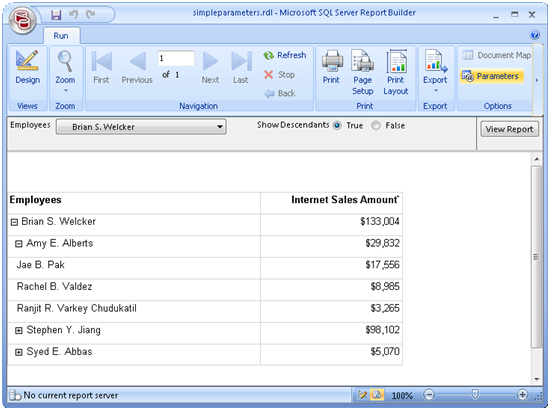
This report shows the Internet Sales Amount measure broken down by the Employees parent-child hierarchy. What’s more interesting is the Show Descendants parameter. It lets you filter the report for a single employee (Show Descendants = False) or the descendants of the selected employee including the selected employee (Show Descendants = True). So, what’s the issue? You can whip out such a report in no time if you source data from a relational database. However, the MDX Query Designer insists that the parameter is resolved to a single dimension member or a set of dimension members. Apparently, simple parameters or parameterizing by measures were considered uncommon scenarios. So, we need a sleek hack.
Solution: Luckily, there is a way to gain more control over the MDX query parameters but the design mode (the one that lets you drag and drop stuff) won’t cut it. So, it may make sense to author the report query in design mode as much as you can before you jump into the cold waters of MDX query mode because there is no going back to drag and drop, sorry.
- To start with, you need to define a query parameter for the ShowDescendants parameter. Switch to MDX mode and click the Query Parameters toolbar button (enabled only in MDX mode).
- Add a new ShowDescendants “hanging” parameter that doesn’t reference any dimension. Make sure that the query parameter name matches the report parameter name. Otherwise, the MDX Query Designer will treat the parameter as a new parameter and it won’t associate it to the existing ShowDescendants report parameter. Note that the parameter name is case-sensitive.
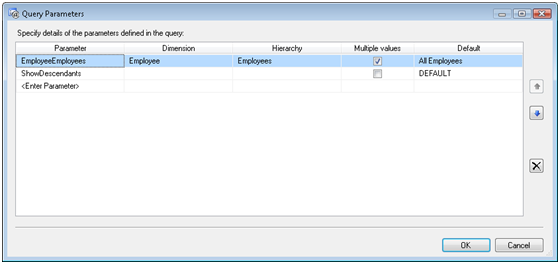
- Leave the Dimension and Hierarchy columns empty. Luckily, they are not required in MDX mode. Either type in a measure name, such as [Measures].[Sales Summary], or enter DEFAULT in the Default column. In the latter case, the default cube measure will be used when you test the query in the MDX Query Designer. See this blog by Chris Webb for ideas about how to speed up the default measure if needed. Click OK.
- Back to the query, change it as follows:
SELECT NON EMPTY { [Measures].[Reseller Tax Amount] } ON COLUMNS, NON EMPTY
IIF(@ShowDescendants=False, StrToMember(@EmployeeEmployees), DESCENDANTS(StrToMember(@EmployeeEmployees)))
DIMENSION PROPERTIES MEMBER_CAPTION, MEMBER_UNIQUE_NAME, PARENT_UNIQUE_NAME, LEVEL_NUMBER ON ROWS FROM [Adventure Works] CELL PROPERTIES VALUE, BACK_COLOR, FORE_COLOR, FORMATTED_VALUE, FORMAT_STRING, FONT_NAME, FONT_SIZE, FONT_FLAGS
These changes are specific to the report requirements. In our case, the IIF expression checks the value of the ShowDescendants parameter. If the user has selected the False option, the query brings only the selected employee on rows. Otherwise, we use the Descendants function to bring the descendants of the selected employee.
Looks hacky? Join me and make a wish on connect.microsoft.com to improve the SSRS-SSAS integration. Don’t be surprised if you are not active that the MDX Query Designer will continue to sneak from one version to another unchanged.



So, speaking of hacking MDX queries, and (previously) cube metadata; Any ideas on aliasing columns in SSAS cube default action drillthroughs? I can, of course, set up a default drillthrough action, but I want to modify the unfriendly column names returned (as they’ve done in SSAS 2008 with the caption property). Thoughts?
Nice hack Teo – can you post a link to your Connect “wish” – I’d like to vote for it.