Join us for our next Atlanta MS BI Group meeting tomorrow, Monday, May 19th, to learn about Power Query. Spread the word and invite your coworkers but RSVP on our website so we can plan food accordingly. Main Presentation: Power Query Level: Intermediate Date: Monday, May 19th, 2014 Time 6:30 – 8:30 PM ET Place: South Terraces Building (Auditorium Room) 115 Perimeter Center Place…
A requirement popped up for calculating an inception-to-date (ITD) measure. MDX CALCULATED MEMBER Aggregate(PeriodsToDate ([Date].[Calendar Hierarchy].[(All)]), [Measures].[Sales Amount]) In MDX, ITD is not much different than other time calculations, such as YTD or QTD. We only need to specify that the calculation will be performed over the top-most level of the Date hierarchy whose default name is ([Date].[Calendar Hierarchy].[(All)]. Of course, time calculations should be…
Everyone wants to press a button and have the entire BI system generated and ready to go. But things are not that simple. You know it and I know it. Nevertheless, BI automation tools are emerging with growing promises that propelled them to the Top 10 BI Trends according to the Information Management magazine. As a side note, it was interesting that the same article…
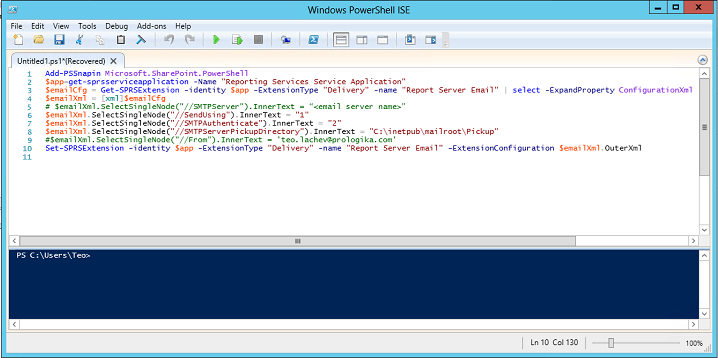
Reporting Services data alerts were introduced in SQL Server 2012 to allow business users to receive e-mail notifications based on rules they specify. Data alerts require SSRS to be configured in SharePoint integration mode. However, you'd probably run SharePoint on a VM for development and demo purposes and you might not have access to a functional mail server. The following steps allow you to configure…
Scenario: You need to visualize point-to-point geospatial data, such as routes from an origin location to destinations. The map region in Reporting Services (Report Designer or Report Builder) supports point-to-point mapping but more than likely your users would prefer an interactive report. As they stand, neither Power View nor Power Map support point-to-point mapping. Further down on the limitation list, Power View doesn't support layers…