How do you start a data warehousing project? Not much different than any complex software project. You break it down to small iterations, e.g. by subject area, design and implement each iteration from beginning to end, and deploy to deliver incremental value. Agile? Perhaps. In my career I've seen software methodologies come and go so I'd abstain from applying a label. The main goal is…
MS BI fans, join me for the next Atlanta MS BI and Power BI Group meeting on September 25th at 6:30 PM. Carlos Rodriquez and Daniel Granadillo from Brightstar will share their experience with Power BI and QlikView. Accelebrate will sponsor the meeting. And your humble correspondent will show you two new cool Power BI features: drillthrough to page and explain increase/decrease. Presentation: Did Qlik run out…
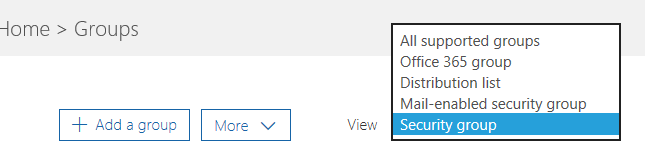
Power BI security is interwoven with Azure and O365 security. Sure, granting individual users access by entering emails works everywhere but it quickly becomes counterproductive with many users. For example, a large insurance company would like grant report access to 250 users and integrate this report with Dynamics 365. If you secure individually, this will require entering 250 emails three times: Dynamics 365, Power BI,…
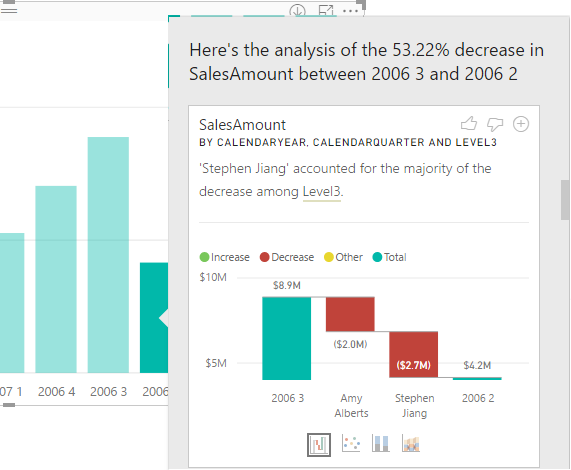
The September release of Power BI Desktop brings Quick Insights in the form of the very nice Explain Increase/Decrease feature (in preview). Suppose you have a column chart and you see a sudden increase or decrease in the chart series. You can now right-click on the bar and then click Analyze, Explain the Decrease menu. This runs the Quick Insights machine learning algorithms to predict…
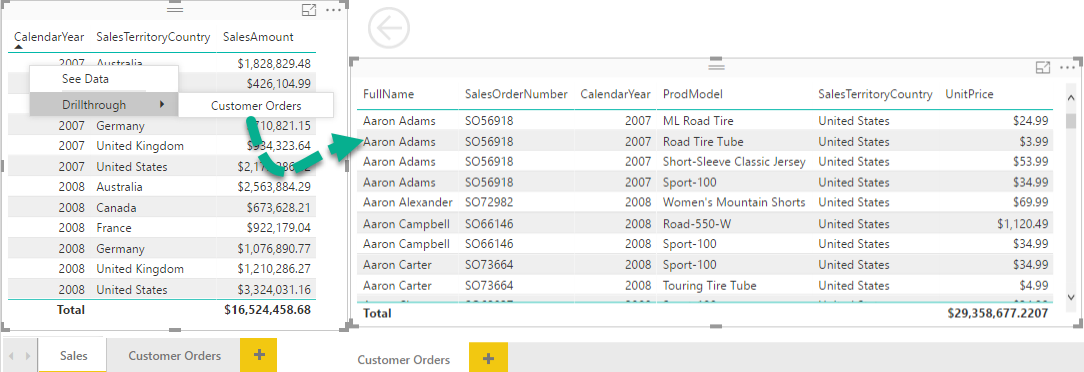
The September release of Power BI Desktop adds two very useful features: drilling through another page and explain increase/decrease. SSRS practitioners might find "page drillthrough" similar to SSRS actions. However, instead of navigating to another report, it allows the user to navigate to another page within the same report (at least for now cross-report drillthrough is not supported). Although not as flexible as SSRS actions,…
In the "Processing Tabular from Exotic Clients" blog, I said that if you Azure AS model retrieves data from an Azure database, such as Azure SQL Database, it should also be located in the same Azure data center for faster processing and to avoid data transfer fees between data centers. Let's elaborate a bit on this and share some performance results from a real-life project.…
Business Performance Management As I'm writing this newsletter, Florida and Georgia (I live in Atlanta, GA) are in the midst of planning for hurricane Irma, which is expected to be one of the most powerful Atlantic Ocean hurricanes in recorded history. I hope that this won't be the case and we don't have to deal with a disaster of the magnitude of hurricane Harvey…
Mark your calendar for the next meeting of our Atlanta MS and Power BI Group on September 25th when we will compare Power BI and Qlik. Presentation: Did Qlik run out of BI Power? Level: Intermediate Date: September 25, 2017 Time 6:30 – 8:30 PM ET Place: South Terraces Building (Auditorium Room) 115 Perimeter Center Place Atlanta, GA 30346 Overview: Haters are gonna hate. Lovers…
Processing Tabular models from SSMS or .NET client apps is pretty straightforward. For example, you can connect with SSMS and issue processing commands through the UI or via TMSL. You can also use custom apps with Tabular Object Model (TOM) and you can send XMLA commands directly if you have an app perhaps that's already doing that. For Azure AS, it's generally a good idea…