A while back I wrote about the ROI for BI and this blog happened to be one of my post popular blogs. I'm a big fan of a BI semantic model for the reasons I outlined in my "Why Semantic Layer" newsletter. Although written five years ago, these are still valid reasons and a semantic model plays a prominent role in every organizational BI solution.…
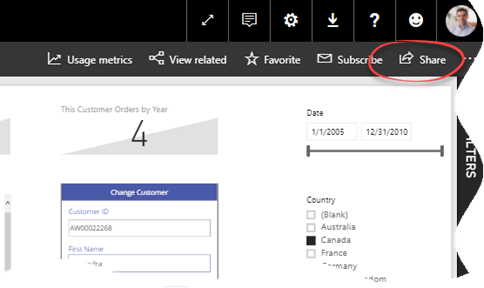
A week ago, I wrote that Power BI sharing improved by giving you the ability to include specific reports and dashboards in an app. Recall that that there are three ways to share Power BI content: workspaces, apps, and dashboard sharing. Only the last two lets you share content out of a workspace, such as by sharing with free users if the workspace is in…
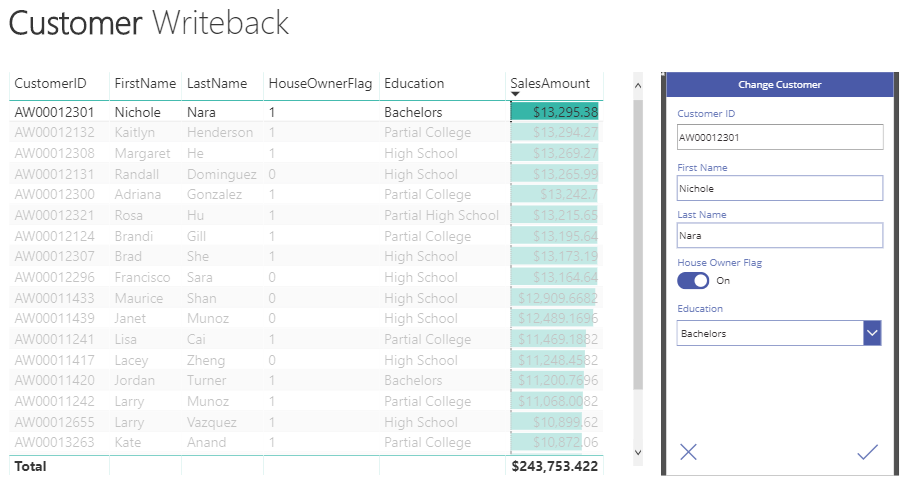
MS BI fans, join us for the next Atlanta MS BI and Power BI Group meeting on January 29th at 6:30 PM. Julie Smith will hack sweet reports in Power BI. Innovative Architects will sponsor the meeting. And your humble correspondent will show you two new cool Power BI features: integration with PowerApps and Q&A in Power BI Desktop. For more details, visit our group page. Presentation:…
One Power BI aspect that I'm not crazy about is sharing. It's my experience that most organization could benefit from a simplified sharing where users or groups are added to a workspace with different roles and permissions, such as Content Manager, Browser, Administrator. This could have worked conceptually like SSRS security. At some point, we could have nested workspaces and custom roles, such as a…
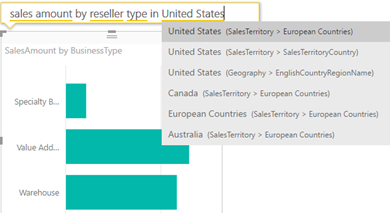
Natural queries (aka Q&A) has been a prominent feature since Power BI Service existed. Wouldn't be nice to do the same in the Power BI Desktop? You can, but make sure to enable first Q&A from File, Options and Settings, Options ("Preview features") tab because it's currently a preview feature. Once you do this and restart Power BI Desktop, you should see "Ask A Question"…
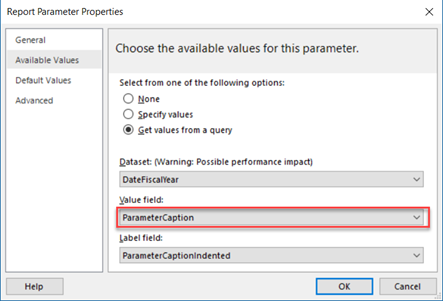
UPDATE: Microsoft has added support for multi-valued parameters in the DAX Query Designer. Please read the discussion thread below for more info. You can use the approach discussed in this article if you need more control over the parameter handling, but the Microsoft-provided way should suffice for most cases and it's easier to implement. Déjà vu today with a twist. SSRS multivalue parameters in SSAS…
One of the Power BI most prominent strengths is that it's a part of the much broader Microsoft Data Platform that spans various on-premises and cloud offerings for data storage, processing, and analysis. After the integration with Visio, Power BI just took another leap forward with the introduction of the PowerApps custom visual. Use this visual to bridge the Data Analytics and Developer worlds. Now…