
“Last thing I remember, I was running for the door
I had to find the passage back to the place I was before
“Relax,” said the night man “We are programmed to receive
You can check out any time you like But you can never leave”
Hotel California, Eagles
Back from a long vacation, I heard a lot of noise from Microsoft Ignite and elsewhere about Fabric Apps: apparently, they are supposed to take reports to the next level and redefine the experience. Naturally, my curiosity was piqued.
Apps here, apps there, apps, apps everywhere
Before diving in, let’s clarify the terminology. Power BI and Fabric have abused the word “app” to cover several very different things:
- Power BI template app – A packaged solution that a software vendor can distribute through Microsoft AppSource. Customers install it, connect their own data, and use the included semantic models and reports.
- Power BI workspace app – A way to package and distribute selected workspace content within an organization. For example, Finance can publish reports to users who are not members of its workspace.
- Power BI organizational app – An evolution of the workspace-app experience that supports creating and distributing multiple apps from content in a workspace.
- (NEW) Fabric App – A custom-coded web application, typically built with JavaScript/TypeScript and a web framework such as React, that is deployed to Fabric and can use managed APIs, authentication, and data services. “Custom-code app” would be a more revealing name. Unlike a Power BI report, it is an application artifact with its own user experience—even if the result looks suspiciously report-like.
The Good
Why consider an app? The short answer: to break out of report-centric constraints and let users take action, not just look at numbers. When the built-in options run out, a developer—or increasingly an AI coding agent—writes code. I’m amused that BI has come full circle: custom code → low code/no code → custom code. And not just in the presentation layer; data integration has joined the party (Python, anyone?). Custom code is cool again. Programmers, perhaps less so, because AI now writes an impressive amount of it.
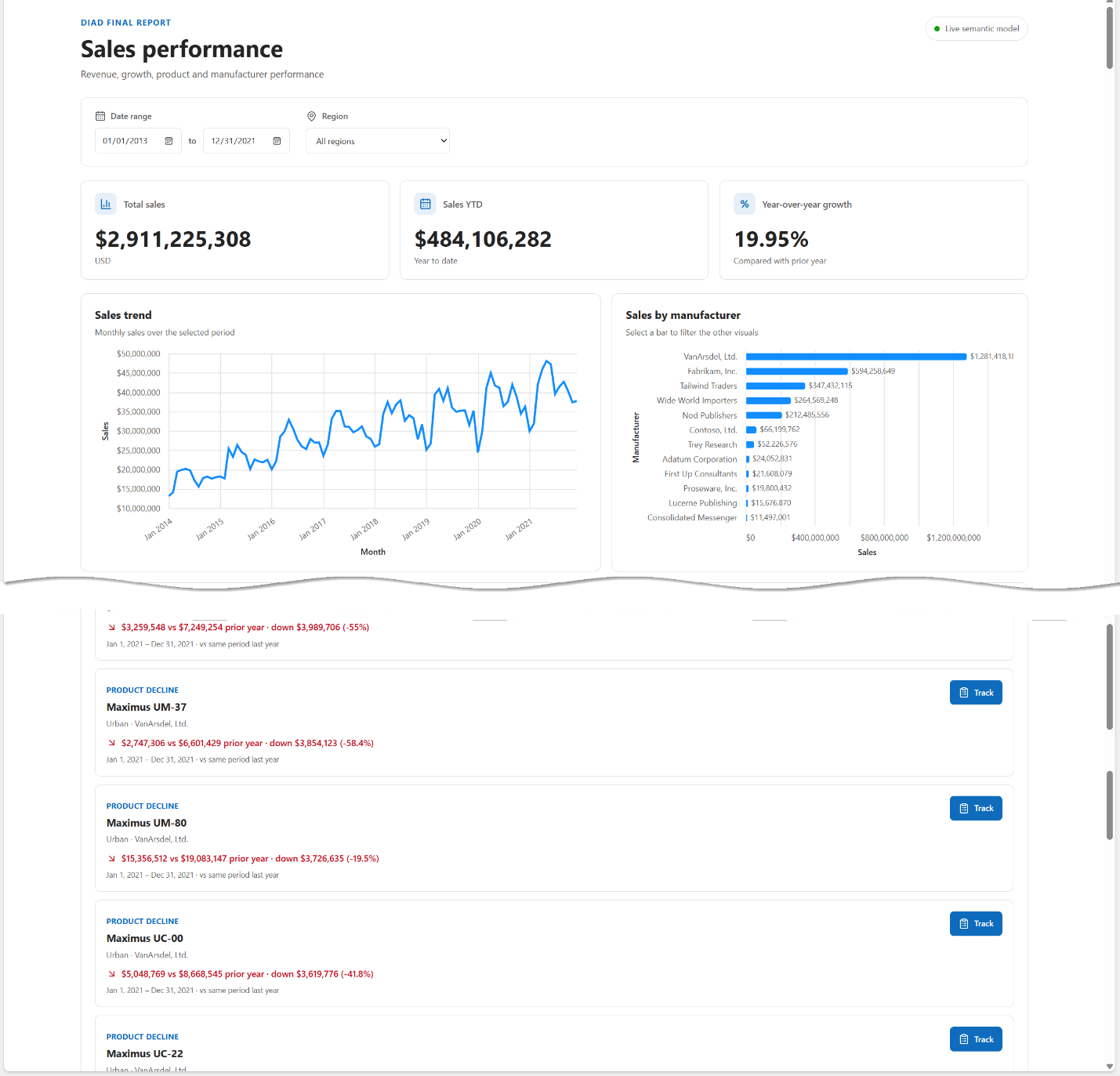
The app shown below took an AI coding agent about an hour to generate, and I didn’t write a line of code myself. The upper portion resembles a basic Power BI report circa 2016—nothing exciting. The interesting part comes later: I asked the agent to add an action for assigning opportunities to people when revenue declines. A conventional Power BI report does not offer that workflow out of the box, although Power Apps integration, Power Automate, custom visuals, and translytical task flows can add actions. Why invest in a separate low-code interface when AI can help me build precisely the custom experience I want? Of course, AI-assisted custom code is not the same as a no-code platform: I still own the testing, security, and maintenance.
Although the screenshot does not show it, a custom app also lets me implement interactions that have long frustrated me in Power BI reports—for example, disabling invalid slicer choices or dynamically selecting defaults based on another control. The tradeoff is that I must implement and maintain that behavior myself.
Microsoft has done substantial plumbing work to make Fabric Apps attractive to developers—and to keep those developers inside Fabric:
- Hosting – Fabric-managed hosting for the deployed application.
- Authentication – Integration with Fabric and Microsoft Entra authentication.
- Database – An optional app-managed SQL database for operational data.
- Data integration – Connectors to Fabric semantic models, Lakehouses, Warehouses, and SQL databases.
- Deployment – Rayfin CLI deployment and Fabric-aligned application lifecycle tooling.
- Visual components – Microsoft-provided grids, charts, cards, and slicers, with patterns for semantic formatting, cross-visual interactions, accessibility, and theming. Microsoft also announced a Power BI Desktop experience for building apps; check its current preview availability rather than assuming it is in every Desktop build.
The Bad
Another Hotel California in Fabric land. You can check in easily, and you may check out any time you like—but can you really leave? Once you take the custom-code path, you must decide whether the convenience of Fabric-managed plumbing is worth tighter coupling to the platform. My rough estimate—not a benchmark—is that an AI-assisted app built outside Fabric might take 1.5 times the initial effort of a comparable Fabric App. If Fabric takes a day, an independent implementation might take a day and a half. That is not a compelling premium for giving up portability, at least for me.
There is also an integration tradeoff. Fabric Apps’ built-in data connectors currently emphasize Fabric data sources. Want live read/write access to Snowflake or an on-premises database? You will generally need an additional API or integration layer. And because Fabric Apps is still a young platform, its longer-term direction is another consideration. Microsoft has introduced promising technologies before and later changed course; I would plan an exit strategy rather than assume every preview feature will be permanent.
The Ugly
We now have several ways to turn analytical insights into business actions:
| Option | Target Audience | Primary Purpose | Limitations |
| Power Automate | Business user/developer | Trigger workflows, approvals, notifications, and external actions from Power BI | Limited in-report UI; workflows can introduce latency; complex forms require another interface |
| Power Apps | Business user/developer | Build low-code applications for data entry, editing, approvals, and writeback | Canvas UI constraints; indirect semantic model query integration; additional licensing may apply. Code Apps offer more UI freedom |
| Custom visuals | Developer | Extend Power BI reports with specialized visuals, interactive controls, and custom actions | Runs inside Power BI’s sandbox; limited model access beyond bound data; writeback typically needs an external service; complex stateful workflows are awkward |
| Translytical task flows | Developer | Execute Fabric user data functions from reports for writeback, annotations, and business actions | Designed for focused actions, not complex multi-step interfaces; depends on supported Fabric data and function capabilities |
| Fabric Apps | Developer / AI-assisted developer | Build full-stack analytical applications with custom UI, semantic model queries, business logic, and transactional features | Code-first; preview maturity; limited built-in connectors outside Fabric; must recreate some native report features; platform coupling |
These options are not strictly interchangeable. Power Automate, custom visuals, and translytical task flows can add actions within an existing report; Power Apps can be embedded or used alongside reports; Fabric Apps creates a separate application experience. I hope your requirements make the choice obvious. But here is the conversation I fear:
Economic buyer: “This report is great, but can you add a feature to track opportunities?”
Teo: “I can connect it to Power Automate—or Power Apps if we need a richer interface.”
Economic buyer: “So that could mean more licensing, and I might need more features later?”
Teo: “How about a Fabric App? With AI-assisted custom code, I can build a lot more.”
Economic buyer: “Great. What about exports, printing, subscriptions, and the other report features we already have?”
Teo: “We can keep both a report and an app. Or I can re-create some of those features in the app.”
Economic buyer: “Remind me why we invested in Power BI reports in the first place.”
This could work out well for Teo: in an AI-dominated world, he can remain relevant by perpetually enhancing the app. But is there a better path? What if Microsoft opened up more of the Power BI report interaction framework—still more restrictive in certain respects than the SSRS experience that preceded it—so developers could attach events and AI-assisted custom code directly to reports?
I could start with a report, preserve its built-in features, and add business actions or flexible writeback only when needed. Wouldn’t that be a more compelling evolution than maintaining two separate, potentially overlapping technologies?
Summary
Fabric Apps are a new artifact for presenting and interactive with data and they are implemented in custom code. Fabric Apps is a promising step toward making analytics more actionable. Microsoft has removed much of the development plumbing, and AI-assisted coding makes building custom applications easier than ever. But this flexibility comes at a price: vendor lock-in, a relatively immature platform, and a separate development experience that overlaps with Power BI.
My biggest concern isn’t whether Fabric Apps can deliver. It’s why we need to abandon the rich Power BI reporting experience to build something more actionable. Wouldn’t it be better to make reports extensible enough to evolve into applications, rather than force customers to choose between the two?



JOIN THE CONVERSATION
Discussion