Disabling check constraints, such as foreign key constraints, is often required when populating a data warehouse. For example, you might want to disable a check constraint to speed up loading of a fact table. How do we disable check constraints in SQL Server? You can script each check constraint or you can use the undocumented sp_MSforeachtable function. ALTER TABLE [dbo].[FACT_ITEM_INVENTORY] NOCHECK CONSTRAINT [FK_DIM_DATE_FACT_ITEM_INVENTORY_Date_Id] -- disables…
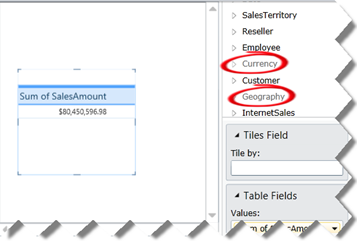
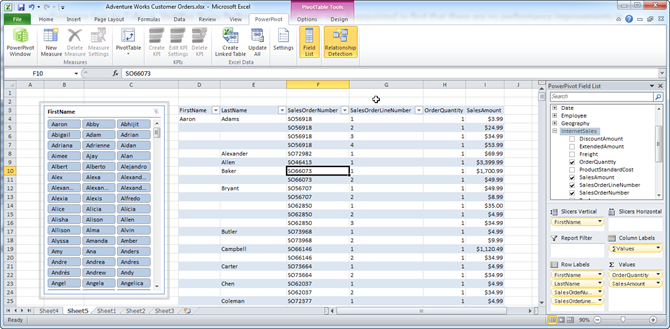
Similar to Report Builder models (now obsolete), Power View (formerly known as Crescent) filters metadata automatically. The reasoning behind this feature is that the tool should guide the user to choose only tables that are related to the ones used on the report to avoid Cartesian joins. For example, if the user has selected Sales Amount from the Reseller Sales table, Power Pivot automatically disables…
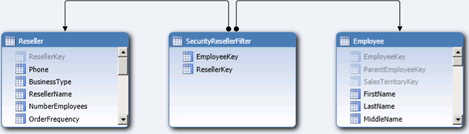
About four years ago, in my article Protect UDM with Dimension Data Security, I introduced an approach to secure dimension data in multidimensional cubes by using a factless bridge table. Since then, many BI practitioners have favored this approach because of its simplicity, reusability (transactional reports can join to the security table), and performance. Now that organizational tabular projects support data security, I wanted to…
A client complained that Reporting Services ReportViewer doesn't render reports in Google Chrome or Apple Safari browsers. The magic property to apparently fix this issue was SizeToReportContent="True" <rsweb:ReportViewer ID="reportViewer" runat="server" Height="100%" Width="100%" SizeToReportContent="True"> </rsweb:ReportViewer> Here is a link to Microsoft's official stand on the browser support for Reporting Services. A couple of notes: Currently Microsoft doesn't support report rendering in Chrome but are re-visiting the…
Normally, when you export a report, the Save As dialog box will default to the report name. However, if you the SSRS LoadReportDefinition API and view the report in the ReportViewer, you'll find that when you export the report it will default the name to a system generated name, such as Report(N).pdf. That's because LoadReportDefinition creates a transient report on the server that doesn't have…
Microsoft just released a Hyper-V image of SQL Server Denali CTP3 in action, including fully configured services and integration with SharePoint 2010 and Office 2010. The following software is configured on the virtual machine: • SQL Server "Denali" CTP3 • SharePoint 2010 • Office 2010
I ran into a couple of snags with the PowerPivot Management Dashboard and CTP3 of Denali. In this case, I've installed PowerPivot for SharePoint on a standalone domain controller. The Actions web part of the PowerPivot Management Dashboard refuses to load with the following exception logged in the SharePoint URL log " Unable to acquire information about the NT group 'Enterprise Admins'" Resolution: This is…
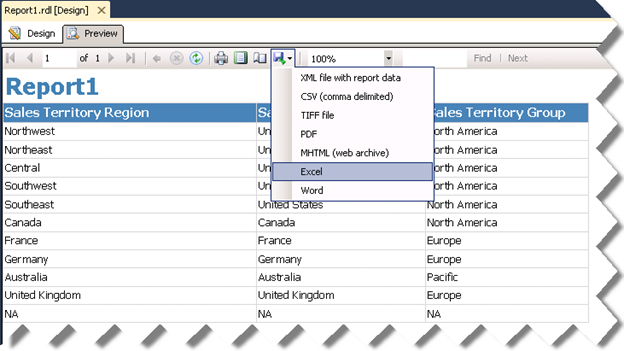
One welcome improvement in the forthcoming "Denali" release of Reporting Services is exporting to Excel 2007 (*.xlsx) file formats. I bet many companies will upgrade just to get this feature. In fact, the default rendering option when you export to Excel is to xlsx. The old Excel 2003 renderer is still there but it's hidden by default. And, yes, BI projects now integrate with Visual…
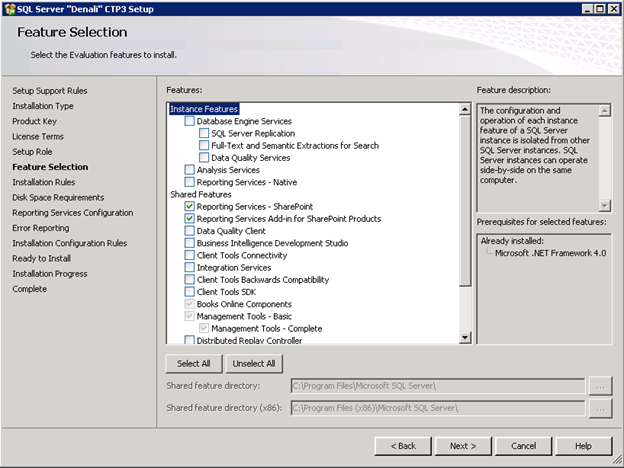
A week ago, I raved about how the new PowerPivot Configuration Tool would simplify configuring PowerPivot for SharePoint. Guess what? Setting up Reporting Services for SharePoint integrated mode got simplified too! In SQL Server Denali, Reporting Services leverages the SharePoint service application infrastructure and it doesn't require installing a Reporting Services server. Not only this simplifies setup but improves performance because there is no round-tripping…
One great enhancement in SQL Server 11 (Denali) is the PowerPivot for SharePoint setup refactoring. Previously, the PowerPivot for SharePoint setup and configuration was included and performed at the end of the SQL Server setup. Consequently, it was very difficult to figure out what went wrong. In Denali, you need to perform the PowerPivot for SharePoint configuration as a post-installation step after the SQL Server…