
Want to display a visual-left hint to perplexed users that explains what your visual is supposed to reveal? Like me, you’ve probably missed the handy Power BI help tooltips feature that allows you to pop up some helpful text for each visual. On the Format tab of the visualization pane, expand the Help Tooltip section, and enter the text. Then, a question mark glyph shows up in the visual header when the user hovers. Besides showing static text, you could alternatively redirect the user to a report page that could provide more context.
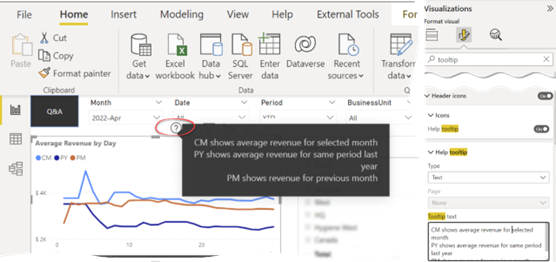
Unfortunately, the tooltip tip can’t be expression-based due to a long-standing and overdue Power BI limitation that only a small set of properties that can be bound to measures.



JOIN THE CONVERSATION
Discussion