
An interesting requirement popped up during an Analysis Services class I’m teaching this week. The customer wants to implement a Tabular/PowerPivot KPI that has this pseudo logic:
CASE
WHEN Actual Below Goal && Below LastYearSales Then Red
WHEN Actual Below Goal && Above LastYearSales Then Yellow
WHEN Actual >= Goal Then Green
END
Although I’m using Tabular, the same calculations will work with Power Pivot.
- Define a LastYearSales measure using the following formula assuming that the measure for the actual amount will be ResellerSales[SalesAmount]
=CALCULATE(SUM(ResellerSales[SalesAmount]), PREVIOUSYEAR(‘Date'[Date])) - Define a measure for the KPI actual value using the formula:
=SWITCH(TRUE(),
SUM(ResellerSales[SalesAmount])<Sum(SalesQuotas[SalesAmountQuota]) && SUM(ResellerSales[SalesAmount])<[LastYearSales],-1,
SUM(ResellerSales[SalesAmount])<Sum(SalesQuotas[SalesAmountQuota]) && SUM(ResellerSales[SalesAmount])>[LastYearSales],0,
SUM(ResellerSales[SalesAmount])>=Sum(SalesQuotas[SalesAmountQuota]),1
)
This measure using the DAX Switch function. However, to use it as a searched case expression, we use a trick where first argument returns TRUE and the rest of the conditions are evaluated against this hardcoded Boolean value. The formula normalizes the status as -1 (Red), 0 (Yellow), and 1 (Green).
-
Define the KPI. Notice that the KPI uses an absolute value of 0 for the target.
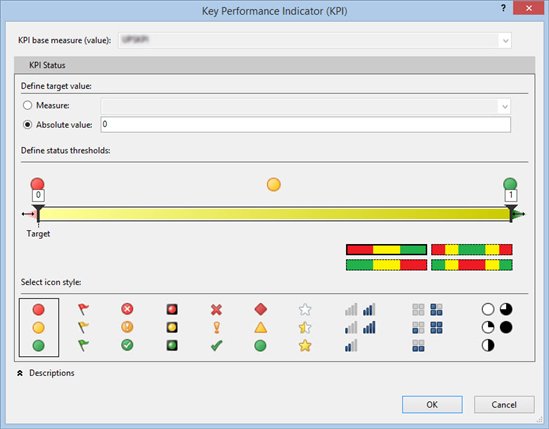
TIP: If you use Tabular, instead of using the UI you can open the BIM file source code, locate the _KPI Status measure and modify it as follows:
CREATE MEASURE ‘ResellerSales'[KPI]=SWITCH(TRUE(),
SUM(ResellerSales[SalesAmount])<Sum(SalesQuotas[SalesAmountQuota]) && SUM(ResellerSales[SalesAmount])<[LastYearSales],-1,
SUM(ResellerSales[SalesAmount])<Sum(SalesQuotas[SalesAmountQuota]) && SUM(ResellerSales[SalesAmount])>[LastYearSales],0,
SUM(ResellerSales[SalesAmount])>=Sum(SalesQuotas[SalesAmountQuota]),1
);
CREATE MEASURE ‘ResellerSales'[_KPI Goal] = 0;
CREATE MEASURE ‘ResellerSales'[_KPI Status] = if(ISBLANK(‘ResellerSales'[KPI]),BLANK(),
If(‘ResellerSales'[KPI]<0,-1,
If(‘ResellerSales'[KPI]<1,0,1)
);



JOIN THE CONVERSATION
Discussion