
There could be 1001 reasons why IE asks you for credentials when you access a website configured for Windows Authentication and none of them has to do with Reporting Services itself. Windows Vista and IE 7 add yet another one. IE 7 will prompt you for credentials if your computer is not added to a domain and you access a local website configured for Windows Authentication, such as http://localhost/reports. Thanks to the help from James Wu on the SSRS team and Bryan Noyes’s blog, the solution is simple.
- Open IE and go to Tools, Internet Options, Security tab.
- Select the Local Intranet zone. Press the Sites button.
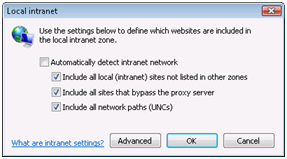
- Unselect the Automatically detect intranet network checkbox and check the three checkboxes below it.
- Restart IE. Now http://localhost/Reports or http://localhost/ReportServer shouldn’t prompt for credentials.
If it still prompts and you have SQL Server 2008 installed, it could be an issue with Kerberos. To fix this, open the ReportServer configuration file (rsreportserver.config). Locate the following section:
<Authentication>
<AuthenticationTypes>
<!–RSWindowsNegotiate/–>
<RSWindowsNTLM/>
</AuthenticationTypes>
<EnableAuthPersistence>true</EnableAuthPersistence>
</Authentication>
Comment the <RSWindowsNegotiate/> element or remove it, so only <RSWindowsNTLM/> is enabled.



JOIN THE CONVERSATION
Discussion