
Microsoft’s expanding family of Copilot experiences has caused plenty of confusion and frustration. For example, one enterprise customer recently complained that its users lost access to a Copilot experience they had been using under Microsoft 365 E5. The confusion has spread to Fabric, where copilots, agents, and other exotic creatures seem to multiply by the month.
I admit I’ve been skeptical about the value AI brings to data analytics beyond Q&A and automated insights, but clients are reporting useful results. One client, for example, values Copilot for executives who don’t have time to browse reports but can get quick answers by asking specific questions about their data.
The Copilot is dead, long live the Copilot
So, I rejoiced at Microsoft’s announcement that it is unifying the Copilot experience across applications. As part of this transition, Microsoft plans to retire the standalone Power BI Copilot and introduce Microsoft Copilot directly in Power BI and Fabric. During the preview, both entry points can coexist. The table below highlights the differences, with licensing qualifications.
| Feature | Standalone Power BI Copilot | New Microsoft Copilot in Power BI/Fabric | Licensing required |
| Microsoft 365 context | Power BI/Fabric data focus | Combine Power BI results with permitted Teams, Outlook, meetings, and documents via Work IQ | Paid Microsoft 365 Copilot license for Work IQ |
| Conversation continuity | Separate standalone Power BI conversation | Continue supported conversations across Microsoft Copilot experiences | Eligible Copilot Chat (basic) for Fabric IQ; paid license for Work IQ |
| Broader contextual reasoning | Reasoning grounded in Power BI content | Explain Power BI results using permitted Microsoft 365 work context | Paid Microsoft 365 Copilot license |
| Cross-application discovery | Discover supported Power BI/Fabric content | Add discovery of permitted Microsoft 365 work content through Work IQ | Paid Microsoft 365 Copilot license |
| Attach business context | Select relevant Power BI content, such as semantic model | Reference reports/models; attach supported files where available; optionally ground in Work IQ content | Basic for Fabric IQ; paid license for Work IQ; file capabilities vary |
| Copilot Cowork | No corresponding integrated workflow | Initiate follow-up actions where the Cowork feature is available | Paid Microsoft 365 Copilot license; availability and billing vary |
| Unified interface | Power BI-specific standalone experience | Microsoft Copilot entry point inside Power BI/Fabric with shared supported experiences | Eligible Copilot Chat (basic); permissions and tenant settings apply |
A First Look at the New Copilot
Quick as a bunny, I enabled the new Microsoft Copilot preview in the Fabric admin portal, selected a semantic model, and liked what I saw. I tested the basic Fabric IQ experience, not the premium copilot features.
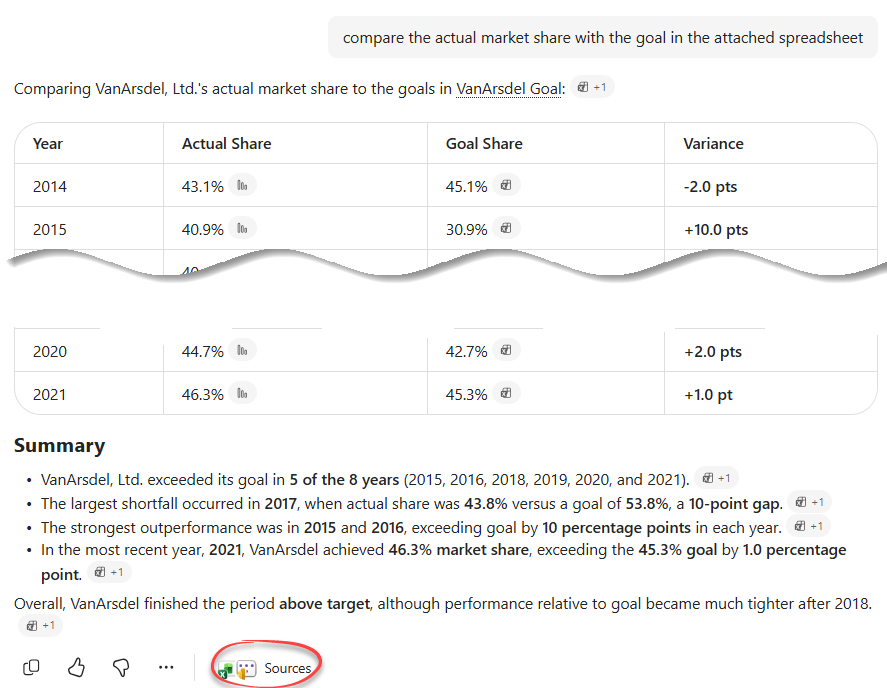
- Users can now compare external data, such as goals in an attached Excel spreadsheet, with results from a semantic model.
In my test, Copilot aligned the spreadsheet’s targets with actual market-share figures and calculated variances. As it stands, Copilot can’t create a composite model by joining an external table to a table in the semantic model, but who knows what the future holds? This feature might light up one day.
-
- In my initial tests, the new Copilot felt considerably faster. That’s an observation, not a controlled benchmark against standalone Power BI Copilot.
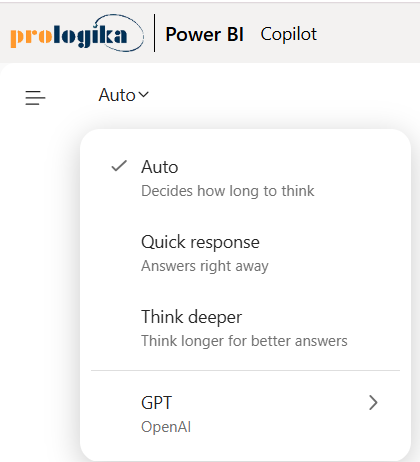
- The interface offers response modes (Auto, Quick response, Think deeper) and shows a GPT model menu. This suggests more user control, although model choices may depend on licensing and rollout.
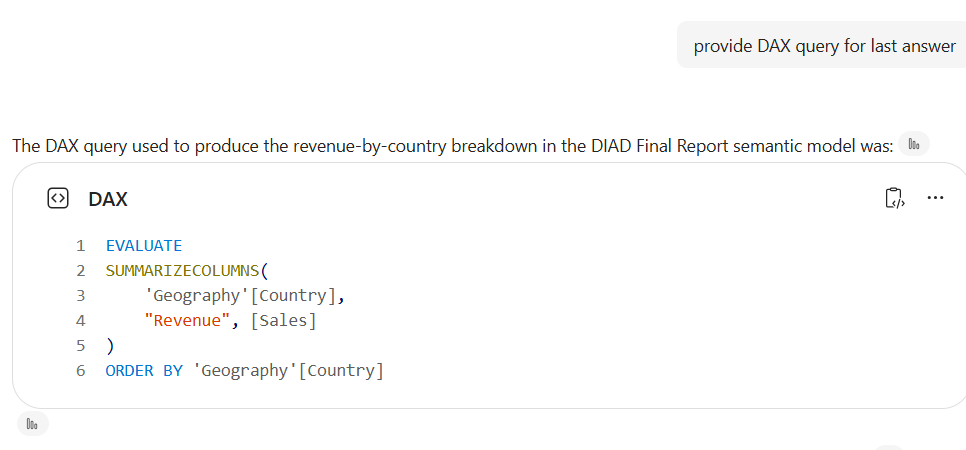
- I can ask Copilot to show the DAX query behind an answer. That’s useful for reviewing measure selection, filter context, and whether the result makes sense.
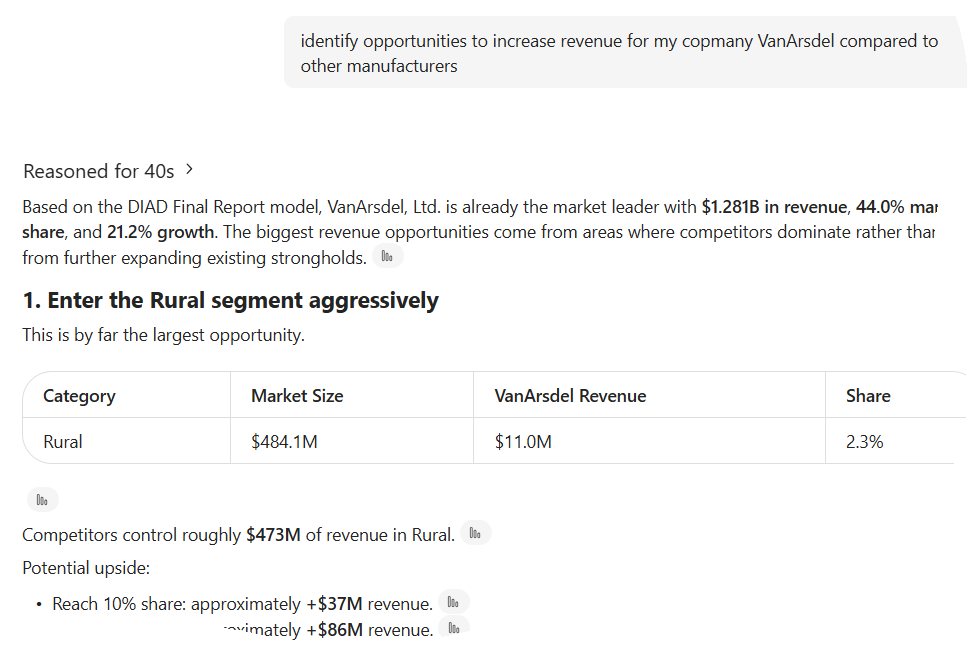
- It also handled a more involved, multi-step investment-style question well in my test. Of course, a plausible narrative isn’t a substitute for checking the numbers and assumptions against the underlying model.
- The new Fabric IQ experience supports users with appropriate Power BI Pro access without requiring an F SKU solely for this integration. That distinction matters: traditional in-report Power BI Copilot has different capacity requirements. The preview still needs tenant enablement and suitable permissions.
Summary
My first impression is positive. The new Microsoft Copilot keeps the familiar Talk-to-Data experience while making it easier to bring in user-supplied context, review generated DAX, and tackle more ambitious questions. For organizations with Power BI Pro, Fabric IQ does not require purchasing an F SKU solely for this integration,. I would still validate complex answers, especially those combining spreadsheet targets with semantic-model data. As before, the real test is not whether Copilot produces a convincing answer, but whether it produces a correct one.



JOIN THE CONVERSATION
Discussion