
Yet another relative dates implementation in an Analysis Services cube. So far, I’ve implemented two. But I’m now starting a project to implement an accounting (G/L) cube and the traditional relative date approach where each relative date is calculated for the current member in the Date dimension doesn’t fly anymore. Heck, the business analyst even found the excellent “Translating Cognos PowerPlay Transformer Relative Date Functionality into SQL Server Analysis Services (SSAS)” whitepaper by David Greenberg and told me that’s exactly what they need. That’s what happens when you have smart users. Power Pivot anyone? While the business users are not empowered yet, let me share how I implemented this approach.
What’s Needed?
The difference now is that we want to drill down from each relative date to the periods that the relative date spans. Let’s take a look at the screenshot below.
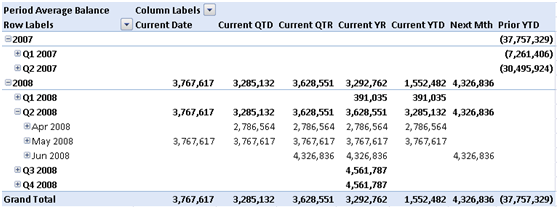
The cube sets the default member of the Date hierarchy to the accounting closing period, which is May 2008 in this case. The Current Date relative date shows the actual measure values for May 2008 only. The Current QTD shows the actual measure values for April and May 2008. The current QTR shows the actual measure values for April, May, and June, etc. In other words, when the user slices by Relative Dates and Date dimension, the system shows the actual measure values for the periods that belong to that relative date. Consequently, the only way for the user to get the calculated relative dates values, such as the Current YTD aggregate is to force the Date dimension to the [All] member but that’s fine with the business users.
Why We Disagree?
My implementation differs from the above-mentioned whitepaper in the following ways:
- I use a regular Relative Dates dimension instead of dimension calculated members that the SSAS BI Wizard and the whitepaper use. It looks to me that OLAP clients compete with each other to butcher dimension calculated members the most. Excel, for example, doesn’t retrieve calculated members by default and it doesn’t let you select individual calculated members. Other tools ignore them whatsoever. To avoid such pitfalls, I defined the Relative Dates dimension as a regular dimension.
- The whitepaper defines extra columns in the DimDate table that flag the qualifying dates. My implementation doesn’t do this because it’s not needed.
- The whitepaper produces the relative dates results by aggregating the measure across the qualifying date members. My approach uses simple scope assignments as you will see in a moment.
How This Got Implemented?
The implementation of this Relative Dates approach is remarkably simple.
- Implement a SQL View on which the Relative Dates dimension will be based that hardcodes the Relative Dates members with SELECT…UNION statements. Note that first row on which will join the Date dimension doesn’t have a name because we will hide it in the next step.
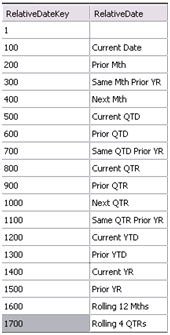
-
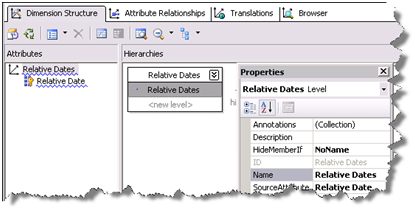
Set up a Relative Dates dimension. Here I use a little trick to hide the first member because the user shouldn’t see it. Specifically, I set the AttributeHierarchyVisible of the Relative Date dimension key to False. Then, I created a Relative Dates hierarchy and set the HideMemberIf property of the Relative Dates level to NoName.
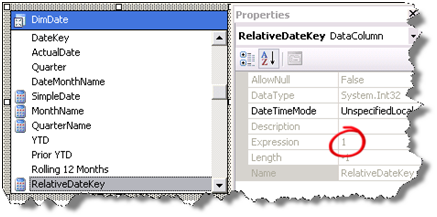
- I added a named calculation called RelativeDateKey to the DimDate table in the data source view with the expression value of 1 so I can relate the Relative Dates and Date dimensions.
- Next, we relate the Relative Dates dimension to all associated measure groups with a referenced relationship via the Date dimension.
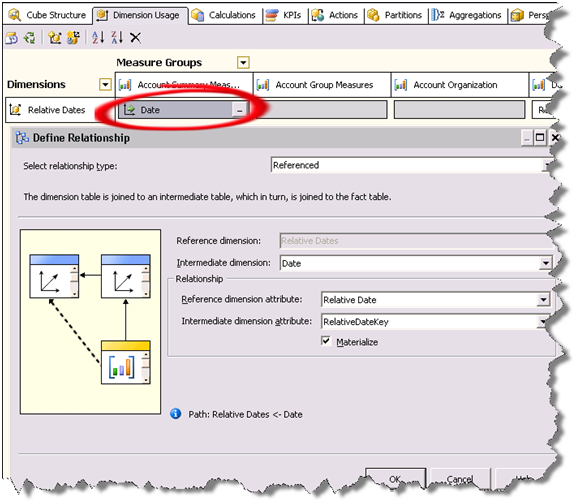
- Time for some MDX programming. We use script assignments to populate the Relative Dates cells. By default, all cells intersecting with all Relative Dates members (except for the RelativeDateKey member) are empty. So, we just need to “carry over” the measure values from the qualifying members of the Date dimension. Here is what the first three assignments look like:
— Current Date
Scope ([Relative Dates].[Current Date], [Date].[Date].DefaultMember);
this = [Relative Dates].&[1];
End Scope;
— Current QTD
Scope ([Relative Dates].[Current QTD], Exists(PeriodsToDate([Date].[Date Hierarchy].[Quarter], [Date].[Date Hierarchy].DefaultMember), [Date].[Date].[Date].Members));
this = [Relative Dates].&[1];
End Scope;
— Current QTR
Scope ([Relative Dates].[Current QTR], Exists(Descendants(Ancestor([Date].[Date Hierarchy].CurrentMember, [Date].[Date Hierarchy].[Quarter]), [Date].[Date Hierarchy].[Date]), [Date].[Date].[Date].Members));
this = [Relative Dates].&[1];
End Scope;
Prior to these assignments, the cube script sets the default member of the Date hierarchy to the accounting closing period. Each assignment scopes on the qualifying members of the Date dimension and sets the scope to [Relative Dates].&[1] , which as we’ve seen is the first member of the Relative Dates dimension.
Why Does This Work?
The script carries over the measure values to the Relative Date members that intersect with the members of the Date attribute hierarchy. From there on, the measure aggregation function kicks in to roll up the values, e.g. by month, year, and quarter.



This is a very nice trick!!
You mentioned in the blog that “Prior to these assignments, the cube script sets the default member of the Date hierarchy to the accounting closing period.” Can you please give an example for that? My thinking is that the default member was 05/2009 as now but when 06/2010 comes, it will be set to 05/2010. Does this sound right? Thanks again.
The cube script uses the Exists function to set the current date based on an attribute that flags the current period. I tried to post the code, but Community Server errors out 🙂
This is a great improvement Teo – thanks!
While I am now deeply into the MS BI stack, I come from a Cognos background so I agree wholeheartedly with your business analyst (and “agree to disagree” with 99% of the MS BI techies).
I’ve just been testing a conversion from the “whitepaper” approach to yours (the “Teo YARDI” approach?), and it appears to be about 10 times faster (on identical hardware, source data etc). And it also works naturally in Excel filters (like a regular dimension), which was a shortcoming of the “whitepaper” approach and other variants.
So I think this is definitely the winner – IMO.
I think there was one (trivial) step missing in the procedure – after creating the named calculation called RelativeDateKey, you have to add it to your Dates dimension as an Attribute Hierachy (with AttributeHierarchyVisible = False).
Hi Teo,
I tried it because it looks like the solution for me. Unfortunately, I am stuck at the step “the cube script sets the default member of the Date hierarchy to the accounting closing period”. I know you wrote that you got an error while trying to post that part of the code… it is possible to try again?
Thanks so much !
Depends on your implementation. Typically, the Exists function is used to query the last period with data. Or, if you flag your Date dimension with a Last Processed Period flag, it could be:
ALTER CUBE CURRENTCUBE UPDATE DIMENSION [Accounting Date].[Date], Default_Member = Exists([Accounting Date].[Date].[Date].Members, [Accounting Date].[Last Processed Period Flag].&[Yes]).Item(0);
Wonderful, it does work now! Thanks for your fast anwser.
I guess my last step is to write the MDX code for each relative dates. Since I am a beginner with MDX, where can I find example for them?
Never mind, I am better at MDX than I first tough 🙂
Hi, me again. So everything is working fine when I use the relatives date. The only issue is when I use the date dimension, without using any relative members.
The result is then multiply by 4, or by 3.5, depending of the year of my data.
I am having difficulties to find what could cause that, any idea? You look like a genius so I tought I should ask 🙂
Thank you!
Not from the top of my head. Feel free to contact me offline if you want me to take a look.
Hi tlachev or iTekExpert,
I would like your help in implementing the Relative Date dimension.
I am getting an issue with the MDX Programming –section…
Would you be able to let me know what you did to get it to work?
Kind regards,
P3L
Hi there
First of all, great solution – I’m an analysis services newbie but this works well and was easy to implement, although I had the issue of measure not aggregating when you use the dates hierarchy exclusively also.
For example if you browsed the cube using the date hierarchy for the default member (current day) the value displayed would be the aggregation of both the values at the intersection the default date member, [Relative Dates].&[1] AND the [Relative Dates].[Current Date] members (assuming that my relative dates dimension only contained the two members) – I could only assume this is because while we set the relative dates member to hide if there was ‘no name’ the member is still included in the cube and is included in aggregations accordingly.
The only way I could find to get around this was to include another ‘no name’ member in the relative dates dimension ([Relative Dates].&[2]) that served as a ‘balancing member’ to ensure that the amount displayed when the date hierarchy was used without relative time. See below for code.
–Create Balancing Amounts
Scope ([Relative Time].&[2], [Calendar].[Financial Calendar].ALLMEMBERS);
this = AGGREGATE(EXCEPT([Relative Time].[Relative Time].[All].Children,[Relative Time].[Relative Time].[Relative Time Name].&[1]))*-1;
End Scope;
Am I missing something? Can I ask how did you manage to get around this issue.
Thanks very much
very helpful
Hi, i don’t see RelativeDateKey under ‘Intermediate dimension attribute’ when defining referenced relationship between date dim and relative dates. Looks like I missed a step. Could you please elaborate? Thanks.
Suresh, the RelativeDateKey is the key of the Relative Date attribute. Its KeyColumns property is bound to the RelativeDateKey column from the view.
Hi,
thank you I use that solution for years in a multidimentional model and it’s working perfectly.
But I can’t figure out how to implement something like that in a tabular model… any hint ?
thanks !
I typically don’t implement a Relative Date dimension in Tabular. Instead, I flatten time calculations in measures, such as SalesAmountYTD, SalesAmountQTD, etc. There are a lot of formulas to duplicate but it’s not that bad.