
The Perfect Host
This is my first blog about SSRS 2008. The July CTP (CTP4) of SQL Server 2008 (aka Katmai) includes the new hosting model of Reporting Services. Gone is the dependency to IIS and all the management headaches associated with it. Instead, the SSRS Windows service pulls a nice trick by hosting the http.sys kernel-mode device driver which listens for HTTP requests. Behind the scenes, the SSRS Windows service hosts application domains for the Report Manager and Report Server and forwards the incoming requests to them.
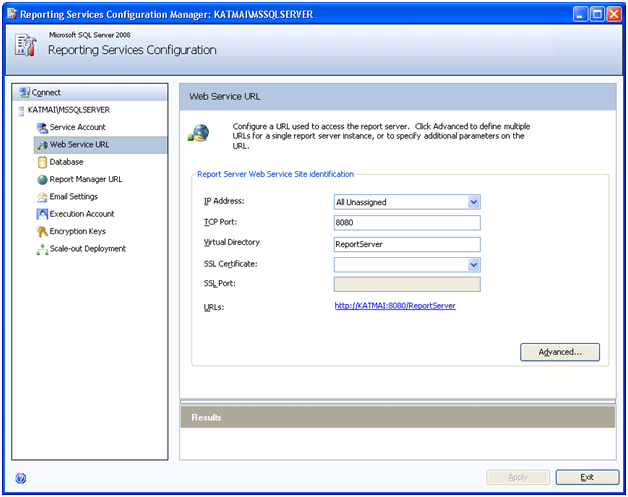
You reserve URL addresses for Report Manager and Report Server by using the Reporting Services Configuration utility. If you have ever set up a web site in IIS, you know everything you need to reserve an URL address. The URL address consists of IP address, TCP port, and vroot. You can specify any unreserved port (in Vista and Windows Server 2003+ you can have SSRS and another application listen on the same port, e.g; IIS and Report Server both listening on port 80). For example, if you reserve port 8080 and accept the defaults, the report server URL address will be http://<servername>:8080/ReportServer. You can optionally use the Advanced tab to specify additional settings, such as host headers. When the SSRS Windows service starts it registers the URL addresses with http.sys. Http.sys listens for http requests and forwards them accordingly.
While we are still on the Reporting Services Configuration topic, here is a nice tip. CTP4 doesn’t officially support upgrading from SSRS 2005. However, you may need to test old reports with SSRS 2008. You can upgrade an old catalog by using the Database tab and pointing to a SQL Server 2005 instance that hosts the SSRS 2005 catalog. The Reporting Services Configuration utility will upgrade the catalog in place. Later, you can back up and restore the catalog on the SQL Server 2008 instance if you need to remove the dependency on the SQL Server 2005 instance.


