Intelligencia Query
Chris Webb, a fellow MVP and MDX guru, who’s blog is a must-read for all SSAS junkies, was kind enough to let me take a look at the Intelligencia Query product he’s been working on for a while with Andrew Wiles. Chris announced the product back in April which is now selling as a commercial offering.
Now, lots of things have been said about the current state of the SSRS-SSAS integration, which is to say the least wanting. In a previous blog, I wrote “In my opinion, the biggest challenge the Microsoft BI initiative faces today is the inadequate support for Analysis Services.” Alas, we won’t witness an improved SSRS-SSAS integration in SQL Server 2008 as Microsoft decided to focus on other areas and priorities.
Rest assured though that Microsoft understands the importance of this integration scenario. I personally have voiced my concerns on a few occasions and have put this on the top of my wish list which I shared with the Reporting Services team. There are good things happening already which make me believe that SQL Server.NEXT (post-SQL Server 2008) will materialize this wish. What’s really needed is Excel-like support of SSAS in Reporting Services, plus calculated members which are already supported.
Then, the question is what to do meanwhile if you target Analysis Services (and you should). One approach is to take the “I’ll stick with Microsoft” approach. This may require you find workarounds for the static schema and other limitations, such as using the Microsoft OLE DB Provider for Analysis Services instead of the built-in SSAS provider. This is not as bad as it seems as little out-of-box thinking usually gets the job done. By the way, I wrote some 50 pages in my next book to cover integrating SSRS with SSAS in as much detail as possible.
The second approach is to look at third-party offerings, such as Radius Producer and Intelligenca Query. What I liked about Intelligenca Query is that it doesn’t require throwing the baby with the water. You can still keep the Microsoft Report Designer but use Intelligenca Query to replace the built-in SSAS provider. This works because just like the built-in provider, Intelligenca Query is implemented as a data extension. I tested Intelligenca Query with SQL Server 2008 and it worked without any issues with the BIDS Report Designer and Report Builder 2.0 (aka Report Designer Preview).
The good thing about Intelligenca Query is that it lets you plug in an arbitrary MDX query. Behind the scenes, it pulls out a little trick where it rewrites the report dataset by transposing columns to rows. Consequently, you have to use the matrix region to rotate the rows back to columns to recreate the original query results. Now, my ideal provider would support a dual mode where I can tell it not to rewrite anything but just to give me the results. Of course, if another dimension member is added, it won’t show up on the report columns (assuming a table with fixed columns) but I can see this being useful for notice users that create ad hoc reports or when the columns are fairly static.
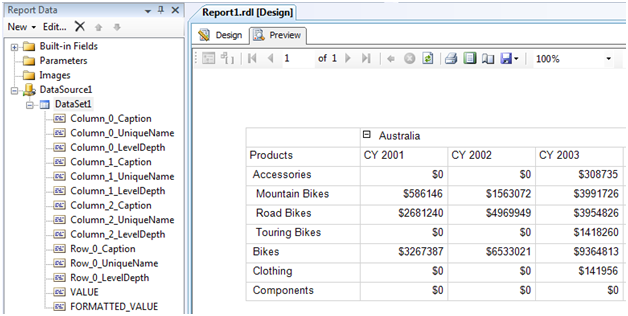
Another thing I liked, of course, about Intelligenca Query is that it eliminates the nagging issue of server aggregates which are the aggregates for the dimension All members. With the built-in provider, you have to explicitly request them by using the Aggregate function but they won’t be retuned if you hand-code your query. Intelligenca Query simply brings them as additional rows. What if you don’t want them, such as when you need a group footer? No problem, just exclude them from the query and group on the rest of the rows.
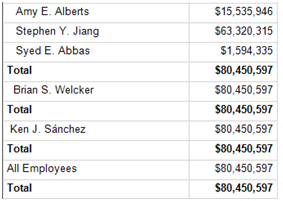
Another cool thing is working with parent-child hierarchies. The MS built-in provider takes this strange design pattern where it dumps all members in a single column, thereby making it virtually impossible to create subtotals per level. With Intelligence Query this issue disappears:
I also liked the graphical query designer which is pretty much in par with the Microsoft graphical MDX Query Designer. On the downside, some outstanding work is required to handle parameters and synchronize the text query with the graphical designer.
If the SSAS built-in provider is driving you nuts, I encourage you to take a look and evaluate Intelligenca Query.