
Extending Report Builder 2.0
As I mentioned in my previous blog, Report Builder 2.0 RC1 has arrived. Although perhaps too early in the game, you may wonder how you can get the most out of Report Builder 2.0 and extend it when the built-in features are not enough. As Report Designer and Report Builder 2.0 share the same design surface, you may believe that they are equally extensible. Unfortunately, this is not quite the case. Specifically, due to time constraints, Report Builder 2.0 supports the following RS extensibility features only in server mode:
- Custom Data Processing Extensions
- Custom Security
- Custom Report Items
Server mode is triggered when you open a report from the server or when the report references a shared data source whose definition must reside on the server. When you preview a report in server mode, the report is processed and rendered on the server. The above extensibility areas are not available in client mode. For example, the user can open a server report that has a custom report item, sets its properties (assuming that the right configuration settings have been made to the Report Builder 2.0 configuration files), and preview the report, as shown in the screenshot. However, the Report Builder 2.0 ribbon will not be extended with the custom report item. Nor the user will be able to author a report from scratch and add the custom report item to the report.
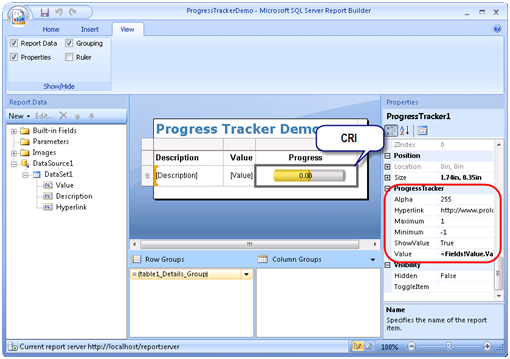
The unfortunately side effect is that if the business user needs to use a CRI on a report, such as the Dundas Map CRI, a developer must author a “shim” report with Report Designer, add the CRI to the report, and deploy the report to the server so the business user can use the report as a starting point.
The only extensibility mechanism that seems to be working in client mode in RC1 is custom code (embedded and external). More than likely, Report Builder 2.0 will get the entire extensibility support of Reporting Services at some point of time. If you want to expedite the process, log your wish on connect.microsoft.com and vote for extensibility features you need Report Builder 2.0 to provide.


