Prologika Newsletter Summer 2026

If Microsoft Fabric was the Statue of Liberty, the inscription would be “Give me your data”. Fabric is obsessed with owning the data when it makes sense and when it doesn’t. As I wrote before, this pattern was probably borrowed from Palantir and to align Fabric with the push for “modern” medallion architectures. Or, to establish a permanent dependency on Fabric…

In this newsletter, I make a case that Fabric should support better data virtualization that goes beyond creating shortcuts to files.

Auto-replicating data to Fabric

To satisfy the Fabric data appetite and facilitate data ingestion into OneLake, Fabric offers two primary options that don’t require explicit ETL: mirroring and shortcut transformations.

  1. Mirroring targets a growing number of relational and non-relational database engines. Although described as “easy-to-use”, mirroring could prove challenging to set up in real life. For example, in one case, the client simply refused to set up mirroring from Google BigQuery because of the requirement to grant excessive permissions. In another case, we are still trying to figure out why mirroring doesn’t work from Azure SQL MI configured on private network. Not to mention that mirroring even from Microsoft SQL SKUs has limitations, such as historical temporal tables can’t be mirrored.
  2. This leaves with the second option: shortcut transformations. They target a subset of file formats (not databases). Like mirroring, Fabric polls periodically the shortcut target folder and synchronizes the data in OneLake Delta tables. These transformations could be useful to provide convenient access to this data from Fabric workloads, such as to access reference data a business user maintains in an Excel spreadsheet in a Fabric Data Warehouse. On the downside, data must be exported and saved as files.

OneLake Shortcuts

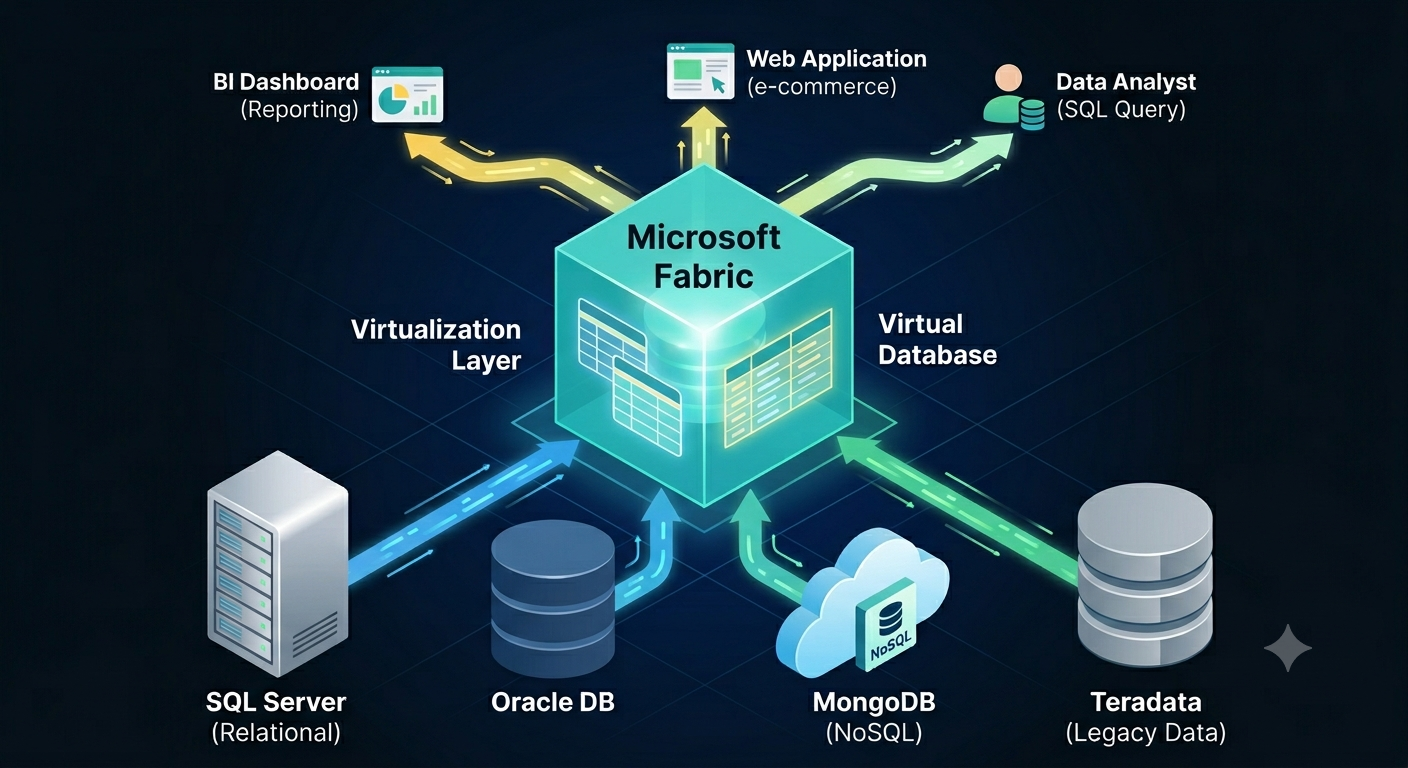
Yet, many scenarios could be addressed by simply accessing the data where it is. In other words, by data virtualization. As it stands, Fabric has limited file-based data virtualization capabilities with OneLake shortcuts. OneLake shortcuts shouldn’t be confused with the shortcut transformations mentioned before. OneLake shortcuts are read-only pointers to external files. These shortcuts are typically listed in the unmanaged section of OneLake (the Files folder). OneLake shortcuts don’t import the data in Delta tables. How are they useful then? The main thought is to conveniently share data between teams, workspaces, or domains, workloads, without moving it.

As an exception to the rule, if the OneLake shortcut points to a Delta table, such as OneLake or elsewhere, or Iceberg table, the shortcut still doesn’t copy the data but exposes it as OneLake Delta table. This lets you utilize Delta-specific features, such as a DirectLake semantic model without moving the data. I find this inspiring to imagine a simplified data integration in a world where one day other vendors could embrace standard file formats.

What about databases?

Based on experience, a typical company has 90+ percent of its data in relational databases or connectable non-file sources, such as REST APIs and SFTP servers. In my opinion, mirroring these (sometimes huge) datasets into a file-based, pseudo-relational lakehouse rarely makes sense. Wouldn’t be nice to have shortcuts to tables in these sources and then shape and get the data you need instead of writing ETL? And even better, run cross-database queries? Wouldn’t this be a great Fabric differentiator compared to other vendors?

Since time immemorial, SQL Server has been supporting linked servers and heterogenous joins across databases. Then PolyBase was supposed to replace linked servers and be the Microsoft answer to broader data virtualization. Alas, both technologies didn’t make it to Fabric. Linked servers are available only in on-prem SQL Server and with limited support in Azure SQL MI. Polybase was relegated to the on-prem SQL Server.

I think it’s time Fabric to fulfil its zero-copy promise and say “Let me connect the dots, don’t move that data”.


Teo Lachev
Prologika, LLC | Making Sense of Data
logo

Open Semantic Interchange (OSI)

An excited enterprise client came back from a conference where Snowflake delighted them with AI demos and semantic views built on Open Semantic Interchange (OSI) standard. Snowflake even went further to show how their Cortex Analyst tool returns deterministic AI answers. Naturally, given their existing investments in Snowflake data lake and ODS, the client questioned why we don’t build everything in Snowflake instead of bringing Microsoft Fabric and two vendors into the mix.

What’s OSI?

Reading about the relatively freshly baked OSI, we learn that “the Open Semantic Interchange is an industry-wide specification effort to standardize how we exchange semantic metadata across analytics, AI and BI platforms, providing a vendor neutral, single source of truth for semantic data.” Great, I am all about standardization. If you ask me, the world should adopt the metric system and English as a universal language, and life will be much simpler. But this is about BI so let’s peek under the hood and keep ‘em honest.

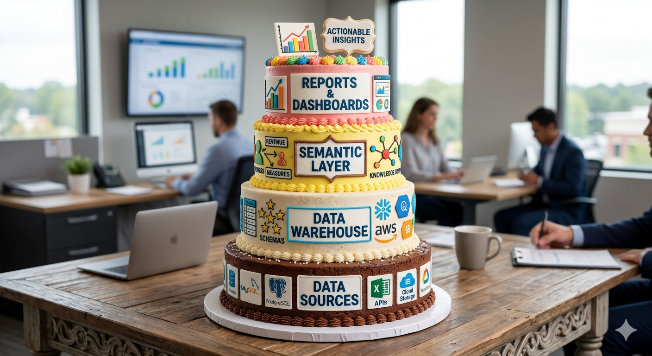
Now, like ogres and cakes, a BI architecture has layers. Besides data sources, at minimum I like to see a central repository (let’s called a data warehouse) with star schema (if the star is missing, you don’t have DW, but operational data source, sorry), semantic layer (don’t skip it!), and of course reports with possibly AI – the cherry on top of the cake. “Modern” medallionists will of course dream of a bigger cake with bronze, silver, and gold layers, and then wonder what to put in them, but I digress.

OSI is an initiative from major Microsoft competitors in the BI space (Snowflake, Dbt, Google, Databricks, Salesforce) to standardize the semantic model definition so good report vendors who have bad semantic models, like Tableau and Salesforce, can integrate with vendors who have good backends but bad reporting, like Snowflake and Google. Did I get this right? I believe the main goal here is to compete more effectively against Microsoft which currently dominates the data analytics space. All that wrapped with “avoid the vendor lock-in and single version of truth” story.

About Snowflake semantic views

A Snowflake semantic view is OSI-based metadata definition described in YAML inside their database. Created similarly to a SQL view, it enumerates the star schema dimension and fact tables, their relationships, and basic metrics with SQL formulas. Inside Snowflake, the semantic views are currently used by their Cortex Analyst tool (analogous to Copilot in Microsoft Fabric) to let users and apps talk to data with natural questions. Behind the scenes, the question is translated to SQL, which is how Microsoft Fabric Data Agent works when connected to a lakehouse or warehouse.

For the most part, tables, relationships, and metrics is all OSI has defined at this point. And of course, ontology to glue semantic views together so AI knows how to reason across them (or, to check the box when you hear that catchy phrase on the golf course since every CIO has heard about ontologies by now although no one knows what it means). I’m glad Snowflake calls them “views” and not semantic models, which would be a big misnomer. By contrast, Microsoft has a 30+ years head start on semantic modeling so the two technologies (semantic view vs semantic model) can’t be meaningfully compared by any criteria (features, tooling, etc.).

Shall we standardize?

At this point, Microsoft doesn’t participate in OSI. Although to the best of my knowledge Microsoft hasn’t released official reasons, more than likely it’s because they don’t need to. There is a large distance between Microsoft and the rest of the pack. Further, they spent 20+ years on their engine and DAX tooling. I don’t think it’s even possible to retrofit many features into a new SQL-based basic standard. For example, the OSI metric language is SQL while DAX is Excel-like language because the thinking back then was to transition Excel users into self-service BI. I remember having discussions with the Analysis Services team about why not use SQL, but alas, Excel prevailed…I wonder if they’ve made a mistake there.

Now, if we are serious about open standards and interoperability, then I would argue that we should start with data formats. Wouldn’t be nice if Google and Snowflake rewrite their databases to use open formats, such as Delta or Iceberg, before getting to the semantic layer? That would immediately facilitate data integration and virtualization, such as by letting a Fabric user create shortcuts in a lakehouse to Google and Snowflake tables instead of replicating the data, as I mentioned in my “Give me your data” blog. So, if we are serious about make integration easier, let’s start from the bottom up as Microsoft and Databricks did, shall we?

Meanwhile, if you have invested in another database vendor, my advice would be to use the best of both worlds. If you like Snowflake, use their database for lake/warehouse and Power BI/Fabric for its semantic models and reporting capabilities. The best data source for AI is a rich semantic layer (sorry, Snowflake OSI semantic views).

And about the Cortex AI deterministic answers, it’s pure marketing propaganda; all LLMs might vary their answers and are not guaranteed to return the same results.


Give Me Your Data!

If Microsoft Fabric was the Statue of Liberty, the inscription would be “Give me your data”. Fabric is obsessed with owning the data when it makes sense and when it doesn’t. As I wrote before, this pattern was probably borrowed from Palantir and to align Fabric with the push for “modern” medallion architectures. Or, to establish a permanent dependency on Fabric…

Auto-replicating data to Fabric

To satisfy the Fabric data appetite and facilitate data ingestion into OneLake, Fabric offers two primary options that don’t require explicit ETL: mirroring and shortcut transformations.

  1. Mirroring targets a growing number of relational and non-relational database engines. Although described as “easy-to-use”, mirroring could prove challenging to set up in real life. For example, in one case, the client simply refused to set up mirroring from Google BigQuery because of the requirement to grant excessive permissions. In another case, we are still trying to figure out why mirroring doesn’t work from Azure SQL MI configured on private network. Not to mention that mirroring even from Microsoft SQL SKUs has limitations, such as historical temporal tables can’t be mirrored.
  2. This leaves with the second option: shortcut transformations. They target a subset of file formats (not databases). Like mirroring, Fabric polls periodically the shortcut target folder and synchronizes the data in OneLake Delta tables. These transformations could be useful to provide convenient access to this data from Fabric workloads, such as to access reference data a business user maintains in an Excel spreadsheet in a Fabric Data Warehouse. On the downside, data must be exported and saved as files.

OneLake Shortcuts

Yet, many scenarios could be addressed by simply accessing the data where it is. In other words, by data virtualization. As it stands, Fabric has limited file-based data virtualization capabilities with OneLake shortcuts. OneLake shortcuts shouldn’t be confused with the shortcut transformations mentioned before. OneLake shortcuts are read-only pointers to external files. These shortcuts are typically listed in the unmanaged section of OneLake (the Files folder). OneLake shortcuts don’t import the data in Delta tables. How are they useful then? The main thought is to conveniently share data between teams, workspaces, or domains, workloads, without moving it.

As an exception to the rule, if the OneLake shortcut points to a Delta table, such as OneLake or elsewhere, or Iceberg table, the shortcut still doesn’t copy the data but exposes it as OneLake Delta table. This lets you utilize Delta-specific features, such as a DirectLake semantic model without moving the data. I find this inspiring to imagine a simplified data integration in a world where one day other vendors could embrace standard file formats.

What about databases?

Based on experience, a typical company has 90+ percent of its data in relational databases or connectable non-file sources, such as REST APIs and SFTP servers. In my opinion, mirroring these (sometimes huge) datasets into a file-based, pseudo-relational lakehouse rarely makes sense. Wouldn’t be nice to have shortcuts to tables in these sources and then shape and get the data you need instead of writing ETL? And even better, run cross-database queries? Wouldn’t this be a great Fabric differentiator compared to other vendors?

Since time immemorial, SQL Server has been supporting linked servers and heterogenous joins across databases. Then PolyBase was supposed to replace linked servers and be the Microsoft answer to broader data virtualization. Alas, both technologies didn’t make it to Fabric. Linked servers are available only in on-prem SQL Server and with limited support in Azure SQL MI. Polybase was relegated to the on-prem SQL Server.

I think it’s time Fabric to fulfil its zero-copy promise and say “Let me connect the dots, don’t move that data”.