
If Microsoft Fabric was the Statue of Liberty, the inscription would be “Give me your data”. Fabric is obsessed with owning the data when it makes sense and when it doesn’t. As I wrote before, this pattern was probably borrowed from Palantir and to align Fabric with the push for “modern” medallion architectures. Or, to establish a permanent dependency on Fabric…
Auto-replicating data to Fabric
To satisfy the Fabric data appetite and facilitate data ingestion into OneLake, Fabric offers two primary options that don’t require explicit ETL: mirroring and shortcut transformations.
- Mirroring targets a growing number of relational and non-relational database engines. Although described as “easy-to-use”, mirroring could prove challenging to set up in real life. For example, in one case, the client simply refused to set up mirroring from Google BigQuery because of the requirement to grant excessive permissions. In another case, we are still trying to figure out why mirroring doesn’t work from Azure SQL MI configured on private network. Not to mention that mirroring even from Microsoft SQL SKUs has limitations, such as historical temporal tables can’t be mirrored.
- This leaves with the second option: shortcut transformations. They target a subset of file formats (not databases). Like mirroring, Fabric polls periodically the shortcut target folder and synchronizes the data in OneLake Delta tables. These transformations could be useful to provide convenient access to this data from Fabric workloads, such as to access reference data a business user maintains in an Excel spreadsheet in a Fabric Data Warehouse. On the downside, data must be exported and saved as files.
OneLake Shortcuts
Yet, many scenarios could be addressed by simply accessing the data where it is. In other words, by data virtualization. As it stands, Fabric has limited file-based data virtualization capabilities with OneLake shortcuts. OneLake shortcuts shouldn’t be confused with the shortcut transformations mentioned before. OneLake shortcuts are read-only pointers to external files. These shortcuts are typically listed in the unmanaged section of OneLake (the Files folder). OneLake shortcuts don’t import the data in Delta tables. How are they useful then? The main thought is to conveniently share data between teams, workspaces, or domains, workloads, without moving it.
As an exception to the rule, if the OneLake shortcut points to a Delta table, such as OneLake or elsewhere, or Iceberg table, the shortcut still doesn’t copy the data but exposes it as OneLake Delta table. This lets you utilize Delta-specific features, such as a DirectLake semantic model without moving the data. I find this inspiring to imagine a simplified data integration in a world where one day other vendors could embrace standard file formats.
What about databases?
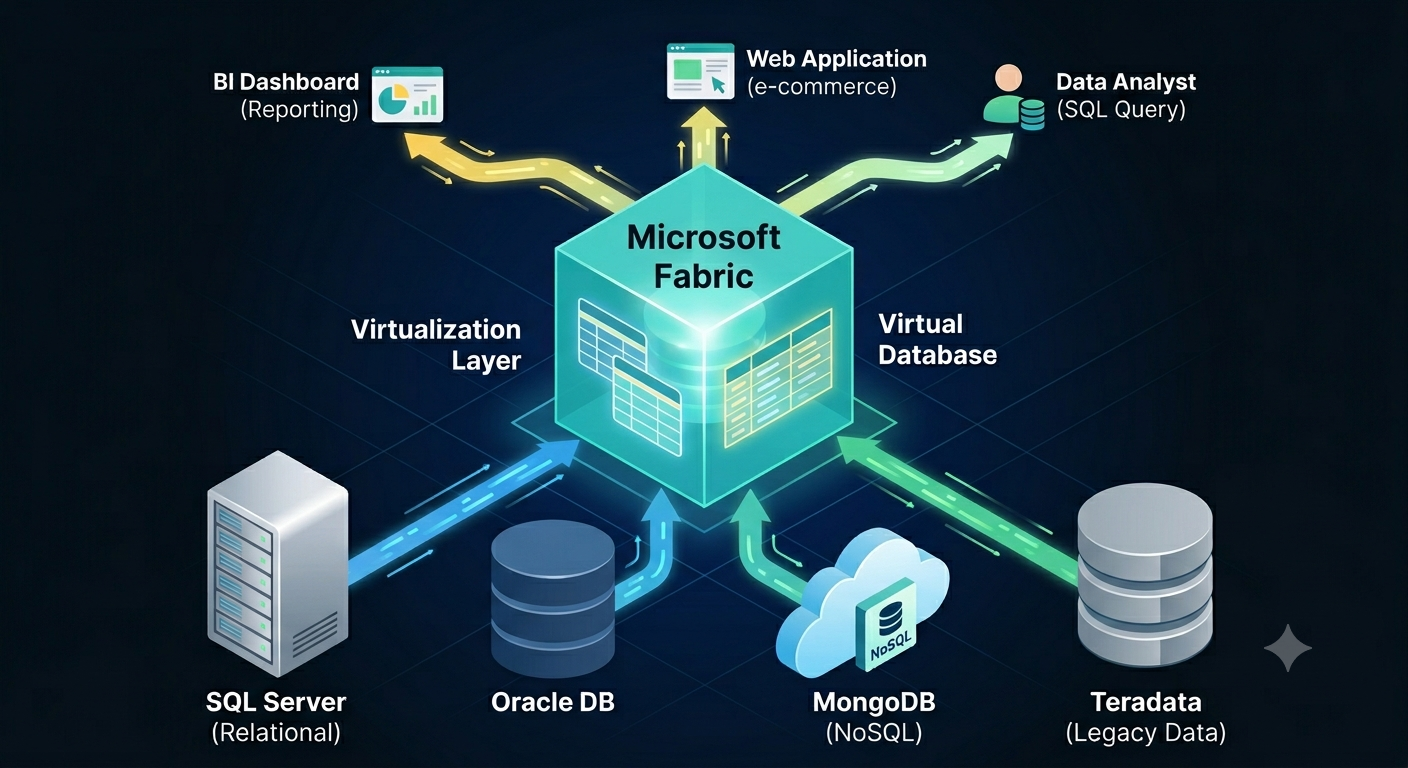
Based on experience, a typical company has 90+ percent of its data in relational databases or connectable non-file sources, such as REST APIs and SFTP servers. In my opinion, mirroring these (sometimes huge) datasets into a file-based, pseudo-relational lakehouse rarely makes sense. Wouldn’t be nice to have shortcuts to tables in these sources and then shape and get the data you need instead of writing ETL? And even better, run cross-database queries? Wouldn’t this be a great Fabric differentiator compared to other vendors?
Since time immemorial, SQL Server has been supporting linked servers and heterogenous joins across databases. Then PolyBase was supposed to replace linked servers and be the Microsoft answer to broader data virtualization. Alas, both technologies didn’t make it to Fabric. Linked servers are available only in on-prem SQL Server and with limited support in Azure SQL MI. Polybase was relegated to the on-prem SQL Server.
I think it’s time Fabric to fulfil its zero-copy promise and say “Let me connect the dots, don’t move that data”.



JOIN THE CONVERSATION
Discussion