
Power BI Date Picker
The June release of Power BI Desktop includes a preview of a new Power BI slicer configuration – Date Picker. It’s meant to solve two issues with report design.
The first one is letting the user select a single date by configuring the Date Picker using the Manual selection. Yes, it took a decade, so we must appreciate the engineering effort to get this implemented, so we don’t have to rely on workarounds as Patrick explains here.
More importantly, it helps with filtering the “current” period, so the end users don’t have to change filters when the calendar rolls forward. Previously, we had to resort to overwriting the current period caption, such as renaming the current month to “Current”, so the slicer automatically rolls forward when the current month changes. Or configure the slicer to use relative date, such as This Month.
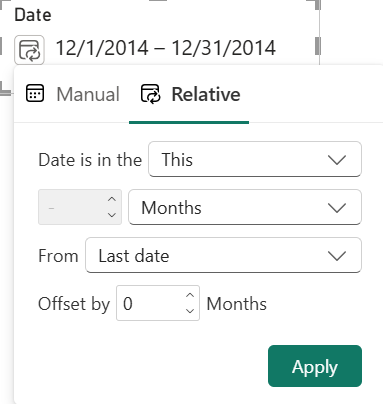
The problem with both approaches has been that if the calendar has just rolled forward but there is no data yet, end users will get wonderful insights from emptiness. Apparently, the support tickets from enterprise customers reached a critical mass and Microsoft acted. Therefore, in my opinion the important feature here is rolling forward but anchored to the last date in the Date column bound to the slicer.
For example, the last month with Adventure Works data is December 2014 so the Date dimension table has dates only until this date. Let’s say January 1st 2015 comes along but the semantic model doesn’t have data yet for January and therefore the Date table doesn’t have that date yet (or the slicer uses a DAX measure to filter dynamically the date range). The slicer will remain anchored to December 2014. Once we have data for January, the relative date configuration will switch to January.
TIP: If the Date table has future dates, you can use a DAX measure to filter the date range, such as SlicerDateFilter = IF(NOT ISBLANK([<SomeConditionToDetermineTheDateRange>]), 1, 0). Then drag your newly created SlicerDateFilter measure from the Data pane and drop it into the Filters On This Visual well in the Filter pane with the slicer selected.


