Continuing the line of thought from my previous blog "Microsoft Unveils BI Roadmap", one nagging question still remains. What to do with all these Excel files now that SSRS came with a vengeance and has been promoted to THE on-premises BI platform? It looks like Microsoft is thinking along these lines. Interestingly, Excel Services will be removed from SharePoint Server 2016 and replaced with Office…
Today at the SQL PASS Summit 2015, Microsoft shared its BI roadmap for next year and beyond. The BI cloud roadmap shouldn't be a surprise to anyone. It's centered around Power BI. The main takeaway about the on-premises roadmap is deemphasizing the role of SharePoint and Office in favor of Reporting Services. In SQL Server 2016, SSRS will be extended to support Datazen reports. A…
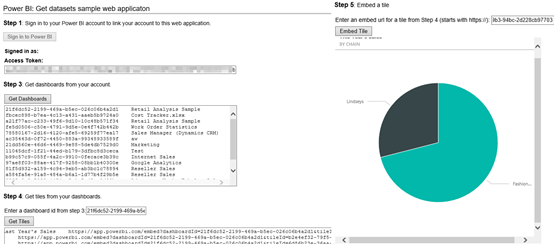
UPDATE: An updated sample is included in the Chapter 12 source code of my "Applied Power BI" book. One of the biggest Power BI strengths is its open architecture. In addition to opening the visualization framework, Power BI introduced REST APIs that let developers embed dashboard tiles in custom web applications (embedded reports will probably follow soon). Microsoft provided a sample application (Integrate-a-tile-into-an-app) on GitHub…
Microsoft awarded me again with the Most Valuable Professional (MVP) Award for SQL Server. This is an annual prestigious award given to selected individuals worldwide in recognition for their expertise and contribution to the community. Currently, there are 371 SQL Server MVPs worldwide and only 85 in the USA. This makes it 12 consecutive years for me as SQL MVP!
Come and join us on Monday, September 28th, for our next Atlanta MS BI Group meeting. The topic this time is "Enhancing Data Analysis and Predictive Analytics with NoSQL" delivered to you by RDA Consulting. Presentation:Enhancing Data Analysis and Predictive Analytics with NoSQL Level: IntermediateDate:Monday, September 28th, 2015Time6:30 – 8:30 PM ETPlace:South Terraces Building (Auditorium Room) 115 Perimeter Center Place Atlanta, GA 30346Overview:The pervasiveness of Big…
For years I've been harassing Microsoft to support embedding interactive reports connected to SSAS on custom apps. This feature has been sorely missing in the Microsoft BI stack. Yet, it's a must-have feature that enables a wide range of integration scenarios, such as customer-facing reporting. Imagine your customers being able to ask natural questions for data exploration. This is a killer feature! It looks like…
I'm optimizing a SQL Server OLTP mirrored database hosted on an Azure VM. After load testing, it was clear that CPU is the primary resource constraint so I suggested an upgrade to a higher A-series machine alongside other reconfiguration and storage changes. Meanwhile, I've noticed that starting in October, the D-Series pricing goes down. Moreover, D-series include a SSD temporary drive to host the temp…
Scenario: You're conducting a capacity planning effort and load testing an Azure website (Azure App Service) that saves data to SQL Server running on Azure VM. You've created a load test, e.g. using Visual Studio, and you've realized that the throughput caps for no obvious reason. SQL Server and Azure performance counters indicate that both layers are not under pressure. Solution: Although no specifics are…
Our next Atlanta MS BI Group meeting will be on August 31st. This happens to be our 5th anniversary! Thanks for everybody who contributed to the group success! We've come a long way since our first meeting with a dozen people to the attendance we enjoy today of 60-70+. Come and join the festivities and learn about sentiment analysis with Big Data & Machine Learning.…
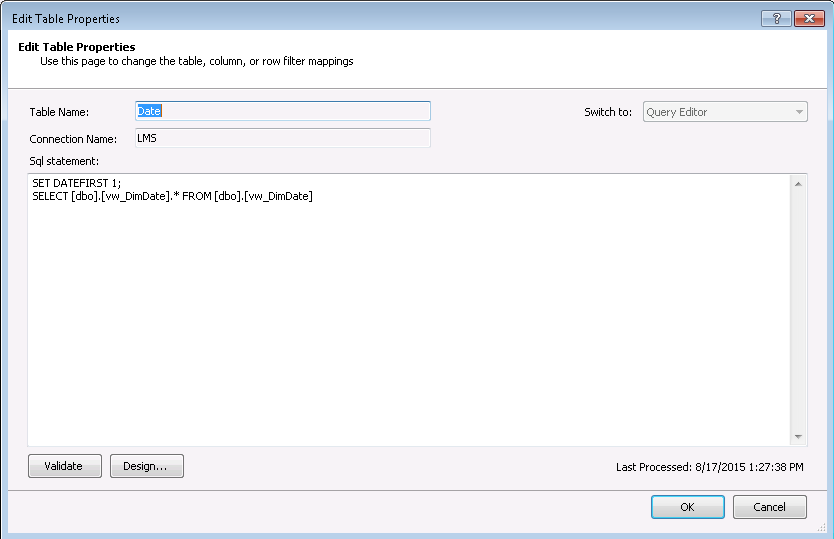
Scenario: You have a date dimension table and typical date-related columns, such as DayOfWeek, WeekEndDate, etc. In US, weeks start on Sunday and end on Saturday (ISO weeks on the other hand start on Monday and end on Sunday). You have a requirement to overwrite the week start and end days for a Power Pivot, Tabular, or MD model. For example, while the Date table…