The Dazzling R2 Report Manager

In this and future blogs I’ll cover the most important new features in the forthcoming release of Reporting Services which will be included in SQL Server 2008 R2 (code-named Kilimanjaro or KJ for short). Let’s start with the most obvious new feature: the all new Report Manager UI.

SharePoint-like UI

The moment you open Report Manager, you will notice that significant work was done to make the UI more intuitive, a la SharePoint.

081209_0051_TheDazzling1

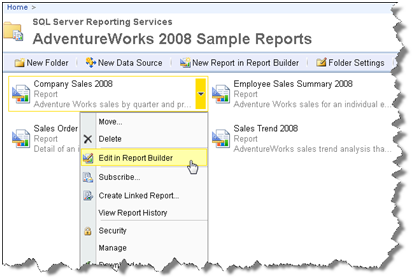
For example, similar to SharePoint, a drop-down context menu pops up when you hover on a report item that lets you quickly access relevant tasks.

Simplified UI

The management pages also received facelift. Microsoft has reduced the number of buttons and changed the tab styling so you are sure which tab is selected.

081209_0051_TheDazzling2

Although seemingly minor, I am sure you’d love the new look and feel. For example, I like the fact that I don’t have run a report or switch to Details mode just to get to the report properties.

Report Builder 3.0 ClickOnce

Another welcome enhancement is that opening a report in Report Builder, launches Report Builder 3.0 (more on it in another post) by default. Report Builder 1.0 is still installed but it’s not the default reporting client. You see the writing on the wall. Report Builder 1.0 days are counted and you better embrace the future.

AJAX Report Viewer

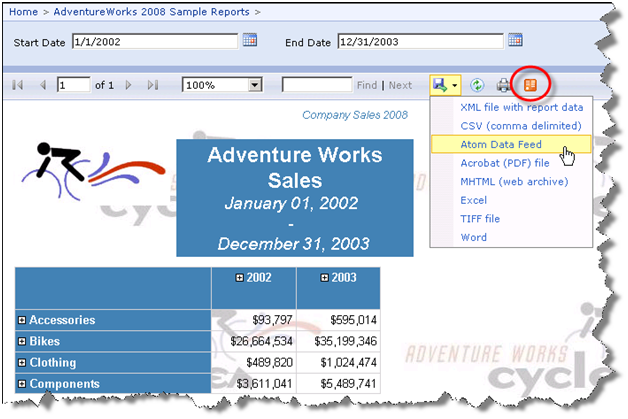
Another major enhancement is the debut of an AJAX-enabled ReportViewer control (developers will get the Visual Studio counterpart in Beta 2 of Visual Studio 2010). The control eliminates visible page reposts when interactive actions, such as drilldown, are initiated. The page fades out but it stays in place and a spinny lets the user know that an interactive action is taking place.

081209_0051_TheDazzling3

All in all, end users and administrators will enjoy the new Report Manager. You won’t have to switch to SharePoint integration mode just to get a SharePoint-like UI.

New Reporting Services Features in SQL Server 2008 R2 CTP2

It turned out that for time being the CTP2 of SQL Server 2008 R2 which I announced yesterday is available for TAP participants only. It will be publicly available on Wednesday. Meanwhile, Robert Bruckner listed the new Reporting Services features which got implemented in CTP2. The biggy is the new map region that lets you visualize geospatial and geometry data.

In my first book I had a sample that demonstrated how to export a report as a data feed. Well, in R2 this will be natively supported. Reports as data feeds, anyone? Visual Studio 2010 Beta 2 will include an AJAX Report Viewer. I would hope for a Silverlight version but one step at a time.

Again, post your KJ-related question to the Reporting Services forum.

SQL Server 2008 R2 CTP Available

Microsoft just pushed CTP2 of SQL Server 2008 R2 build #1092.20 (code-named Kilimanjaro).

SQL Server R2 Forums Available

The SQL Server R2 (Kilimanjaro) discussion forums went live today. Your humble correspondent is the moderator of the Reporting Services forum. SQL Server R2 CTP 2 should be out on connect.microsoft.com shortly. Looking forward to your feedback!

SharePoint Integrated with Reporting Services on Windows Vista

So, how’s this not cool? Running SharePoint integrated with Reporting Services on Windows Vista! I’ve always had a grudge with SharePoint that it doesn’t run on a desktop OS. This forces you to install Windows Server or use a virtual image, both options far from ideal. When I went to TechEd I blurted by disappointment to a couple of SharePoint gurus who clued me in (this is why we go to conferences, right, to learn the latest hacks) but I didn’t have time to try it … until today.

The solution is to use the Bamboo’s workaround (OK, an ingenious hack) but it works like a charm. What about Windows 7 which has recently RTM’ed? Bamboo took care of that as well. I hope Microsoft will take a note and finally support officially SharePoint on a desktop OS. If SQL Server can scale down all the way to mobile devices, so should SharePoint.

Bamboo made my day today!

080709_2315_SharePointI1


Nevron Charting for Reporting Services

Reporting Services charting not enough? Nevron Software has released a Nevron Charting for Reporting Services which I haven’t personally tested yet. According to the vendor, here are the major features where Nevron excels in comparison with Reporting Services charting:

– Speed – Nevron Chart for SSRS is the fastest rendering chart inside Reporting Services – in both 2D and 3D modes.

– 3D Charting – Nevron Chart for Reporting Services has the best layout in 3D and the most advanced feature set in 3D – including: 11 predefined lighting modes, ability to specify element materials (control the way in which elements reflect light), largest charting types set in 3D, biggest set of shapes in 3D (applicable to pies, bars, markers, areas etc.).

– 2D Charting – Nevron Chart for Reporting Services is the only chart for Reporting Services to provide Adobe Photoshop like image filter effects, which are applicable to all chart elements – these include bevel, emboss, lighting filters etc. When it comes to shadows it is the only chart for Reporting Services which has soft shadows (based on Gaussian and Radial blur image filters).

– 2D/3D Consistency – Nevron Chart for Reporting Services is consistent in 2D/3D modes. For example you can map gradients, textures to elements in both 2D and 3D. Colors specified in 2D are inherited by materials in 3D. You can mix 2D and 3D chart areas in a single chart control.

– Visual Effects – Nevron Chart for SSRS introduces numerous Lighting Models; Orthogonal Projection with Depth Offset (perfect for creating 2D half imitation charts); Soft Shadows based on image filters; Blur, Glow, Lighting, Bevel and Emboss image filters.

– Numerous XY and XYZ scatters – Nevron Chart for SSRS includes the industry leading support for XY and XYZ scatters inside Reporting Services.

– XML Formatted Texts – Nevron Chart for Reporting Services supports XML Formatted Texts. This feature is applicable to all elements which display text. It allows you to mix fonts, mix bold, italic underline formatting and many other advanced features like different fill styles, shadows, image filters etc. – all inside a single label, title etc. XML formatted texts use a format similar to HTML, but with many more advanced options.

– Multithreaded UI – The user interface in design time is multithreaded. This allows for very quick editing of the component, regardless of the preview complexity

– Save/Load Templates (available in Vol.2).

– Ability to inject custom code and to author the generated chars programmatically (code editor) (available in Vol.2).

Unique charting types:

– Surface Chart Series (Grid, Mesh and Triangulated).

– XYZ Scatter Series (Bar, Line, Point, Bubble, Float Bar).

– Financial charting types Renko, Kagi, Three Line Break, Point and Figure (available in Vol.2).

Major Chart Axis Features:

– Multiple X and Y Axes.

– Axes can be docked or crossed.

– Many scale options including support for Categorical, Hierarchical, Logarithmic, Numeric, Date/Time and Time Line scales.

– Control over the range and appearance axes.

– Scale sections

080109_1500_NevronChart1

Nevron is also working on SharePoint charting which will combine their charting technology with the new Nevron Pivot Data Aggregation engine.

Applied Reporting Services 2008 Online Training Class with Teo Lachev

Some of you shared with us your frustration with training budgets cut in half. Many of you couldn’t attend industry conferences this year. Many of you asked how we can help.

We are excited to offer online Business Intelligence classes – no travel, no hotel expenses, just 100% content delivered right to your desktop!

Our first class is Applied Reporting Services 2008. This three-day intensive event teaches you the knowledge and skills you need to master Reporting Services to its fullest.

072809_2347_AppliedRepo1 Applied Reporting Services 2008 Online Training Class
with Teo Lachev

Date: August 31 – September 2, 2009
Time: Noon – 4 pm EDT; 9 am – 1 pm PDT
12 training hours total for only $799!

072809_2347_AppliedRepo2

Attend this class for only $799 and get a free paper copy of the book Applied Microsoft SQL Server 2008 Reporting Services by Teo Lachev!

For more information or to register click here!

Cumulative Update 3 for SQL Server 2008 Service Pack 1

Microsoft released today a Cumulative Update 3 for SQL Server 2008 Service Pack 1. Among other things it fixes the Report Builder 2.0 ClickOnce deployment issue on x64 which I reported here.

Excel Page Numbering Issue

An issue was reported about page numbering and exporting reports to Excel with Reporting Services 2008. Specifically, if the page header or footer uses a placeholder for the page number, when exported and previewed in Excel, the report will show Page 1 on all pages.

Page [&PageNumber] of [&TotalPages]

While waiting for Microsoft to fix this, use an expression that concatenates the PageNumber member of the Globals collection.

= “Page” & Globals!PageNumber & ” of “ & Globals!TotalPages

To enter the expression, select the textbox item, right-click and choose Expression.

Google – The Best Thing that Ever Happened to Microsoft

On a different subject, you’ve probably heard the news: Google will release an operating system called Google Chrome OS which will challenge Windows and instill fear into the Microsoft camp. To the contrary, I think Google is the best thing that ever happened to Microsoft. How come?

I remember reading somewhere that after the perestroika, Mikhail Gorbachev had supposedly told Ronald Reagan “we’ll now do the worst thing to you (USA); we’ll leave you without enemy”. Perhaps, too extreme but paraphrased to business, completion is a good thing. When challenged, good companies become better, products improved and consumers benefit. So, I hope Google will continue expanding their ambitions. Similarly, I hope Microsoft gives Google a run for its money by competing relentlessly to increase their share of the search market. I’d personally love to see business intelligence features added to the search results. Why not, the first two letter s of bing are BI, right? How come I can’t even sort the search results by date to see the most recent matches on top? A chart showing the popularity of the search item over time? People who searched for X searched also for Y?

It will be interesting to see how this mega competition will evolve in time. As Chinese say “may you live in interesting times”.