• Flavors of Self-service BI

    September 21, 2013 / No Comments »

    My Fall newsletter entitled "Why a Semantic Layer?" is out and it will be e-mailed to subscribers on Monday. The reason why I wrote is to bring the focus back on organizational BI. Based on my experience, decision are makers are confused about what their company's BI strategy and roadmap should be. I've asked a BI manager recently if he knows that a semantic layer could be a true self-service BI enabler and he said he didn't know. After talking to some well-known BI vendors and listening to their "pure" self-service mantra, the focus was shifted from a comprehensive BI architecture that truly addresses the company needs to selecting a tool that has the most visualization fluff. In general, there are two self-service BI paths your organization can take: Semantic layer + ad hoc reporting – If your organization decides to invest in implementing a comprehensive organizational BI framework (see...

  • Announcing Prologika Validator

    September 15, 2013 / 2 Comments »

    Data is your biggest asset and today's currency but the data can be messy. You know it and we've seen it – many times. The messier the data, the bigger the headache. At Prologika, we believe that data quality issues should be addressed as early as possible and the validation process should start with the source systems. You need a solution to detect data entry issues without ETL, custom validation code, and exhaustively hard-coded rules. This is why I'm excited to announce today the availability of Prologika Validator! Available as a cloud service and on-premises offering, Prologika Validator uses predictive analytics to find data anomalies in order to help you improve data quality. It analyzes historical data and discovers common data patterns and relationships. When the user attempts to save a data entry that is outside the norm, Prologika Validator can detect the outlier. Then, the source system can notify...

  • Integrating Power View with PerformancePoint

    September 15, 2013 / No Comments »

    Integrating Power View with PerformancePoint

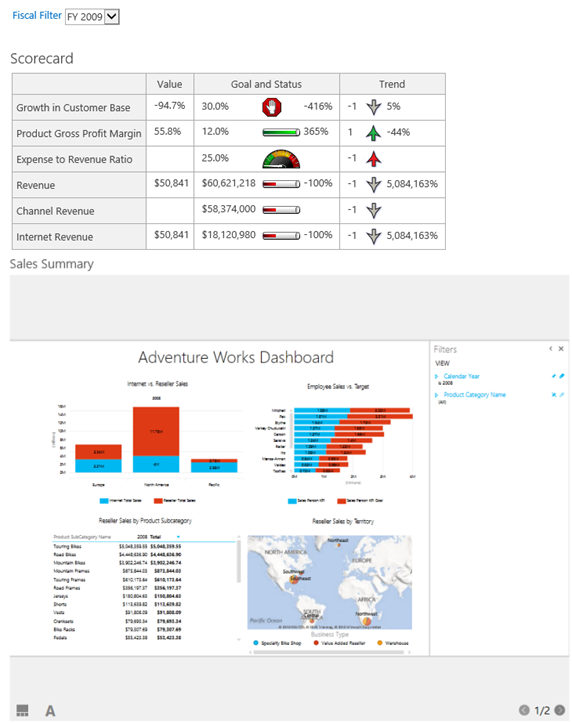
    With the rising popularity of Power View, you may need to integrate it with PerformancePoint to jazz up your dashboards and make them more interactive. Take a look at the following, admittedly unpolished, dashboard which combines a PerformancePoint scorecard and Power View report. What's interesting is that the Power View report is synchronized with the dashboard filter. For example, when the user changes the filter to 2009, the Power View report filters on the same year. Starting with SQL Server 2012 SP1 CU4, Power View supports passing URL parameters using the syntax rf=[Table].[Field] eq Value. In this case I use the following Power View URL: http://<site>/_layouts/15/ReportServer/AdHocReportDesigner.aspx?RelativeReportUrl=/PowerPivot Gallery/Adventure Works Dashboard.rdlx&ViewMode=Presentation&PreviewMode=True&PreviewBar=False&[Date].[Calendar Year] eq 2009 As you would quickly discover, the Power View customization is rather basic. The only operator supported for now is the equal operator (eq) and multi-valued parameters are not supported. The PerformancePoint integration is achieved by using the Web...

  • Power BI (Part 2 – The Data Management Gateway)

    September 10, 2013 / No Comments »

    Power BI (Part 2 – The Data Management Gateway)

    In my previous blog on the Power BI subject, I've introduced you to Power BI. In this blog, we'll take a look at the Data Management Gateway and how to set up data sources to refresh on-premise data. I'll be quick to point out that the actual data refresh is not in the preview yet. The Data Management Gateway is implemented as a Windows service which you can download and install on premises. It has two main features: Enable cloud access for on-premises data sources within your organization Expose data from on-premises data sources as OData feeds that can be consumed by using Power Query. You configure the gateway and data sources from the Admin->Power BI section of the Office 365 portal. This starts a simple wizard that walks you through the steps to install, configure, and test the data management gateway. You can set up multiple gateways if needed,...

  • Web API CORS Adventures

    September 10, 2013 / No Comments »

    Web API CORS Adventures

    I've been doing some work with ASP.NET Web API and I'm setting a demo service in the cloud (more on this in a future post). The service could be potentially accessed by any user. For demo purposes, I wanted to show how jQuery script in a web page can invoke the service. Of course, this requires a cross-domain Javascript call. If you have experience with web services programming, you might recall that a few years ago this scenario was notoriously difficult to implement because the browsers would just drop the call. However, with the recent interest in cloud deployments, things are getting much easier although traps await you. I settled on ASP.NET Web API because of its invocation simplicity and gaining popularity. If you are new to Web API, check the Your First Web API tutorial. To execute safely, Javascript cross-domain calls need to adhere to the Cross-origin resource sharing...

  • Power BI (Part 1 – Getting Started)

    August 31, 2013 / No Comments »

    Power BI (Part 1 – Getting Started)

    Microsoft BI has been criticized about its complexity and price because it requires SharePoint Server Enterprise for deploying Power Pivot models and dashboards. Microsoft introduced Office 365 (E3 or E4 plan required) and SharePoint Online (Plan 2 required) to mitigate such concerns and allow you to host Power Pivot and Power View in the cloud. Power BI is the next step in the Microsoft BI cloud strategy. As I explained in a previous blog and in the SQL Server Team blog, Power BI is essentially a cloud combo of all the self-service "power" tools (Power Pivot, Power View, Power Query, and Power Map) available on a subscription basis and running on Microsoft Azure, precluding SharePoint on-premises installation and licensing. Microsoft has started inviting participants subscribed to the Power BI for Office 365 Preview to test the prerelease version of Power BI. During the Worldwide Partner Conference, Amir Netz, a Technical Fellow at Microsoft,...

  • DQS Error after CU Upgrade

    August 29, 2013 / No Comments »

    DQS Error after CU Upgrade

    I installed SQL Server 2012 SP1 CU5 and I got greeted with the following error while opening Data Quality Services DqsInstaller.exe can be found by default in the C:\Program Files\Microsoft SQL Server\MSSQL11.MSSQLSERVER\MSSQL\Binn folder. However, running the dqsinstaller-upgrade didn't fix the issue. To fix it, I had to recompile the .NET assemblies by running dqsinstaller-UpgradeDlls. BTW, CU4 is still marked as in research by the DQS team and CU5 is not even on the list.

  • Does Self-service BI Make Sense?

    August 29, 2013 / No Comments »

    Does Self-service BI Make Sense?

    Besides data messiness (in direct proportion with the company size), another common data-related challenge that every organization nowadays is trying to tackle is how applicable self-service BI is to their business and to what extent it should be used. The tools are here and they are readily available. For example, given that Power Pivot is now natively integrated with Excel 2013, your power users will find a way to get inspired even if you don't roll out a formal self-service BI strategy. When self-service BI make sense Having consulted with and trained many organizations ranging from small companies to Fortune 100 behemoths, I think that the following two scenarios appears as good reasons for self-service BI: Organizational BI is not an option. For example, a small company might not have resources to roll out an organizational BI solution, such as a management dashboard, and the data doesn't require extensive transformation....

  • Speaking at SQL Server Innovators Guild

    August 27, 2013 / No Comments »

    I'll be speaking at the SQL Server Innovators Guild group in Greenville, SC on September 3rd. If you happen to be in the area, please join us to learn best practices for implementing an enterprise BI solution. Please confirm attendance at https://ssig201309.eventbrite.com/  

  • Semantic Layer Flavors

    August 26, 2013 / No Comments »

    Semantics relates to discovering the meaning of the message behind the words. In the context of data and BI, semantics represents the user's perspective of data: how the end user views the data to derive knowledge from it. As a modeler, your job is to translate the machine-friendly database structures and terminology into a user-friendly semantic layer that describes the business problems to be solved and centralizes business calculations. Different vendors have different ideology and implementations of semantic layers. Some, such as Oracle and MicroStrategy, implement the semantic layer as a thin, pass-through layer whose main goal is to centralize access to data sources, metadata and business calculations in a single place. A Fortune 100 company that had a major investment in Oracle engaged us to recommend a solution for complementing their OBIEE semantic layer with user-friendly reporting tool that would allow end users to create ad hoc transactional reports...

Training

We offer onsite and online Business Intelligence classes! Contact us about in-person training for groups of five or more students.
For more information or to register click here!

Books

Learn Power BI at your own pace with our latest book Applied Microsoft Power BI. Targeting information workers, data analysts, pros, and developers, It is designed as an easy-to-follow guide for learning how to implement BI solutions spanning the entire personal-team-organizational BI spectrum.

Syndication