-
Power BI Expands Microsoft Cloud Self-service BI
July 9, 2013 / No Comments »
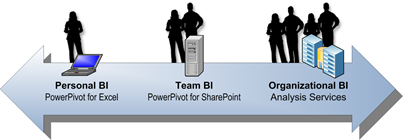
Expanding its Office 365 feature set, Microsoft introduced Power BI. Power BI is an umbrella name of the following BI offerings in the cloud: Power Pivot, PowerView, Power Query (previously known as Data Explorer), and Power Map (previously known as GeoFlow), plus more. Microsoft demonstrated Power BI at WPC yesterday (scroll to the 30th minute marker to see the Amir's heart attack-provoking demo) or see the YouTube extract. The "more" is the intriguing part to me: Data Management Gateway – not sure how exactly this will work but it will provide some sort of connectivity to on-premise data so you can schedule PowerPivot data refreshes between the Microsoft cloud and your corporate data. Expect your ISP speed provider speed to be a limiting factor here so don't hope for fast refreshes of millions of rows. BI Sites – a dedicated SharePoint site that will support finding and collaborating on BI...
-
PerformancePoint Display Condition Not Working
July 3, 2013 / No Comments »
Issue: A client reports an issue with our PerformancePoint dashboard where the clicking a KPI in the scorecard doesn't show the supporting analytical grid. Normally, when the user clicks a row in the Operational Scorecard (see the image below), the SharePoint connectable architecture triggers an update of the Operational Detail Report Months analytical report that shows more details about the selected KPI. Workaround: Finding the cause was tricky. To make things even trickier, the SQL Server Profiler would show "Query (1, 36) Parser: The syntax for ',' is incorrect." error so you would believe that there is something wrong with the MDX queries. This turned out to be an "innocent" error if there is such a thing. The reason for the issue with the report refresh not working was actually a PerformancePoint Display Condition bug presumably introduced by a recent SharePoint upgrade (more than likely the April CU). The...
-
Microsoft SQL Server 2014 Community Technology Preview 1 (CTP1) Released
June 26, 2013 / No Comments »
Microsoft released the Community Technology Preview 1 (CTP1) of SQL Server 2014. As I mentioned in my previous post, the accompanying Product Guide should get you started with the new features.
-
Microsoft SQL Server 2014 CTP1 Product Guide Released
June 23, 2013 / No Comments »
In anticipation of SQL Server 2014 CTP1, which should be out soon, Microsoft released Microsoft SQL Server 2014 CTP1 Product Guide – a collection of white papers, slides, and other resources that discuss the new features to help you evaluate SQL Server 2014. "The SQL Server 2014 CTP1 Product Guide is now officially available to customers and partners. The guide is intended to help you get the most value out of Microsoft SQL Server 2014 CTP1."
-
Atlanta BI Group Meeting on Monday
June 23, 2013 / No Comments »
The Atlanta Microsoft BI Group will have a meeting tomorrow, June 24th. Main Presentation: Developing a Custom Task in SSIS 2012 Level: Intermediate Date: June 24th Time 6:30 – 8:30 PM ET Place: South Terraces Building (Auditorium Room) 115 Perimeter Center Place Atlanta, GA 30346 Overview: Integration Services uses tasks to perform units of work in support of the extraction, transformation, and loading of data. Integration Services includes a variety of tasks that perform the most frequently used actions, from executing an SQL statement to downloading a file from an FTP site. If the included tasks and supported actions do not completely meet your requirements, you can create a custom task. In this session we will demonstrate to you how to create custom SSIS tasks. Speaker: Aneel Ismaily was born and raised in Karachi, Pakistan. He moved to the United States at the age of 18. Since then he has...
-
Big Data Twitter Demo
June 20, 2013 / No Comments »
So, you have (or heard of) classic BI, self-service BI, Big Data BI, descriptive BI, predictive BI or even prescriptive BI, but do you have real-time BI? I've been doing quite bit of research and work in that area lately. As you could imagine, real-time BI requires a different architecture that is capable of processing streams of data (sometimes thousands of events) in real time. The Microsoft premium technology for Complex Event Processing (CEP) is StreamInsight (requires a SQL Server license). Microsoft has also a lightweight, open-source .NET library called RX which does event streaming but it doesn't have many of the StreamInsight features, such as windowing. To demonstrate how classic BI, Big Data, and real-time BI can play together, Microsoft put together a great sample – Big Data Twitter Demo. The demo allows you to subscribe to one or more Twitter topics of interest. It uses StreamInsight to listen...
-
SSAS Instance Not Starting
June 17, 2013 / No Comments »
Issue: A customer reports an issue with a production SSAS Tabular instance not starting after reboot. The server has also an SSAS Multidimensional instance which starts just fine. There are no interesting messages in the Event Viewer. Resolution: During installation, the customer has configured the LogDir of both instances to point to the same physical folder. However, the Flight Recorder can't start on the Tabular instance because the log file is already locked by the Multidimensional instance. The solution to this horrible problem was to reconfigure the LogDir setting of the Tabular instance (in SSMS, connect to the SSAS instance, right-click the server, and click Properties) to a separate folder. Moral: Always separate DataDir, LogDir and TempDir folders so each instance has its own set of folders.
-
Smart Date Keys Got Smarter
June 12, 2013 / 3 Comments »
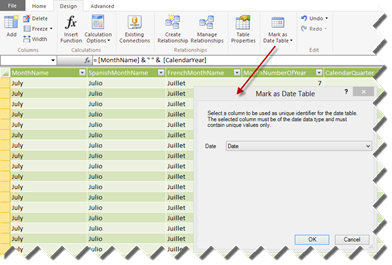
Using "smart" date surrogate integer keys in the format YYYYMMDD is a dimensional modeling best practice and venerable design technique. To make them smarter though, consider using the Date data type which was introduced in SQL Server 2008. The Date data type stores the date without the time component which is exactly what you need anyway. Using the Date data type instead of integers have the following benefits: The Date data type allows you to perform date arithmetic easier as the date semantics is preserved, so you can use date functions, such as YEAR and MONTH when querying the table or partitioning a cube. Self-service BI users can conveniently filter dates on import. For example, PowerPivot enables relative date filtering, such as Last Month, when the user filters a date column. The Date data type has a storage of three bytes as opposed to four bytes for integers. The only...
-
What’s New for BI in SQL Server 2014?
June 5, 2013 / No Comments »
The short answer is nothing much, which is probably good so we can catch our breath after the SQL Server 2012 and Office 2013 waves. As you've probably heard, Microsoft announced SQL Server 2014 at TechEd. SQL Server 2014 will be a database-focused release with no major changes to the BI "pillars" (SSAS, SSRS, SSIS) and PowerPivot, except perhaps bug fixes. However, you might find some other new additions and enhancements interesting depending on your specific projects: In-Memory Enhancements This should come to no surprise due to the continuing investment in memory backed-up storage. New In-Memory storage – Code-named Hekaton, this new in-memory storage option will allow you to host SQL Server tables in memory in order to improve I/O. While predominantly targeting OLTP applications, I believe Hekaton will be useful for narrow-case BI scenarios as well, such as for improving the performance of the ETL processes by using in-memory...
-
Configuring Power View Connectivity to Multidimensional
June 2, 2013 / No Comments »
As I mentioned in my previous blog, CU4 for SQL Server 2012 SP1 includes the release bits of Power View Connectivity for Multidimensional (DAXMD). It allows you to create Power View reports from Multidimensional cubes. In this blog, I'll show you how to configure this feature. APPLYING CU4 You need to upgrade both Reporting Services in SharePoint mode and the Analysis Services instance that hosts your cubes. If SharePoint and SSAS are on the same machine, as in the screenshot below, you need to run the CU4 setup program only once. In this case, I decided to accept the default choice and upgrade all instances on the box although the required ones are highlighted. With distributed deployments, you need to install CU4 on the SharePoint server and on the SSAS server. CREATING DATA SOURCE Once CU4 is applied, you're ready to set up a data connection in a SharePoint library...

We offer onsite and online Business Intelligence classes! Contact us about in-person training for groups of five or more students.