-
Cube vs. VertiPaq Query Performance
July 28, 2011 / No Comments »
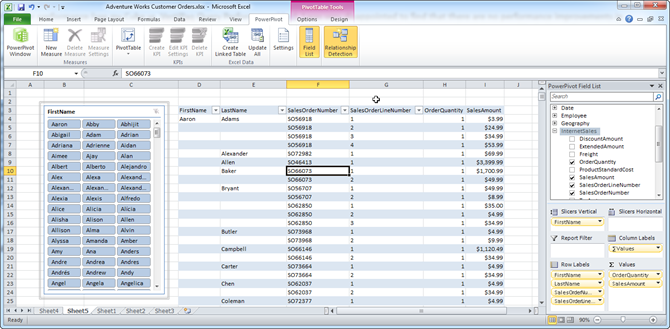
This is a big topic and frankly it's too ambitious on my part to tackle it. Assuming equivalent multidimensional (BISM Multidimensional) and tabular (BISM Tabular) models, I was curious how a multidimensional cube fares against VertiPaq in terms of performance. To be fair to VertiPaq, I decided to use native DAX queries. As you've probably heard, BISM Tabular in SQL Denali will include a variant of DAX to query tabular models deployed to SharePoint and SSAS running in VertiPaq mode. Chris Webb has a good writeup about DAX queries here. The DAX EVALUATE construct allows external clients to query tabular models using native DAX syntax instead of MDX. Since BISM Tabular speaks DAX, DAX queries are likely to be more efficient and give you better performance when querying tabular models. At this point, only Crescent generates native DAX queries. The DAX query syntax is: DEFINE MEASURE Table1 [measure1] = <DAX_Expression>...
-
The Load Balancing Act
July 12, 2011 / No Comments »
I had some fun lately setting up a Reporting Services farm of two SSRS 2008 R2 nodes and a hardware load balancer. We followed the steps in BOL only to find out that the report server will return sporadic empty pages or MAC viewstate validation errors although the machine key was identical on both servers. We fixed the issues by: Enabling sticky sessions in the load balancer (not documented). Configuring the ReportServerURL setting (BOL says "Do not modify ReportServerUrl"). Despite what BOL says or doesn't say, it appears that sticky sessions required with R2 probably due to the AJAX-based ReportViewer. Here is an example configuration that demonstrates the three settings you need to change in the rsreportserver.config: <UrlRoot>http://atltstssrsibo/reportserver</UrlRoot> <Hostname>atltstssrsibo</Hostname> <ReportServerUrl>http://atltstbir02ibo/reportserver</ReportServerUrl> On each node, set up ReportServerURL to point to the node itself. In this scenario, atltstssrsibo is the load balancer name and atltstbir02ibo is the node server name.
-
PowerPivot and SQL Server Denali CTP3 Release Notes Available
July 8, 2011 / No Comments »
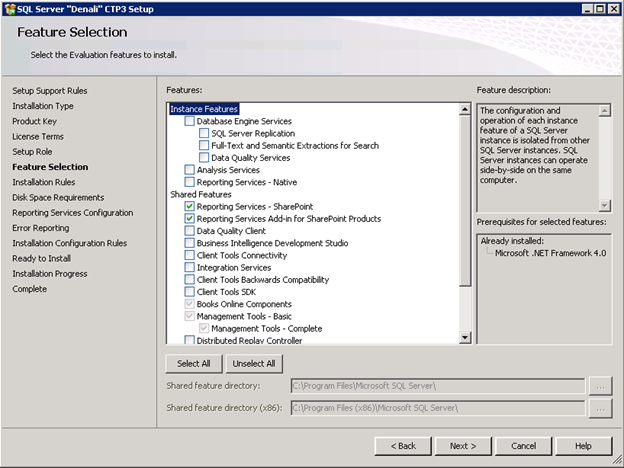
Microsoft published release notes for PowerPivot and SQL Server Denali Community Technology Preview (CTP) 3 Release Notes. This means that the CTP3 release is imminent although the download link is not live yet. The release notes cover the new features pretty well. UPDATE 7/12/2011 CTP3 got released today.
-
Applied Analysis Services 2008 and PowerPivot Onsite Class
July 3, 2011 / No Comments »
I am partnering with Data Education to deliver an intensive five-day onsite class on Analysis Services and PowerPivot. The class will be held September 19-23 at the Microsoft Technology Center in Boston. The class doesn't assume any experience with Analysis Services. We'll start from zero and build a multidimensional cube sharing along the way as many as best practices as possible. More information about the class and registration details is available here.
-
Using the IF Operator in Scope Assignments
July 3, 2011 / No Comments »
UDM scope assignments are incredible useful because they let you write to the cube space, such as to implement custom aggregation, allocations, currency conversion, data calculations, and so on. Unfortunately, scope assignments have limitations. One of them is that more complicated scope expressions result in "an arbitrary shape of the sets is not allowed in the current context" error. Recently, I tried to use a scope assignment to zero out a cube subspace that the end user shouldn't see and cannot be protected via dimension data security. I tried the following scope assignment (translated to Adventure Works): Scope ( Employee.Employees.Members - Exists([Employee].[Employees].Members, <another set>, "<Measure Group Name>"), <another attribute hierarchy> ); this = null; End Scope; This produces the above error caused by employee set expression and as far as I know there is nothing you can do to rewrite the scope expression to avoid the error. In a moment...
-
Atlanta BI Record Attendance Last Night
June 29, 2011 / No Comments »
We had a blast light night at Atlanta BI and ran out of space with a record attendance of some 60+ people. This is phenomenal given that we are amidst a vacationing season. Jonathan Lacefield from Daugherty gave us a great intro presentation of Analysis Services. Michael Clifford shows cool Integration Services tips. And, Beth Lenoir from Daugherty was kind to sponsor to event and arrange for some great food. Whether it was Jonathan's presentation, tips, or the food, the atmosphere was electrifying. Thanks to everybody for making last night a fantastic success!
-
Performance Considerations for Securing Parent-Child Dimensions
June 23, 2011 / No Comments »
Parent-child dimensions are a very useful feature of Analysis Services to model recursive hierarchies, such as an organizational hierarchy. Recently, I had to apply dimension data security to a parent-child dimension. The allowed set expression used the factless fact table approach (see my Protect UDM with Dimension Data Security article for more details), as follows (translated to the Adventure Works schema): IIF -- check if the user has full access (StrToMember("[User].[Login].&[" + Username +"]").Properties("FullDimensionAccess",TYPED)=True , [Employee].[Employees].[All], Generate ( Exists ([Employee].[ Employee].[ Employee].Members, StrToMember("[User].[Login].&[" + Username + "]"), "Bridge Employee Security") , {LinkMember (Employee.Employee.CurrentMember, Employee.Employees)} ) ) To avoid loading the factless fact table with all dimension members for users with full dimension access, the expression checks if the user is flagged as such. Since Analysis Services doesn't provide a way to ignore dimension data security from the allowed/denied set, the expression returns the hierarchy top member [Employee].[Employees].[All] and this is...
-
Dimension Data Security and Cube Script
May 31, 2011 / No Comments »
If you have worked with Analysis Services dimension data security for a while, you know that MDX allowed/denied set expressions can become rather complex. You might be tempted to externalize these expressions in the cube script for brevity or reusability reasons. For example, you might decide to add a calculated member that returns a list of allowed partners that the user is authorized to see over a factless fact table as follows: CREATE MEMBER CURRENTCUBE.[Measures].[PartnerSecurityFilter] AS "Exists([Partner].[Partner].[Partner].MEMBERS, StrToMember(""[User].[Login].&[" + Username + "]""), 'Bridge Partner Security'; Then, in the allowed set you might try reusing the member definition in the allowed set expression, such as: StrToSet([Measures].[PartnerSecurityFilter]) This sounds like a great idea but it doesn't work. Specifically, you will find that it works for the first member of the SSAS role that connects to the server but it doesn't work for any other members of the same role who connect to...
-
My TechEd 2011 Sessions Available Online
May 21, 2011 / No Comments »
All TechEd 2011 breakout sessions are available online on MSDN Channel9 website. Here the links to mine: Top 10 Reasons to Upgrade to Microsoft SQL Server 2008/R2 Reporting Services Can Your BI Solution Scale? Enjoy and vote!
-
Business Intelligence Semantic Model – TechEd Redux
May 20, 2011 / No Comments »
While I've been busy at TechEd talking to BI enthusiasts, professionals and wannabes and delivering sessions, the news is out about the new BI roadmap and BISM positioning. See: T.K. Anand blog T.K. Anand & Ashvini Sharma recorded session What's New in Microsoft SQL Server Code-Named "Denali" for SQL Server Analysis Services and PowerPivot"? Sean Boon, Carolyn Chao, and Sabrena McBride recorded session Abundantly "Crescent": Demos Galore Julie Strauss' recorded session The Next Generation Design Tools for Analysis Services And the feedback from the community insiders, including Chris Webb's Good News on the Future of Analysis Services blog, Marco Russo's Microsoft Updates its BI Roadmap blog, and Boyan Penev's SSAS to BISM – Recent Developments blog. So, I won't repeat what's been already said. Instead, I'll attempt to summarize my thoughts about the new BI developments and give you some take-home points to help you plan future BI work. I...

We offer onsite and online Business Intelligence classes! Contact us about in-person training for groups of five or more students.