-
Finding Kerberos in Forests
April 30, 2011 / No Comments »
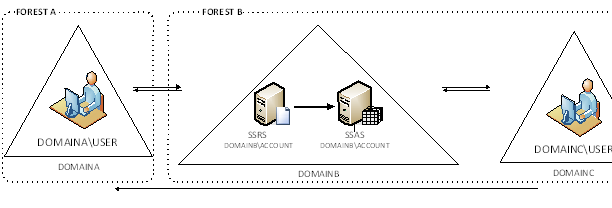
I've made a decision. My next book will be Applied Kerberos BI. Jokes aside, I've been doing a lot of security work lately to get Kerberos working for internal and external users. Here is my latest success story. In this case, the customer has two AD forests. The internal users are on a DOMAINA in FORESTA. The production servers are in DOMAINB. The external user accounts are in DOMAINC. Both DOMAINB and DOMAINC are in a separate forest. There is a bi-directional trust between DOMAINA and DOMAINB and between DOMAINB and DOMAINC. DOMAINC trusts DOMAINA. After registering SPNs, etc. we've found that Kerberos doesn't work. Or, to be more specific, it works partially. If a service account from DOMAINB is used to run SSRS and SSAS, the double hop (user-SSRS-SSAS) is successful for users on DOMAINC but not for DOMAINA users. And vice versa, if a DOMAINA service account is...
-
Analysis Services Refusing to Start
April 23, 2011 / No Comments »
I had a laptop which blue screened and shut down. Some files got corrupted and fixed by the CheckDisk. Apparently, something got whacked during the process because the Analysis Services would refuse to start with the following error: The service cannot be started: XML parsing failed at line 1, column 40961: Illegal xml character. Unfortunately, Analysis Services doesn't support starting in recovery mode, such as SQL Server Database Engine. Usually, when you get a message like this, the error message tells you which object file, such as dimension, got corrupted. To fix, you would delete the database from C:\Program Files\Microsoft SQL Server\<SSAS Version>\OLAP\Data and reprocess the database or restore from backup. But in this case, the error message in the Windows Event Viewer didn't indicate any object. As it turned out the issue was a corrupted master.mvp file in the Data folder. The resolution path was: Copy the master.mvp file...
-
Data Driven Subscriptions and Row-level Security
March 28, 2011 / 2 Comments »
Scenario: A customer wants to have report row-level security and data-driven subscriptions. If you have used SSRS for a while, you will now the cornerstone of report row-level security is User!UserID which returns the user identity. But here is the catch – SSRS will refuse creating a data driven subscription if a report has an expression with User!UserID. Solution: How do we solve this horrible issue? A great hack is in order. We will disguise the User!UserID in an embedded function inside the report or in an external assembly so SSRS can't see it. (The reason why this function is named GetHashedUser although no hashing is in place will become obvious in a moment) Public Function GetHashedUser() as String return Report.User!UserID.ToLower() End Function Believe it or not, this lets the data-driven subscription going. But there is another catch. A data-driven subscription runs in unattended mode and you need to...
-
SSRS Query Performance Issues with Parameters
March 18, 2011 / No Comments »
I recall seeing "fast queries in SSMS but slow in SSRS" issues reported a few times in the public discussion list but I've always dismissed them as unrelated to SSRS. Alas, I happened to see one today when a report would take a very long time (7 min) to execute. As usual, the first stop was to take a look at the SSRS Execution Log which showed that all the time was spent in data retrieval. However, executing the report query in SSMS would take a few seconds. In this case, the report had a complex free-text T-SQL SELECT statement that referenced a single report parameter several times in the query. The workaround we found at the end was to declare a variable at the beginning of the query that referenced the parameter once, as follows: DECLARE @invoice_number as int SET @invoice_number = @inv_parameter Then, we referenced the variable...
-
Presenting at TechEd North America 2011
March 16, 2011 / No Comments »
I'll be presenting two breakout sessions at TechEd North America 2011 which will be held this year in my home city of Atlanta. The tentative titles of the sessions are: DBI205: Reporting Services Are We There Yet? – I'll discuss top requested SSRS features, give solutions and workarounds, share more tips with lots of demos, and present reasons to upgrade to SSRS 2008 or R2. DBI330: Can Your BI Solution Scale? - Present practical load testing methodology, show how to load test SSRS and SSAS, analyze results and performance bottlenecks. The sessions are scheduled back to back on Monday, May 16th, from 3 PM to 6 PM. Please join me if you plan to attend TechEd. See ya'll in Hotlanta!
-
Applied PowerPivot Online Training Class
March 6, 2011 / No Comments »
Self-service BI is on the rise. Join me this month for the PowerPivot online class. Learn how self-service BI can help your users build their own BI solutions with minimum involvement from IT. No travel, no hotel expenses, just 100% content delivered right to your desktop! Our intensive online classes teach you the skills to master Microsoft BI to its fullest. Use the opportunity to ask questions and learn best practices. Applied Business Intelligence Training in March NEW! Applied PowerPivot Online Training Class - Only $599 Date: March 29 – March 30, 2010 Time: Noon – 4:00 pm EDT; 9 am – 1:00 pm PDT 8 hours for only $599 You can request custom dates for groups of five or more students. For more information or to register click here!
-
Dundas Analytical Dashboard and Analysis Services
March 3, 2011 / No Comments »
In my Dundas Dashboard and MS PerformancePoint Comparison article, I introduced you to Dundas Dashboard and explained how you can use it to rapidly assemble compelling performance dashboards. With Dundas Dashboard, you can also build analytical dashboards to let users create interactive, web-based reports from OLAP databases, such as Microsoft Analysis Services, as I will show you in this article.
-
Drillthroughs Going Wild
March 1, 2011 / No Comments »
Got bit by an unfortunate bug which has been around for four years since it got reported on connect.microsoft.com with Analysis Services OLAP drillthrough. It caused me almost a day to figure out. Drillthrough actions (both default and explicit drillthrough) won't return any rows on some cells or would return repeating rows for other cells. As I posted on connect the bug springs to action when: The measure group has IgnoreUnrelatedDimensions=False. Bryan Smith provides a great coverage of IgnoreUnrelatedDimensions in this blog. A dimension attribute has IsAggregatable set to False. Setting the dimension default member either using the DefaultMember attribute property or via script doesn't make a difference. In my case, I had a Time Calculations dimension which was a free floater and it had IsAggregatable=False. Excluding the unrelated dimensions from the drillthrough action doesn't make a difference either. The only workaround I've found is to set IgnoreUnrelatedDimensions back to...
-
Unaggregatable M2M Dimensions
January 31, 2011 / No Comments »
I was called upon to troubleshoot an issue with creating an aggregation design for an existing cube. The Design Aggregation Wizard would refuse to design aggregations with the following cryptic message: Errors in the aggregation designer. The 'Perspective' dimension has no attribute for the aggregation design. The server cannot design aggregations when this attribute is missing. Upon a closer look, it turned out the Perspective dimension joins the measure group via a many-to-many relationship. More importantly, its IsAggregatable property was set to False to suppress the All member because it would be meaningless to aggregate data across the members in this particular dimension. Instead, the cube script would set the dimension default member with an ALTER statement. How do we solve this horrible problem? Here is my solution: Set IsAggregatable property of the dimension attribute back to True. Add a scope assignment to the cube script to nuke the All...
-
Estimating Data Compression
January 26, 2011 / No Comments »
Now that the age of in-memory databases has dawned on us, I've been experimenting with different aspects of VertiPaq and I find its technology fascinating. It's safe to say that VertiPaq will propel Microsoft Business Intelligence for years to come with all of its three flavors: PowerPivot (self-service BI), Business Intelligence Semantic Model (corporate BI), and data warehousing (column-based stored indexes). Unlike Analysis Services MOLAP, which compresses data by rows, VertiPaq compresses data by columns. Column-based compression fits business intelligence like a glove because data is typically analyzed by columns. And, the lower the data cardinality (that is the more repeating values a column has), the higher its compression rate will be. Since most columns used for analytics fit this category, you could expect 10-15 times data compression. Consequently, a half terabyte database could potentially fit into 80 GB of memory. Notice that I account for more memory because when...

We offer onsite and online Business Intelligence classes! Contact us about in-person training for groups of five or more students.