-
PowerPivot Stories from the Trenches
January 15, 2011 / No Comments »
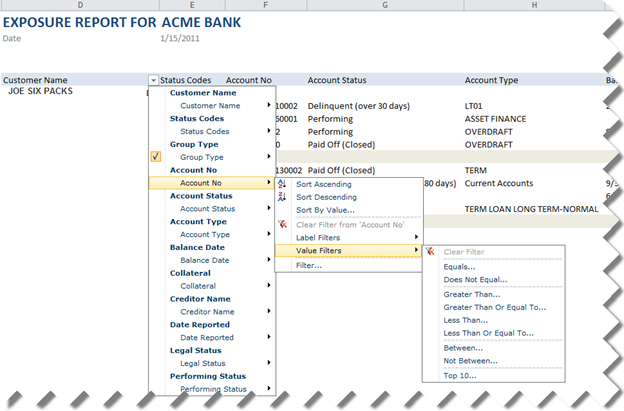
Now that a snow blizzard has paralyzed Atlanta for a week, what a better way to start the new year than sharing a PowerPivot success story. A bank institution has approached Prologika to help them implement a solution to report the customer's credit history so the bank can evaluate the risk for granting the customer a loan. Their high-level initial requirements call for: Flexible searching and filtering to the let the bank user find a particular customer or search for the customer accounts both owned by the bank or externally reported from other banks. Flexible report layout that will let the bank user change the report layout by adding or removing fields. Ability to download the report locally to allow the bank user to run the report when there is no connectivity. Refreshing the credit history on a schedule. Initially, the bank was gravitating toward a home-grown solution that would...
-
PowerPivot Time Calculations
January 15, 2011 / No Comments »
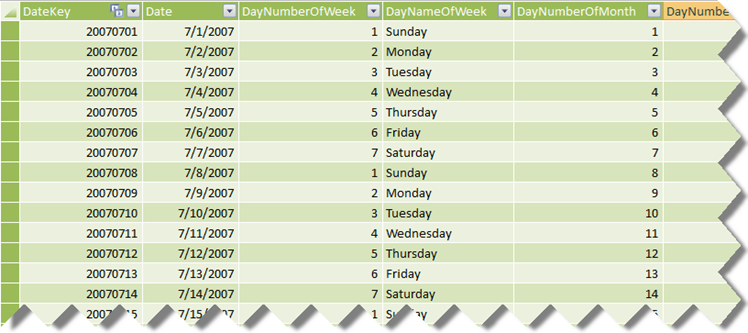
A recommended practice for implementing time calculations in PowerPivot is to have a Data table with a datetime column. Kasper de Jonge explains in more details in this blog. This approach will probably save effort when importing data from normalized schemas and won't require specifying additional arguments to the PowerPivot time functions. However, it will undoubtedly present an issue when importing data from a star schema. A dimensional modeling best practice is to have an integer key for a Data dimension table in the format YYYYMMDD and integer foreign keys in the fact tables. Luckily, you don't have to normalize data back to datetime when building a PowerPivot model on top of star schemas after the issue with the All filter Kasper reported a while back got fixed in PowerPivot RTM. Let's consider the AdventureWorksDW schema. Its DimDate table has an integer key (DateKey). Let's say you import this table...
-
Report Actions for Report Server in SharePoint Mode
December 12, 2010 / No Comments »
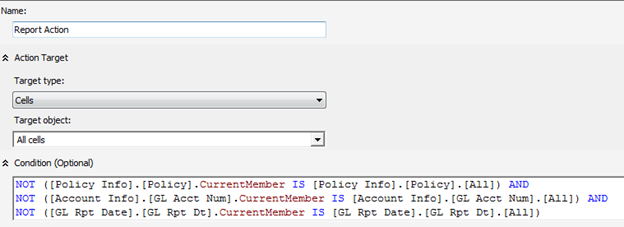
Report actions are an Analysis Services extensibility mechanism that lets end users run a Reporting Services report as they browse the cube. A customer reported that they have trouble setting up a Reporting Services action for a report server configured in a SharePoint integrated mode – a scenario which appears that wasn't tested properly by Microsoft. First, the customer wanted to pass multiple parameters to the report. This was achieved by setting up the report action Target Type to Cells and Target Object to All Cells. This setup allows the user to right-click any cell on the cube to initiate the action. What's more important is that an action-capable browser, such an Excel, will be able to collect the coordinates of all dimensions used in the browser, such as those added to the filter area, so you can pass them as parameters to the report. A condition is further specified...
-
Dundas Dashboard and PerformancePoint Comparison Review
December 8, 2010 / No Comments »
Digital dashboards, also known as enterprise dashboards or executive dashboards, are rapidly rising in popularity as the presentation layer for business intelligence. The chances are that you've been asked to implement a dashboard to let management quickly ascertain the status (or "health") of an organization via key business indicators (KPIs) and this task might seem daunting. This is where Dundas Dashboard can help. As a leader in data visualization solutions, Dundas has given us great products that power many business intelligence solutions, including Microsoft Reporting Services and .NET charting. Its latest offering, Dundas Dashboard 2.5, lets you implement compelling dashboards quickly and easily. Since my career focus has been Microsoft Business Intelligence, I was curious to evaluate the capabilities of Dundas Dashboard and compare them with Microsoft PerformancePoint 2010. Read the full review here.
-
Denali Forums
December 1, 2010 / No Comments »
Microsoft launched SQL Server 11 (Denali) pre-released forums and is eagerly awaiting your feedback. Judging by the number of BI-related forums, one can easily see that BI will be a big part of Denali with major enhancements across the entire BI stack. Of course, not many questions to ask if we don't have the bits yet to play with (CTP1 doesn't include the BI stuff) but still you can start probing Microsoft.
-
Book Review – Microsoft PowerPivot for Excel 2010
November 25, 2010 / No Comments »
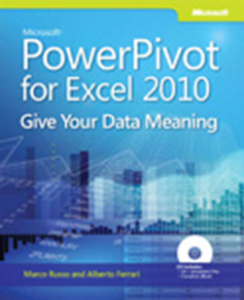
I dare to predict that in a few years after SQL 11 ships, there will be two kinds of BI professionals – those who know the Business Intelligence Semantic Model and those who will learn it soon. By the way, the same applies to SharePoint. What can you do to start on the path and prepare while waiting for BISM? Learn PowerPivot, of course, which is one of the three technologies that are powered by VertiPaq – the new column-oriented in-memory store. This is where the book PowerPivot for Excel 2010 can help. It's written by Marco Russo and Alberto Ferrari, whose names should be familiar for those of you who have been following Microsoft BI for a while. Both authors are respected experts who have contributed a lot to the community. Stationed in Italy, they run the SQLBI website and share their knowledge via their blog and publications. This...
-
Prologika Training Classes Dec 2010-Jan 2011
November 22, 2010 / No Comments »
Our online Microsoft BI classes for December 2010 and January 2011: Class Mentor Date Price Applied SSRS 2008 Teo Lachev 12/14-12/16 12:00-5:00 EDT $799 Register Applied SSAS 2008 Teo Lachev 1/11-1/13 12:00-5:00 EDT $799 Register Applied PowerPivot Teo Lachev 1/25-1/26 12:00-4:00 EDT $599 Register Visit our training page to register and more details.
-
VertiPaq Column Store
November 16, 2010 / No Comments »
In SQL 11, the VertiPaq column store that will power the new Business intelligence Semantic Model (BISM) will be delivered in three ways: 1. PowerPivot – in-process DLL with Excel 2010. 2. A second storage mode of Analysis Services that you will get by installing SSAS in VertiPaq mode. 3. A new column stored index in the SQL RDBMS. The third option picked up my interest. I wanted to know if a custom application will be able to take advantage of these indexes outside VertiPaq. For example, this could be useful for standard reports that query directly the database. It turns out that this will be possible. The following paper discusses columnstore in more details. In a nutshell, SQL 11 will run the VertiPaq engine in-process. Here are some highlights of the VertiPaq columnstore: You create an index on a table. You cannot update the table after the index is...
-
Business Intelligence Semantic Model – The Good, The Bad, and the Ugly
November 13, 2010 / No Comments »
UPDATE 11/14/2010 This blog probably will be the most updated blog I've ever written. I have to admit that my initial reaction to BISM was negative. For the most part, this was a result of my disappointment that Microsoft switched focus from UDM to BISM in Denali and my limited knowledge of the BISM vision. After SQL PASS, I exchanged plenty of e-mails and Microsoft was patient enough to address them and disclosed more details. Their answers helped me to "get it" and see the BISM big picture through more optimistic lenses. UPDATE 05/21/2011 Having heard the feedback from the community, Microsoft announced at TechEd 2011 that Crescent will support OLAP cubes as data sources. This warrants removing the Ugly part from this blog. After the WOW announcement at SQL PASS about PowerPivot going corporate under a new name, Business Intelligence Semantic Model (BISM), there were a lot of...
-
More Details about BISM (UDM 2.0)
November 11, 2010 / No Comments »
It looks like this year SQL PASS was the one to go. A must read blog from Chris Webb who apparently shares the same feelings and emotions about the seismic change in Analysis Services 11 as I do. A must read…

We offer onsite and online Business Intelligence classes! Contact us about in-person training for groups of five or more students.