• Importing SSAS KPIs in PerformancePoint

    September 7, 2010 / No Comments »

    Importing SSAS KPIs in PerformancePoint

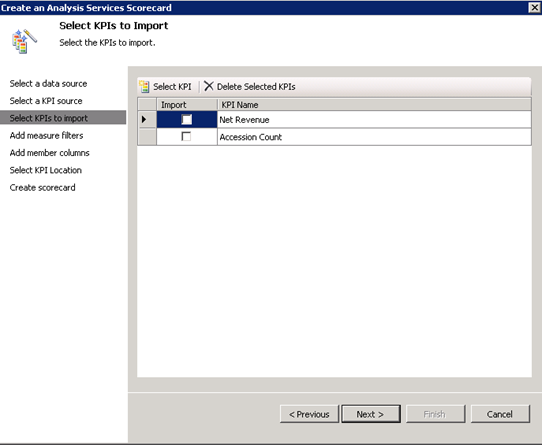
    Forging ahead through the unchartered land of PerformancePoint 2010, I ran into a snag today. Attempting to import Analysis Services KPIs resulting in the following error: An unexpected error occurred.  Error 47205. Exception details: System.IO.FileNotFoundException: Could not load file or assembly 'Microsoft.AnalysisServices, Version=10.0.0.0, Culture=neutral, PublicKeyToken=89845dcd8080cc91' or one of its dependencies. The system cannot find the file specified. File name: 'Microsoft.AnalysisServices, Version=10.0.0.0, Culture=neutral, PublicKeyToken=89845dcd8080cc91'    at Microsoft.PerformancePoint.Scorecards.Server.ImportExportHelper.GetImportableAsKpis(DataSource asDataSource)    at Microsoft.PerformancePoint.Scorecards.Server.PmServer.GetImportableAsKpis(DataSource dataSource) Since in our case, PerformancePoint was running on a SharePoint web front end server (WFE) which didn't have any of the SQL Server 2008 components installed, it was clear that PerformancePoint was missing a connectivity component. Among many other things, I tried installing the Analysis Services Management Objects (AMO) from the SQL Server 2008 Feature Pack but the error won't go away. I fixed it by running the SQL Server 2008 setup program and installing the Client Tools Connectivity...

  • PerformancePoint 2010

    September 3, 2010 / No Comments »

    PerformancePoint 2010

    PerformancePoint? Is it still around? It is (in SharePoint 2010), and it should peak your interest if you are serious about dashboarding. The planning component is of course gone and I have to admit I never had too much faith in it. When comes to dashboards, Microsoft gives you two implementation options: Reporting services reports in SharePoint web parts – Pros include low cost because Reporting Services is available with SharePoint Foundation, and no need to learn new skills. On the downside, you need to implement your own global filter web parts assuming that you don't use SharePoint Server. PerformancePoint – This is tool specifically designed for dashboards and it just got better in SharePoint 2010. However, it requires SharePoint Server 2010 which you need for PowerPivot as well. Unfortunately, this puts you in the $5,000+ upfront investment bucket (Vidas has more to say about SharePoint pricing). Personally, I was...

  • Kerberos Woes

    August 23, 2010 / No Comments »

    [Wikipedia] Cerberus, (pronounced /ˈsɜrb(ə)rəs/);[1] Greek form: Κέρβερος, /ˈkerberos/[2] in Greek and Roman mythology, is a multi-headed hound (usually three-headed) which guards the gates of Hades, to prevent those who have crossed the river Styx from ever escaping. I think Microsoft got the name right although the Windows version of Kerberos has more than three heads for sure. Yet another weekend spent in troubleshooting Kerberos. This one has an interesting setup. SharePoint Server 2010 on a Web Front End (WFE) box. SharePoint Server 2010 (core install) + SQL Server and Reporting Services 2008 integrated with SharePoint on a second box. Analysis Services 2008 R2 on a third box. The customer wanted this setup to minimize the SQL Server licenses. Microsoft recommends installing Reporting Services on the WFE servers but this requires as many SQL Server licenses as the number of the WFE servers, plus probably two more (for SQL Server to...

  • Applied PowerPivot Course Available

    August 23, 2010 / No Comments »

    Applied PowerPivot Course Available

    I am excited to announce that Prologika has added an Applied PowerPivot course to the list of our training offerings in response to the strong interest for self-service BI. The class can be delivered as two-day online class (4 hours each day) or as one full-day onsite class. The cost for the online version is $599. Applied PowerPivot is designed to help students become proficient with PowerPivot and acquire the necessary skills to implement PowerPivot applications, perform data analysis, and share these applications with other users. The full course syllabus is available here. I scheduled the first run for September 21st. Happy self-service BI!

  • PowerPivot Implicit Data Conversion

    August 16, 2010 / No Comments »

    A student noticed an interesting behavior while I was teaching my PowerPivot class last week. He noticed that PowerPivot lets you join a text-based column to a numeric column. As it turns out, PowerPivot does an implicit conversion to text when it discovers that you are attempting to join columns of different data types. However, as a best practice, you should convert numeric columns to a numeric data type, such as Whole Number. This will help PowerPivot minimize storage and improve performance.

  • Professional Microsoft PowerPivot for Excel and SharePoint

    July 31, 2010 / No Comments »

    Professional Microsoft PowerPivot for Excel and SharePoint

    I had the pleasure to read the book Professional Microsoft PowerPivot for Excel and SharePoint by Sivakumar Harinath, Ron Pihlgren, and Denny Guang-Yeu Lee. All of the authors are with the Microsoft Analysis Services team. Together with David Wickert, Denny Lee runs the http://powerpivottwins.com/ blog, which is "dedicated to all things PowerPivot". Siva has written the 2005 and 2008 editions of the Professional SQL Server Analysis Services with MDX. So, the book is straight from the horse's mouth. I really liked the book. It's easy to follow and includes insightful tips. The book targets business users who are interested in creating self-service BI solutions. IT professionals and BI practitioners who will manage PowerPivot applications will find the book useful as well. Professional Microsoft PowerPivot for Excel and SharePoint incudes tutorials that walks the user through the necessary steps to build a PowerPivot-based solution. These steps include importing the data, enriching...

  • PivotViewer Extension for Reporting Services – a Cool BI Fusion with Confusing Name

    July 21, 2010 / No Comments »

    Although late to the party, I announce the arrival of a very interesting BI technology - PivotViewer Extension for Reporting Services – CTP1. What's interesting is that it leverages several BI technologies to provide great data visualization: The Microsoft LiveLabs Pivot which was developed by Microsoft Research. PowerPivot – a Microsoft self-service BI tool. Analysis Services R2 Reporting Services R2 SharePoint 2010 You should keep a close eye of this combination (or at least the last four) as it will become increasingly important in the Microsoft BI stack. Robert Bruckner has provided details about the new arrival. Christian Petculescu, a Principal Architect on the SSAS team, is the driving force behind it. Other MVPs have spread the news. But Kasper de Jonge made my day! He has written a GREAT blog about it with step by step instructions to create your own PivotViewer solution. His blog also cleared my confusion...

  • Atlanta BI Group First Meeting Topic Announced

    July 17, 2010 / No Comments »

    I've just updated the Atlanta BI Group home page to announce the topic for our first meeting on August 23th. Given the great interest surrounding Self-service BI, I'll present "Self-service BI with Microsoft PowerPivot". Hope you can make our first meeting!

  • OLAP PivotTable Extensions for Excel 2010

    July 10, 2010 / No Comments »

    OLAP PivotTable Extensions for Excel 2010

    Kudos to Greg Galloway (SQL Server MVP) for upgrading his fantastic OLAP PivotTable Extensions for Excel 2010 add-in (now available in both x32 and x64). This add-in is one of the first third party tools I install on a new machine. Since the Excel team seems to be ignoring customer feedback for improving the Excel BI features, OLAP PivotTable provides what's lacking, including: Excellent search capabilities with Field List, Dimension Data and attribute options. By contrast, the Excel 2010 search is limited to searching within a hierarchy level only. This is pretty much useless with parent-child hierarchies. If I know what level the member is located, I don't have to search, right? Getting the MDX query – Excel refuses to expose the actual MDX. Calculated members – Another feature that business users keep asking about but Excel doesn't budge. The Calculations tab of the add-in lets you create calculated members....

  • Yet Another Report Timeout Solved

    July 4, 2010 / No Comments »

    Every now and then, I run into mysterious report timeouts. This time the client had a farm of two report servers integrated with MOSS with long running reports that would time out after two minutes or so. Normally, you shouldn't have such report monsters but life is not perfect, right? The client did a due diligence and had checked/changed every possible timeout setting, including: Report Processing Timeout in the Reporting Services Server Defaults settings in SharePoint Central Administration. The httpRuntime settings on all SharePoint farm servers' web.config files: <httpRuntime maxRequestLength="51200" executionTimeout="9000" /> The "databaseQueryTimeout" value in the RSReportServer.config file from 120 to 900 (15 minutes). <Add Key="DatabaseQueryTimeout" Value="900"/> The connection timeout in IIS for the web site on each MOSS server from 120 to 240 seconds. Alas, no help. Reports would still time out. After much investigation, we discovered a server timeout setting on the load balancer which was set...

Training

We offer onsite and online Business Intelligence classes! Contact us about in-person training for groups of five or more students.
For more information or to register click here!

Books

Learn Power BI at your own pace with our latest book Applied Microsoft Power BI. Targeting information workers, data analysts, pros, and developers, It is designed as an easy-to-follow guide for learning how to implement BI solutions spanning the entire personal-team-organizational BI spectrum.

Syndication