We are excited to announce the availability of an online Analysis Services 2008 class – no travel, no hotel expenses, just 100% content delivered right to your desktop! This intensive 3-day online class (14 training hours) is designed to help you become proficient with Analysis Services 2008 and acquire the necessary skills to implement OLAP and data mining solutions. Learn how to build an Adventure Works cube…
An interesting "issue" popped up today. I did a fresh install of Windows 7 on my brand new HP 8530w laptop, which is a great laptop BTW. I install SQL Server 2008 followed by SP1 only to find that the Web Service URL and Report Manager URL don't show up in the Reporting Services Configuration Manager. The report sever would run just fine on http://localhost/reportserver…
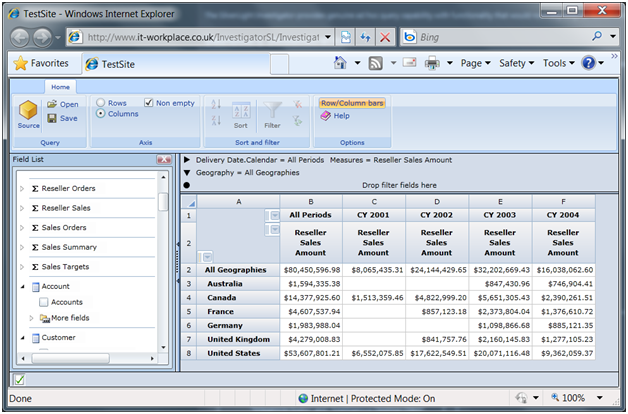
After retiring Office Web Components (OWC), which can hardly can pass the web test as it is implemented as an ActiveX control, Microsoft left developers with no web-based browser for Analysis Services. True, for those who can afford the hefty price tag, Microsoft Office SharePoint Server (MOSS) supports server-side Excel spreadsheets that render to HTML. However, while Excel rules the Windows-based OLAP browser space, HTML-based…
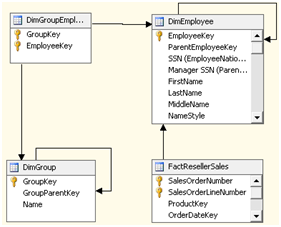
Relax…this blog is all about Analysis Services and not about polygamy or something worse. SSAS 2005 went beyond the "classic" OLAP model by introducing flexible dimension-to-measure group relationships, including many-to-many, referenced, fact relationships. M2M relationships can solve some nagging business problems. For example, in a recent project where we had to implement a financial cube, there was a requirement that a G-L account can belong…
One year after submitting this small article, SQL Server Magazine has finally published it. This article demonstrates how you can use table-value parameters (TVPs), a new feature in SQL Server 2008, to let you pass multivalued parameters from a report to a stored procedure. The code can be downloaded from the SQL Server Magazine site or from here.
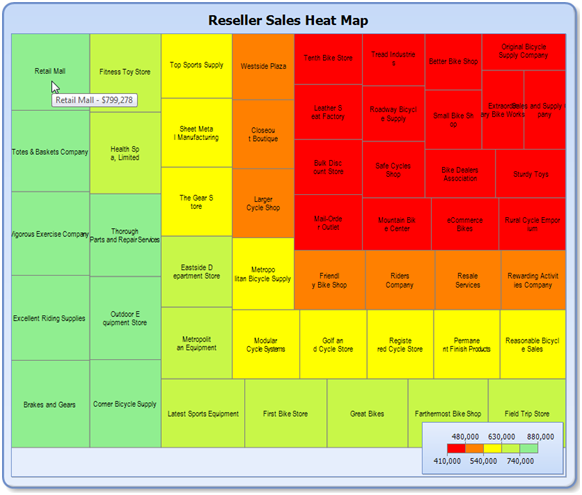
Continuing my intrepid journey through the new Reporting Services R2 enhancements, in this blog I'll demonstrate some of the cool map features. As you've probably heard, R2 brings a brand new map control that lets you visualize spatial data on your reports. Since mapping is the one of the major enhancements in R2, there will be plenty of resources to cover it in details. For…
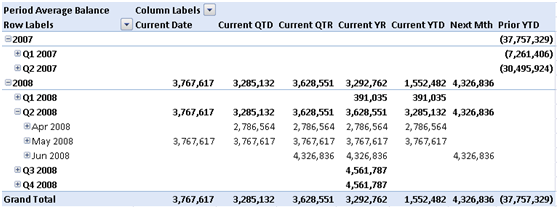
Yet another relative dates implementation in an Analysis Services cube. So far, I've implemented two. But I'm now starting a project to implement an accounting (G/L) cube and the traditional relative date approach where each relative date is calculated for the current member in the Date dimension doesn't fly anymore. Heck, the business analyst even found the excellent "Translating Cognos PowerPlay Transformer Relative Date Functionality…
There is still time to sign up for our Applied Reporting Services 2008 class with Teo Lachev. This three-day intensive event teaches you the knowledge and skills you need to master Reporting Services to its fullest. No travel, no hotel expenses, just 100% in-depth SSRS training delivered right to your desktop! Applied Reporting Services 2008 Online Training Class with Teo Lachev Date: August 31 –…
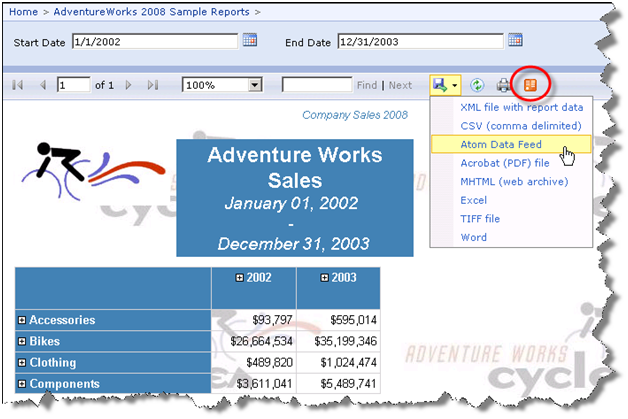
Reporting Services SQL Server 2008 R2 features reports as Atom data feeds. This is accomplished with a new Atom Data Feed extension, as shown on this screenshot. This extension produces an atom service document (an *.atomsvc file). It lists at least one data feed for each data region in a report. In fact, some regions, such as tablix with column groups (cross-tab report layout) may…