
Direct Lake Composite Models
I’ve mentioned previously in the “A Couple of Direct Lake Gotchas” post that unlike Power BI reports, Excel surprised me by not showing user-defined hierarchies in a Direct Lake model. Direct Lake comes with other gotchas, such as not supporting DAX calculated columns and SQL views. I normally don’t use calculated columns, but they can come in handy, such as for flatting a parent-child hierarchies outside ETL. And I like SQL views as an insurance policy for making quick transforms or filters on top of loaded tables to avoid ETL changes.
Recently, Microsoft introduced composite Direct Lake models which I demonstrated as a part of a pilot project, mainly to preserve the Excel report experience for financial users.
Direct Lake Only vs Composite Direct Lake
I view the composite Direct Lake models as the best of both worlds and this table summarizes their characteristics.
| Direct Lake Only | Composite (Direct Lake + Import) Public Preview |
|
| Storage mode | Direct Lake | Some tables, such as dimensions, in import mode, others, such as fact tables, in Direct Lake |
| Tooling | Web modeling, Power BI Desktop | Web modeling only (limited support in PBI Desktop) |
| Refresh required | No (Fabric monitors the Delta log) | Imported tables must be refreshed, such as overnight for dimension changes |
| Memory consumption | Used columns in reports are paged in and out | Refresh requires at least twice the memory of imported objects |
| SQL Views | No | Yes |
| Calculated columns | No | Yes, such as PATH and PATHITEM to flatten parent-child hierarchies outside ETL |
| User-defined hierarchies | Power BI reports | Power BI, Excel, and Anaplan |
| Power Query | No | Yes |
Therefore, composite Direct Lake models could be a good compromise between real-time BI and flexibility. For example, now you can implement the following configuration:
1. Dimensions in Import mode and refresh them overnight since they probably don’t change frequently anyway.
2. Large fact tables or tables requiring real-time BI in Direct Lake without refresh.
Lessons Learned
If composite models sound appealing, you might be eager to convert an existing Direct Lake model to composite. Here are some issues/gotchas that I ran into doing so:
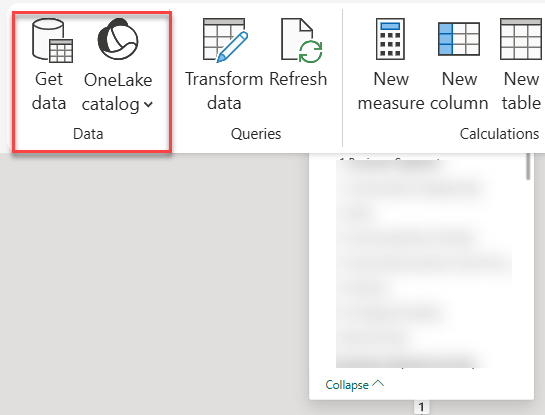
- The web modeling experience (currently, the only way to add imported tables using Microsoft tooling) would show the Get Data buttons disabled. After some reverse-engineering of a brand new model, I fixed it my changing the connection expression in the *.bim file to use onelake (previously, it was pointing to a Fabric warehouse).
"expression": [
"let",
" Source = AzureStorage.DataLake(\"https://onelake.dfs.fabric.microsoft.com/44744d84-...\", [HierarchicalNavigation=true])",
- If you’re switching many tables from Direct Lake, you can automate this in two ways:
- Semantic Links lab notebook
import sempy_labs as sl
from sempy_labs import migration
migration.migrate_direct_lake_to_import(
  dataset="Your_Direct_Lake_Model_Name",
  workspace="Your_Workspace_Name",
  mode="import" # or "directquery"
)
- C# script in the Tabular Editor
- In my case, since there weren’t that many tables, I converted the dimension table partitions manually to “M” partitions, as in this example (change bolded text for each table):
"partitions": [
{
"name": "Account",
"mode": "import",
"source": {
"expression": [
"let",
" Source = Sql.Database(\"<guid>.datawarehouse.fabric.microsoft.com\", \"<warehouse name>\"),",
" #\"Navigation 1\" = Source{[Schema = \"dbo\", Item = \"DimAccount\"]}[Data]",
"in",
" #\"Navigation 1\""
],
"type": "m"
}
} ]
- After switching a partition from Direct Lake to Import in PBI Desktop project and synchronizing to the connected published model, Fabric rejected the change complaining that existing DirectLake table can’t be switched to imported storage. As a workaround, I dropped the connected model.
- Being in public review, Composite Direct Lake is rough around the edges. I’ve got various complaints about credentials missing which I fixed in the dataset settings.
- Although the documentation says that web modeling is the only tooling experience, Power BI Desktop worked for me as with the Direct Lake only counterpart. However, currently Power Query and Get Data (unless you add the tables directly in *.bim file) is only available on the web.
A “Limited” Performance Note
I know everyone is interested in performance. I did some limited performance tests by tracing a massive query against equivalent Direct Lake Only and Composite Direct Lake models. On a cold cache, Composite outperformed Direct Lake Only by some 20%. On a warm cache, surprisingly I saw the reverse, Direct Lake Only outperforming Composite five to six times. Please don’t take this verbatim. More than likely, your results will vary. For example, in that blog I said that I saw much better performance with SWITCH…CASE in Imported vs Direct Lake. Test!


