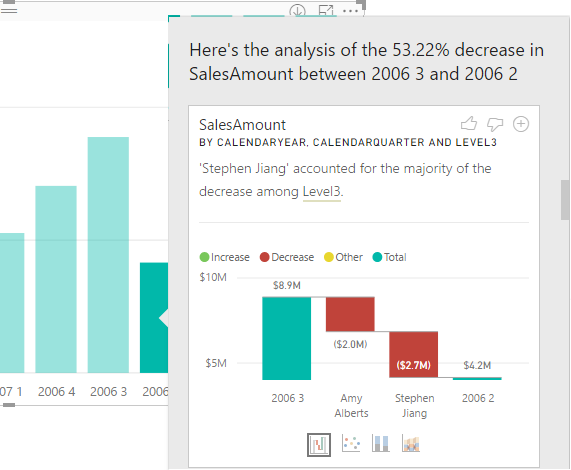
The September release of Power BI Desktop brings Quick Insights in the form of the very nice Explain Increase/Decrease feature (in preview). Suppose you have a column chart and you see a sudden increase or decrease in the chart series. You can now right-click on the bar and then click Analyze, Explain the Decrease menu. This runs the Quick Insights machine learning algorithms to predict…
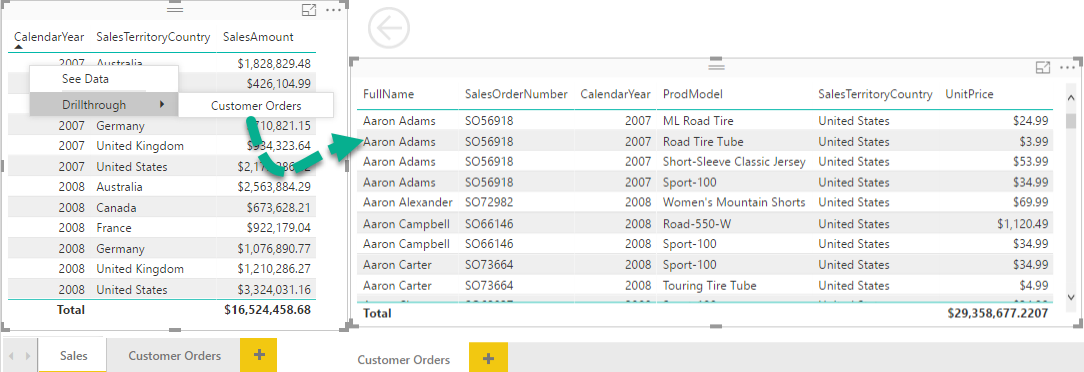
The September release of Power BI Desktop adds two very useful features: drilling through another page and explain increase/decrease. SSRS practitioners might find "page drillthrough" similar to SSRS actions. However, instead of navigating to another report, it allows the user to navigate to another page within the same report (at least for now cross-report drillthrough is not supported). Although not as flexible as SSRS actions,…
Mark your calendar for the next meeting of our Atlanta MS and Power BI Group on September 25th when we will compare Power BI and Qlik. Presentation: Did Qlik run out of BI Power? Level: Intermediate Date: September 25, 2017 Time 6:30 – 8:30 PM ET Place: South Terraces Building (Auditorium Room) 115 Perimeter Center Place Atlanta, GA 30346 Overview: Haters are gonna hate. Lovers…
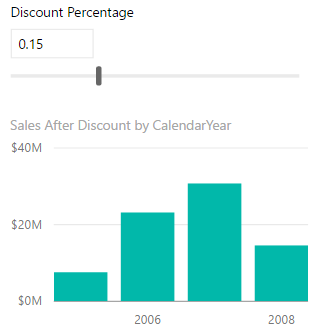
Veteran Excel users might have used the Excel What-if feature that let you try several different sets of values in one or more formulas to explore various outcomes (scenarios). The August release of Power BI Desktop introduces a similar feature. You start by defining a What If parameter from the Modeling tab. Don't confuse the What If parameter with a query parameter which is used…
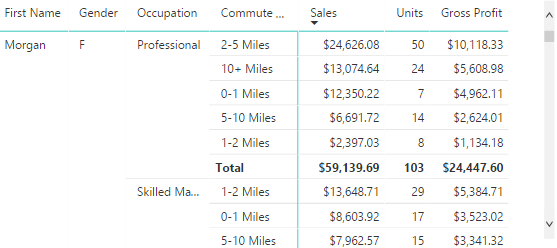
Related to the previous blog, let's show how to create a detail report in Power BI that mimics an Excel PivotTable report in a flattened layout. Consider the report below. To create it, use the Matrix visual and add the necessary fields to the Rows bucket and measures to the Values bucket. By default and similar to Excel, Matrix would use a Stepped layout so…
After Tableau and SiSense, Keeping 'em Honest continues with Qlik. Now, after they sold the company and took a hit in the latest Gartner's quadrant, I didn't expect much of a completion from Qlik but every now and then I run into a customer considering Qlik and willing to share Qlik's feedback on how Qlik outshines Power BI in every possible way (can't share these…
What Does Power BI Premium Mean for You? As I mentioned in my Spring newsletter "15 Reasons Why Microsoft is Leading the BI Space", Microsoft BI is enjoying resurgent interest from customers and industry observers, and Power BI gets lots of attention. I'm sure that you've also heard the announcements about Power BI Premium – a new dedicated licensing model for Power BI. In fact,…
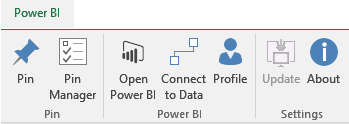
Issue: You want to use the Power BI Excel Publisher but it doesn't load. You look at the Excel add-ins and you see that it's deactivated. You try to activate it and then you get an error. Solution: Copy the following Office PIA files to the add-in folder (C:\Program Files\Microsoft Power BI Publisher for Excel\bin). Microsoft.Office.Interop.SQLIS.12.0.nupkg OFFICE.dll Unfortunately, I don't know where these files are…
Microsoft Power BI has enjoyed a lot of attention and success since it became generally available in July 2015. But its licensing model and cloud-hosted limitations barred wide adoption, especially with larger organizations. The recently introduced Power BI Premium will change all of this. Join this session to learn how Power BI Premium will allow your organization to achieve: • Flexibility to license by capacity…
Microsoft Power BI has enjoyed a lot of attention and success since it became generally available in July 2015. But its licensing model and cloud-hosted limitations barred wide adoption, especially with larger organizations. The recently introduced Power BI Premium will change all of this. Join this session to learn how Power BI Premium will allow your organization to achieve: • Flexibility to license by capacity…