I'm sure we've heard the announcements today about Power BI Premium. In fact, Power BI Premium is so important that Microsoft has positioned it as a new product under the Power BI marketing umbrella name instead of a new licensing model. Microsoft and industry experts covered the announcements well so I won't reiterate the obvious. You may wonder what these changes mean for you. Let's…
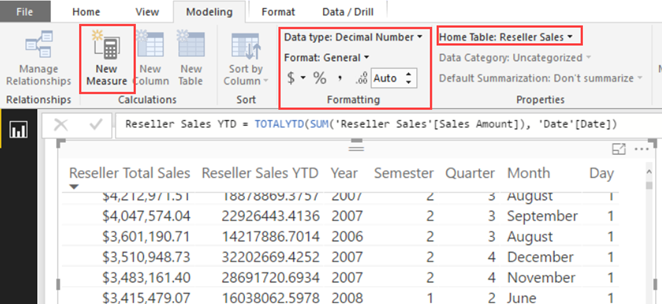
The May release of Power BI Desktop adds the ability to define DAX calculated measures when Power BI Desktop is connected live to a Tabular model or Power BI datasets. This is conceptually similar to defining MDX calculated members in Excel connected to a cube. The measure definitions are local to the Power BI Desktop model (the Tabular model is not modified). You can do…
Excel 2016 added a Publish to Power BI menu to let you export or connect Excel workbooks to Power BI. You can read more about this Excel feature here. One area where Excel is still ahead of Power BI Desktop is that is has an object model that lets you automate tasks with VBA. Unfortunately, Power BI Desktop doesn't have an object model so you have…
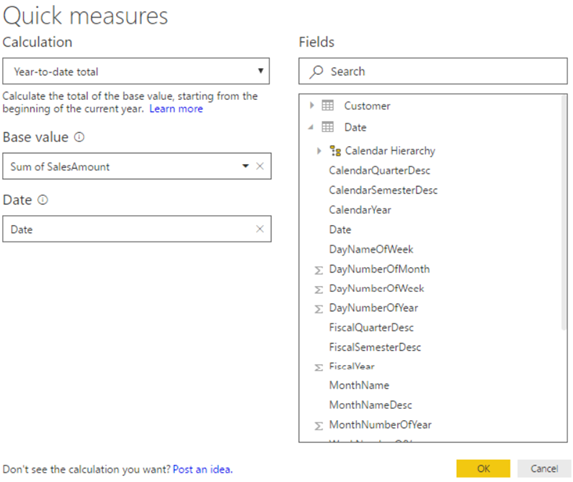
One of the most common complaints raised by Power BI customers is the DAX steep learning curve. The April release of Power BI Desktop introduces a feature called Quick Measures. Currently in preview (make sure to enable Quick Measures from File ð Options and settings ð Options, Preview features), Quick Measures are supposed to replace Quick Calcs. Besides supporting only a limited number of packaged…
Learn how you can use Power BI to monitor the progress with rich, interactive dashboards. Data from Visual Studio Team Services ODATA feeds and APIs as well as pulling data from DocumentDB, teams can drill into their development performance and see where they may be having development performance. Data is accessed via embedded Power BI reports running on dedicated hardware throughout development team spaces as well as…
Patrick LeBlanc and I will deliver a free seminar "Get the Most Out of Power BI" on May 3rd, 8:30 AM to 12 PM, at the Microsoft Office in Alpharetta. You won't want to miss this educational and engaging event! Please register today as seating is limited at https://prologika.com/event/get-the-most-out-of-power-bi/. Power BI is about empowering all types of users to get insights from data. It consists of…
I'm presenting "7 Ways to Integrate Excel with Power BI" for the Atlanta Modern Excel Group on April 19th at the Microsoft office in Alpharetta. Prologika and Microsoft are sponsoring the event. Please RSVP here. Power BI is gaining a momentum but Excel still rules the corporate world. Fortunately, Power BI and Excel are not exclusive choices. Join me to learn how you can preserve…
Power BI is about empowering all types of users to get insights from data. It consists of the Power BI Service (powerbi.com), Power BI Desktop, Power BI Mobile, and Power BI Embedded, and it comes in two pricing options: Power BI Free and Power BI Pro. Power BI enjoys a tremendous momentum and industry observers has given it high scores. Packed with a dizzying variety of features,…
15 Reasons Why Microsoft is Leading the BI Space I hope you're enjoying the beginning of 2017 and you're staying healthy and busy. It's been a hectic and exciting period for me. I published the second edition of my "Applied Microsoft Power BI" book in January to keep it up to date. It's great to see all the momentum and interest surrounding Power BI. Just…
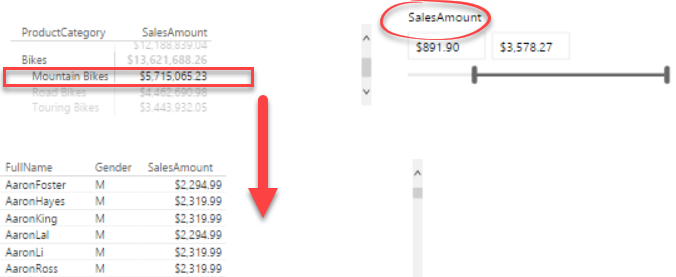
Lots of things to like in the just released March update of Power BI Desktop! My favorite? We can now implement header-details text reports using the updated Matrix visual. Previously, Table and Matrix visuals wouldn't allow you to select a row to cross filter other sections. Now, you can use the Matrix visual for the header section. When you click a row in the "header",…