
Migrating Fabric Import Semantic Models to Direct Lake
I’ve recently written about strategies for addressing memory pressures with Fabric large semantic models and I mentioned that one of them was switching to Direct Lake. This blog captures my experience of migrating a real-life import semantic model to Direct Lake.
About the project
In this case, the client had a 40 GB semantic model with 250 million rows spread across two fact tables. The semantic model imported data from a Google BigQuery (GBQ) data warehouse. The client applied every trick in the book to optimize the model, but they’ve found themselves forced to upgrade from a Power BI P1 to P2 to P3 capacity.
I’ve written in the past about my frustration with Power BI/Fabric capacity resource limits. While the 25 GB RAM grant of a P1/F64 capacity for each dataset is generous for smaller semantic models, such as for self-service BI, it’s inadequate for large organizational semantic models. Ultimately, the developers must face gut wrenching decisions, such as whether to split the model into smaller semantic models, to obey what are in my opinion artificially low and inflexible memory limits. As a reference, my laptop has more memory than the P1/F64 memory grant and the price for 1 GB server RAM is $10.
So, we’ve decided to replicate the GBQ data to a Fabric lakehouse and try Direct Lake in order to avoid the dataset refresh which requires at least twice the memory. Granted, replicating data is an awkward solution, but currently Direct Lake requires data to be in a Fabric repository (Lakehouse or Data Warehouse) in the same tenant.
I’d like to indulge myself and imagine a future where other columnar database vendors will follow Microsoft and Databricks and embrace Delta storage, instead of proprietary formats, such as in the case of GBQ. This could allow semantic models to map directly to the vendor’s database, thus avoiding replication and facilitating cross-vendor BI architectures.
Replicating data
I used a Fabric Copy Job to replicate about 50 tables (all tables in one job) from GBQ to Fabric Lakehouse. Overall, the team was happy with how easy is to set up Copy Job and its job performance (it took about 40 minutes for full replication). As it stands (currently in preview), I uncovered a few Copy Job shortcomings compared to the ADF Copy activity:
- No incremental extraction (currently in preview for other data sources but not for GBQ).
- Doesn’t support mixing different options, such as incremental extraction for some tables and full load for others, or Overwrite mode for some tables an append for others. Currently, you must split multiple tables in separate jobs to meet such requirements. In addition, copying multiple tables doesn’t give you the option to use custom SQL statement to extract the data.
- Bugs. It looks like every time we make a change to the Source Data, such as changing the name of the destination tables, the explicit column mappings are lost to a point where we had to stop using them.
4. Cannot change the job’s JSON file, such as if you want to quickly make find and replace changes.
5. The user interface is clunky and it’s difficult to work with. For example, you can’t resize or maximize the screen.
Semantic model migration notes
Here are a few notes about the actual migration of the semantic model to Direct Lake that go beyond the officially documented Direct Lake limitations:
- Then, I used the Microsoft Semantic Link “Migration to Direct Lake” notebook. The notebook is very easy to use and did a respectable job of switching the table partitions to Direct Lake.
- In this project, the client used a Power Query function to translate the column names. Luckily, the client had a mapping table. I used ChatGPT to update the model by asking to look up each column in the mapping table and derive what the sourceColumn mapping should be. Most of time was spent fixing these bindings.
- Then, I used the preview feature of Power BI Desktop to create a project connected to the Direct Lake model. Then, I changed the model setting to Direct Lake behavior to avoid falling back on Direct Query.

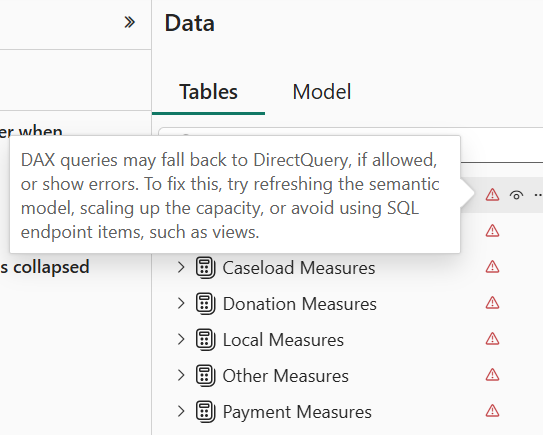
- I quickly found that Direct Lake is very picky about metadata. Even if one column mapping is wrong, it invalidates the entire model. This manifests with errors showing for each table when you switch to the Model tab in Power BI Desktop.
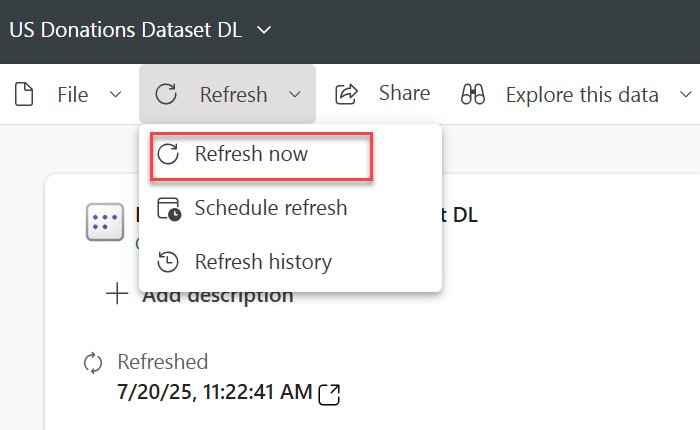
- Attempting to refresh the model in Power BI Desktop to figure out what’s wrong produces all sorts of nonsensical errors. Instead, I used the “Refresh now” task in Power BI Service. This shows an error indicator next to the model that you can click to see the error description and you have to tackle each error one at the time by fixing it in the model.bim file in Power BI Desktop. Again, most errors were caused by wrong column mappings.
- The Microsoft notebook doesn’t migrate field parameters successfully. I had to look up the extended properties for the main field and add it manually to the model.bim file.
extendedProperties": [{
"type": "json",

"name": "ParameterMetadata",
"value": {
"version": 3,
"kind": 2
}
} ]
- The client had a Date dimension with dates starting with 1/1/1899 in order to support spurious dates from legacy data sources. This caused all measures to produce an error “A DateTime value is outside of the transportation protocol’s supported range. Dates must be between ‘1899-12-30T00:00:00’ and ‘9999-12-31T23:59:59’.” In import mode, Power BI auto-fixes bad dates but in DirectLake you must fix this on your own. So, we nuked 1899 in the date table.
- The original model had two date-related tables mapped to the same DW Date table. This is not allowed in Direct Lake so I had to clone the Date table one more time in the lakehouse.
- The original model used dummy tables to organize measures. These tables were created as DAX calculated tables which (together with calculated columns) are not allowed in Direct Lake. Instead, I created dummy tables with one column using a Python notebook in the lakehouse.
Using dummy tables to organize measures is a popular technique which I personally avoid for two main reasons. A while back I assessed a semantic model which had thousands of measures assigned to one Measures dummy table. This caused significant report performance degradation. Also, this approach confuses Power BI Q&A (not sure about copilot). I don’t know if Microsoft has resolved these issues, but I personally don’t use dummy tables. Instead, I assign measures to the actual fact tables.
Summary
Other than that, and after a few days of struggle, the model has been successfully blessed by Fabric as a Direct Lake model. Preliminary testing shows that performance is on par with import mode and we are optimistic that this approach will help significantly reduce the model memory footprint and possibly allow the client to downgrade the capacity, but more testing is warranted. And this will probably justify another blog in near future so stay tuned.


