

To compete more effectively with Power BI, Tableau acquired a database technology called HyPer. Like the Microsoft xVelocity in-memory technology (formerly known as VertiPaq), which powers Analysis Services Tabular, Power BI, and SQL Server Columnstore, HyPer is an in-memory database system. Hyper was initially developed as a research project at the Technical University of Munich. Tableau explains that “with Hyper, transactions and analytical queries are processed on the same column store, with no post-processing needed after data ingestion. This reduces stale data and minimizes the connection gap between specialized systems. Hyper’s unique approach allows a true combination of read-and write-heavy workloads in a single system. This means you can have fast extract creation without sacrificing fast query performance. (We call that a win-win.)”. Tableau shipped Hyper with Tableau v10.5. Here, we have a statement that Tableau claimed that Hyper achieved 3x faster data extraction and 5x increase in query performance compared to the old TDE data extracts.
Intrigued, I ran some tests to compare xVelocity, which has been around for more than a decade (since Excel 2007), with Hyper, and I wanted to share the results. My tests focused only the speed of data extraction and compression. I used Tableau 10.5.1 and Power BI Desktop February 2018 release. The tests loaded data from the ContosoRetailDW SQL Server database hosted on my laptop. Of course, there are many other factors that can influence the data ingestion speed, such as the query performance, driver, etc.
Loading One Table
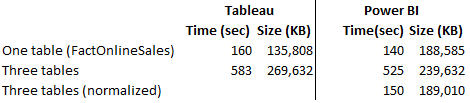
The first test loaded a single table, FactOnlineSales, with over 12 million rows. Tableau data extract finished in 160 seconds while Power BI Desktop finished faster in 140 seconds. Interestingly, Tableau compressed data better. This should warrant some additional investigation, but I don’t know of a Tableau tool that can show the data compression ratio per column. It looks though the Hyper compression algorithm does a better job compressing numeric data types and no so much with text-based columns.
Loading Tree Tables
In the second test, I loaded three tables (FactOnlineSales, DimCustomer, and DimDate). Tableau uses by default an inner join among tables, resulting in a single SQL query that joins all three tables. To achieve the equivalent in Power BI Desktop, I used the same query that Tableau generated (another way would be to merge the tables in the Query Editor, which probably would have resulted in faster data load). Again, Power BI finished loading data faster but this time it compressed the data better.
Three Tables Normalized
In the third test, I wanted to leave the three tables loaded separately but joined with relationships. Surprisingly, Hyper focused apparently on performance alone and left the Tableau data modeling limitations. Tableau is still limited to a single dataset, unless you go for the weird and limited data blending, requiring a primary and secondary data source. Power BI has been supporting normalized schemas (a best practice) since it was initially released more than a decade ago. So, I couldn’t do the third test with Tableau. But out of curiosity, I ran the test with Power BI Desktop. Power BI data load was comparable with the first test, plus some additional time to create the relationships. And the data load size was comparable with the first test.
As far as query performance, both tools felt very responsive when slicing and dicing data and queries would complete within milliseconds. Once we have some officials query stats from Tableau, I’ll compare against xVelocity.
Conclusion
While Hyper might improve data load and query performance compared to the old Tableau data technology, don’t expect it to be any faster than xVelocity. This probably explains why Tableau is shy of touting Hyper too much.
Hyper didn’t remove the Tableau data modeling limitations. Tableau still lags by far the xVelocity data modeling capabilities. As a result, the more data you load, the larger the data footprint would be, and the slower it would be to load the data compared to multi-table Power BI schemas. Not to mention that having all the data merged into a single dataset is not a best practice for a variety of reasons.



do you know if it is a limitation of Hyper per se, or Tableau don’t want to adopt dimensional modelling as it will change radically how the software works ?
No idea. I think Tableau started with the single dataset easy way and continues on that path.
TDE and Hyper have always supported normalised extracts! Tableau just never made the button in the interface… If you want to do this test against a normalised extract add a SFDC connection in the data pane (trust me) before you press extract. You can prove this out by dragging the file in as a data source and then see the individual tables.
Happy testing
Hi Brent,
Thanks for the tip. In this case, the data is coming from a SQL Server database. Can you point me out to more detail steps? Why would Tableau hide this feature?
just press the add button on data source once you have all the tables you want from any data source (sql, oracl, GBQ…). then choose sfdc. log into SFDC with a free developer account you have setup if your company doesn’t already use it (google that). thats it. dont add any tables from SFDC because you don’t want any of them! Tableau never hid a feature, They just didn’t get around to adding a Tableau like way of accessing this feature yet. I think there was blog post from Tamas Foldi on the nature of TDE a few years ago showing this capability.
I see what you mean now. What a hack! While I was able to complete the original test with comparable stats as the first test, this “feature” didn’t work when making the schema a bit more complicated by adding DimProduct and FactSales (so we have two fact tables and three dimensions as shown in the attached file). First, Tableau didn’t detect a join between DimProduct and FactOnineSales. Second, it imports tables sequentially. Third, it froze after 3:46 min (I guess after imported all the data) and pegged CPU 90%, so I had to kill it. So, I guess this is not officially supported. https://uploads.disquscdn.com/images/16719a6f602d5d69997447096cf159102b2baf6ca4b60770143adb9823579c1c.png