
Performance tuning – my favorite! This blog originated from a quest to reduce the processing time of an SSAS cube which loads some 2.5 billion rows and includes DISCINTCT COUNT measure groups. The initial time to fully process the cube was about 50 minutes on a dedicated DELL PowerEdge R810 server, with 256 GB RAM and two physical processors (32 cores total). Both the SSAS and database servers were underutilizing the CPU resources with SSAS about 60-70 utilizations and the database server about 20-30 CPU utilization. What was the bottleneck?
By using the sys.dm_os_waiting_tasks DMV like the statement below (you can use also the SQL Server Activity Monitor), we saw a high number of CXPACKET wait types.
SELECT
dm_ws.wait_duration_ms,
dm_ws.wait_type,
dm_es.status,
dm_t.TEXT,
dm_qp.query_plan,
dm_ws.session_ID,
dm_es.cpu_time,
dm_es.memory_usage,
dm_es.logical_reads,
dm_es.total_elapsed_time,
dm_es.program_name,
DB_NAME(dm_r.database_id) DatabaseName,
— Optional columns
dm_ws.blocking_session_id,
dm_r.wait_resource,
dm_es.login_name,
dm_r.command,
dm_r.last_wait_type
FROM
sys.dm_os_waiting_tasks
dm_ws
INNER
JOIN
sys.dm_exec_requests
dm_r
ON
dm_ws.session_id = dm_r.session_id
INNER
JOIN
sys.dm_exec_sessions
dm_es
ON
dm_es.session_id = dm_r.session_id
CROSS
APPLY
sys.dm_exec_sql_text
(dm_r.sql_handle)
dm_t
CROSS
APPLY
sys.dm_exec_query_plan
(dm_r.plan_handle) dm_qp
WHERE
dm_es.is_user_process = 1
The typical advice given to address CXPACKET waits is to decrease the SQL parallelism by using the MAXDOP setting. This might help in some isolated scenarios, such as UPDATE or DELETE queries. However, the SQL Sentry Plan Explorer showed that each processing query is highly parallelized to utilize all cores. Notice in the screenshot below, that thread 16 fetches only 14,803 rows.

Therefore, the CXPACKET waits were simply caused by faster threads waiting for other threads to finish. In other words, CXPACKET wait is just a coordination mechanism between the threads being parallelized. To confirm this, we set the SQL Server MAXDOP setting to 1. Surely, the CXPACKET waits disappeared but the overall cube processing time went up as well. In our case, the biggest benefit was realized not by decreasing the SQL Server parallelism but by increasing it, by increasing the maximum number of database connections. This resulted in decreasing the overall processing time some 20%.
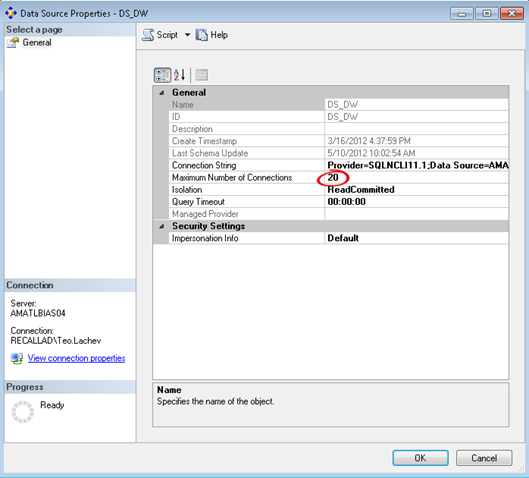
You need to be careful here though. While increasing the connections to max out the CPU on the SSAS server will yield the biggest gain, it might also slow down other processing, such as reports that query the cube while the database is being processed. So, as a rule of thumb, target no more than 80% CPU utilization to leave room for other tasks.



JOIN THE CONVERSATION
Discussion