Prologika Newsletter Spring 2026

At Ignite in November, 2025, Microsoft introduced Fabric IQ. I noted to go beyond the marketing hype and check if Fabric IQ makes any sense. The next thing I know, around the holidays I’m talking to an enterprise strategy manager from an airline company and McKinsey consultant about ontologies. In this newsletter I share my thoughts of FabricIQ based on my initial evaluation. Let’s start with what ontology is and how Fabric IQ uses it to integrate your enterprise data.

Ontology – A branch of philosophy, ontology is the study of being that investigates the nature of existence, the features all entities have in common, and how they are divided into basic categories of being. In computer science and AI, ontology refers to a set of concepts and categories in a subject area or domain that shows their properties and the relations between them.

What is Fabric IQ?

According to Microsoft, Fabric IQ is “a unified intelligence platform developed by Microsoft that enhances data management and decision-making through semantic understanding and AI capabilities.” Clear enough? If not, if you view Fabric as Microsoft’s answer to Palantir’s Foundry, then Fabric IQ is the Microsoft equivalent of Palantir’s Foundry Ontology, whose success apparently inspired Microsoft.

Therefore, my unassuming layman definition of Fabric IQ is a metadata layer on top of data in Fabric that defines entities and their relationships so that AI can make sense of and relate the underlying data.

For example, you may have an organizational semantic model built on top of an enterprise data warehouse (EDW) that spans several subject areas. And then you might have some data that isn’t in EDW and therefore outside the semantic model, such as HR file extracts in a lakehouse. You can use Fabric IQ as a glue that bridges that data together. And so, when the user asks the agent “correlate revenue by employee with hours they worked”, the agent knows where to go for answers. This screenshot shows how you can define such relationships between two entities.

Screenshot of the renamed entity types.

Following this line of thinking, Microsoft BI practitioners may view Fabric IQ as a Power BI composite semantic model on steroids. The big difference is that a composite model can only reference other semantic models while Fabric IQ can span data in multiple formats.

The Good

Palantir had a head start of a decade or so compared to Microsoft Fabric, but yet even in its preview stage, I like a thing or two about Fabric IQ from what I’ve seen so far:

  • Its oncology can span Power BI semantic models (with caveats explained in the next section), powered by best-in-class technology. As I mentioned before, this allows you to bridge all the business logic and calculations you carefully crafted in a semantic model to the rest of your Fabric data estate.
  • Fabric IQ integrates with other Microsoft technologies, such as real-time intelligence (eventhouses), Copilot Studio, Graph. This tight integration turns Fabric into a true “intelligence platform,” reducing duplicated logic, one-off models, and maintenance while enabling multi-hop reasoning and real-time operational agents.
  • Democratized and no-code friendly – Visual tools allow business users to build and evolve the ontology, lowering barriers compared to more engineering-heavy alternatives. Making it easy to use has always been a Microsoft strength.
  • Groundbreaking semantics for AI Agents: Fabric IQ elevates AI from pattern-matching to true business understanding, allowing agents to reason over cascading effects, constraints, and objectives—leading to more reliable, auditable decisions and automation.
  • Compared to Palantir, I also like that Fabric OneLake has standardized on an open Delta Parquet format and embraced data movements tools Microsoft BI pros and business users are already familiar with, such as Dataflows and pipelines, to bring data in Fabric and therefore Fabric IQ.

The Bad

I hope some of these limitations will be lifted after the preview but:

  • Only DirectLake semantic models are accessible to AI agents. Import and DirectQuery models are not currently supported for entity and relationships binding. Not only does this limitation rule out pretty much 99.9% of the existing semantic models, but it also prevents useful business scenarios, such as accessing the data where it is with DirectQuery instead of duplicating the data in OneLake.
  • No automatic ontology building – It requires cross-functional agreement on business definitions, workshops, and governance—labor-intensive for organizations without mature semantic models. I hope Microsoft will simplify this process like how Purview has automated scans.
  • Risk of overhype vs. delivery gap – We’ve seen this before when new products got unveiled with a lot of fanfare, only to be abandoned later.

The Ugly

OneLake-centric dependency. Except for shortcuts to Delta Parquet files which can be kept external, your data must be in OneLake. What about these enterprises with investments in Google BigQuery, Teradata, Snowflake, and even SQL Server or Azure SQL DB? Gotta bring that data over to OneLake. Even shortcut transformations to CSV, Parquet, JSON files in OneLake, S3, Google Cloud Storage, will copy the data to OneLake. By contrast, Palantir has limited support for virtual tables to some popular file formats, such as Parquet, Iceberg, Delta, etc.

What happened to all the investments in data virtualization and logical warehouses that Microsoft has made over years, such as PolyBase and the deprecated Polaris in Synapse Serverless? What’s this fascination with copying data and having all the data in OneLake? Why can’t we build Fabric IQ on top of true data virtualization?

Which is where I was thinking that semantic models with DirectQuery can be used as a workaround to avoid copying data over from supported data sources, but alas Fabric IQ doesn’t like them yet.

Summary

Microsoft Fabric IQ is a metadata layer on top of Fabric data to build ontologies and expose relevant data to AI reasoning. It will be undoubtedly appealing to enterprise customers with complex data estates and existing investments in Power BI and Fabric. However, as it stands, Fabric IQ is OneLake-centric. Expect Microsoft to invest heavily in Fabric and Fabric IQ to compete better with Palantir.


Teo Lachev
Prologika, LLC | Making Sense of Data
logo

Direct Lake Composite Models

I’ve mentioned previously in the “A Couple of Direct Lake Gotchas” post that unlike Power BI reports, Excel surprised me by not showing user-defined hierarchies in a Direct Lake model. Direct Lake comes with other gotchas, such as not supporting DAX calculated columns and SQL views. I normally don’t use calculated columns, but they can come in handy, such as for flatting a parent-child hierarchies outside ETL. And I like SQL views as an insurance policy for making quick transforms or filters on top of loaded tables to avoid ETL changes.

Recently, Microsoft introduced composite Direct Lake models which I demonstrated as a part of a pilot project, mainly to preserve the Excel report experience for financial users.

Direct Lake Only vs Composite Direct Lake

I view the composite Direct Lake models as the best of both worlds and this table summarizes their characteristics.

Direct Lake Only Composite (Direct Lake + Import)
Public Preview
Storage mode Direct Lake Some tables, such as dimensions, in import mode, others, such as fact tables, in Direct Lake
Tooling Web modeling, Power BI Desktop Web modeling only (limited support in PBI Desktop)
Refresh required No (Fabric monitors the Delta log) Imported tables must be refreshed, such as overnight for dimension changes
Memory consumption Used columns in reports are paged in and out Refresh requires at least twice the memory of imported objects
SQL Views No Yes
Calculated columns No Yes, such as PATH and PATHITEM to flatten parent-child hierarchies outside ETL
User-defined hierarchies Power BI reports Power BI, Excel, and Anaplan
Power Query No Yes

Therefore, composite Direct Lake models could be a good compromise between real-time BI and flexibility. For example, now you can implement the following configuration:
1. Dimensions in Import mode and refresh them overnight since they probably don’t change frequently anyway.
2. Large fact tables or tables requiring real-time BI in Direct Lake without refresh.

Lessons Learned

If composite models sound appealing, you might be eager to convert an existing Direct Lake model to composite. Here are some issues/gotchas that I ran into doing so:

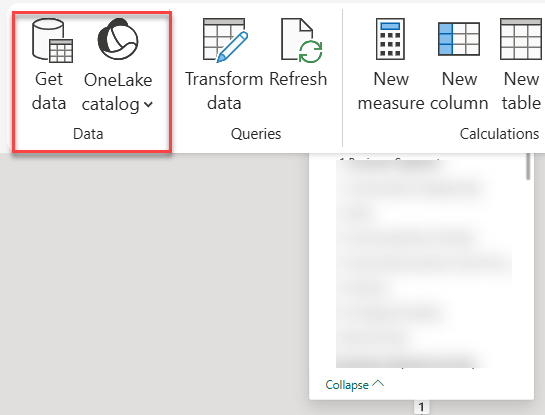
  1. The web modeling experience (currently, the only way to add imported tables using Microsoft tooling) would show the Get Data buttons disabled. After some reverse-engineering of a brand new model, I fixed it my changing the connection expression in the *.bim file to use onelake (previously, it was pointing to a Fabric warehouse).
"expression": [
"let",
" Source = AzureStorage.DataLake(\"https://onelake.dfs.fabric.microsoft.com/44744d84-...\", [HierarchicalNavigation=true])",
  1. If you’re switching many tables from Direct Lake, you can automate this in two ways:
import sempy_labs as sl
from sempy_labs import migration
migration.migrate_direct_lake_to_import(
  dataset="Your_Direct_Lake_Model_Name",
  workspace="Your_Workspace_Name",
  mode="import" # or "directquery"
)
  • C# script in the Tabular Editor
  1. In my case, since there weren’t that many tables, I converted the dimension table partitions manually to “M” partitions, as in this example (change bolded text for each table):
    "partitions": [
{
"name": "Account",
"mode": "import",
"source": {
"expression": [
"let",
" Source = Sql.Database(\"<guid>.datawarehouse.fabric.microsoft.com\", \"<warehouse name>\"),",
" #\"Navigation 1\" = Source{[Schema = \"dbo\", Item = \"DimAccount\"]}[Data]",
"in",
" #\"Navigation 1\""
],
"type": "m"
}
} ]
  1. After switching a partition from Direct Lake to Import in PBI Desktop project and synchronizing to the connected published model, Fabric rejected the change complaining that existing DirectLake table can’t be switched to imported storage. As a workaround, I dropped the connected model.
  2. Being in public review, Composite Direct Lake is rough around the edges. I’ve got various complaints about credentials missing which I fixed in the dataset settings.
  3. Although the documentation says that web modeling is the only tooling experience, Power BI Desktop worked for me as with the Direct Lake only counterpart. However, currently Power Query and Get Data (unless you add the tables directly in *.bim file) is only available on the web.

A “Limited” Performance Note

I know everyone is interested in performance. I did some limited performance tests by tracing a massive query against equivalent Direct Lake Only and Composite Direct Lake models. On a cold cache, Composite outperformed Direct Lake Only by some 20%. On a warm cache, surprisingly I saw the reverse, Direct Lake Only outperforming Composite five to six times. Please don’t take this verbatim. More than likely, your results will vary. For example, in that blog I said that I saw much better performance with SWITCH…CASE in Imported vs Direct Lake. Test!