• The SharePoint 2013 Business Intelligence Center

    February 4, 2013 / No Comments »

    The SharePoint 2013 Business Intelligence Center

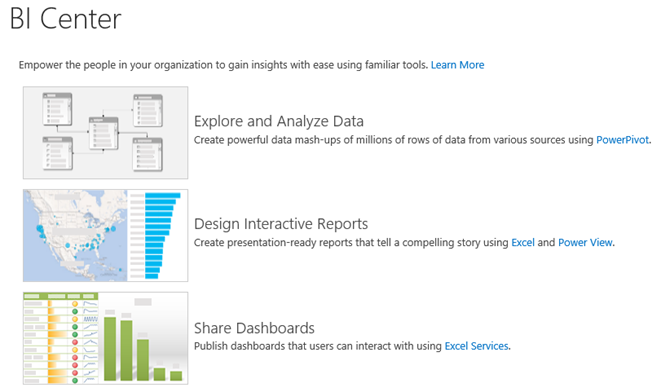
    Where should I put my BI reports? Should I upload them to department-level SharePoint sites or put them in one place? These are common questions that we get from customers. Delivering on the promise of pervasive BI, my preference is to centralize BI artifacts in a single place. Ideally, this BI depository should be the SharePoint Business Intelligence Center. If organizational security is required, you can control security at SharePoint site or library level. For example, you can create department-specific PowerPivot galleries. The BI Center is one of the SharePoint site templates that is specifically designed to host BI reports. In SharePoint 2013, Microsoft has extended the BI Center to accommodate various types of BI documents. When I first installed the BI Center in SharePoint 2013 (click Settings (the wheel in the top-right corner), Site Contents, New Subsite, Enterprise Tab, Business Intelligence Center), I was confused. The images are not...

  • Programming MapReduce Jobs with HDInsight Server for Windows

    December 28, 2012 / 4 Comments »

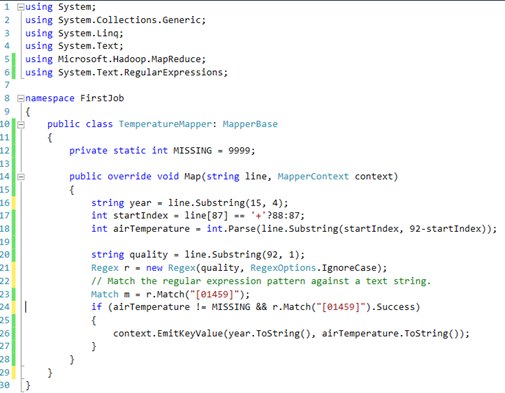
    Programming MapReduce Jobs with HDInsight Server for Windows

    In a previous blog "Installing HDInsight Server for Windows", I introduced you to the Microsoft HDInsight Server for Windows. Recall that HDInsight Server for Windows is a Windows-based Hadoop distribution that offers two main benefits for Big Data customers: An officially supported Hadoop distribution on Windows server – Previously, you can set up Hadoop on Windows as an unsupported installation (via Cygwin) for development purposes. What this means for you is that you can now set up a Hadoop cluster on servers running Windows Server OS. Extends the reach of the Hadoop ecosystem to .NET developers by allowing them to write MapReduce jobs in .NET code, such as C#. And, in previous blogs, I've introduced you to Hadoop. Recall that there are two main reasons for using Hadoop for storing and processing Big Data: Storage – You can store massive files in a distributed and fault-tolerant file system (HDFS) without...

  • Happy Holidays!

    December 26, 2012 / No Comments »

    Happy Holidays!

    As another year is winding down, it's time to review and plan ahead. 2012 was a great year for both Prologika and BI. On the business side of things, we achieved Microsoft Gold BI and Silver Data Platform competencies. We added new customers and consultants. We completed several important projects with Microsoft acknowledging two of them. 2012 was an eventful year for Microsoft BI. SQL Server 2012 was released in March. It added important BI enhancements, including Power View, PowerPivot v2, Reporting Services End-User Alerting, Analysis Services in Tabular mode, Data Quality Services, Integration Services enhancements, MDS Add-In for Excel, Reporting in the Cloud, and self-service BI for Big Data with the Excel Hive add-in. The next BI wave came with Office 2013 and added important organizational and self-service BI features, including PowerPivot Integration in Excel 2013, Power View Integration in Excel 2013, Excel updatable web reports in SharePoint, productivity...

  • DAXMD Goes Public!

    November 30, 2012 / No Comments »

    Microsoft announced yesterday the availability of the Community Technology Preview (CTP) of Microsoft SQL Server 2012 With Power View for Multidimensional Models (aka DAXMD). As a participant of the CTP program and I'm very excited about this enhancement. Now customers can leverage their investment in OLAP and empower business users to author Power View ad-hoc reports and dashboards from Analysis Services cubes. Previously, Power View supported only PowerPivot workbooks or Analysis Services Tabular models as data sources. I'm not going to repeat what T.K. Anand said in the announcement. Instead, I want to emphasize a few key points: This CTP applies only to the SharePoint-version of Power View. Excel 2013 customers need to wait for another release vehicle to be able to connect Power View in Excel 2013 to cubes. You'll need to upgrade both the SharePoint server and SSAS server because enhancements were made in both Power View and...

  • Atlanta BI Group Meeting on Monday, December 3rd

    November 29, 2012 / No Comments »

    I'll be presenting What's New in Excel 2013 and SharePoint 2013 BI at our Atlanta BI Group on Monday, December 3rd. Microsoft has recently released the 2013 version of Excel and SharePoint. Both technologies include major enhancements for self-service and organizational BI. Join us to review these new features. Learn how business users can quickly analyze and understand data in Power Pivot which is now natively supported by Excel. See how Power View enables rich data visualization and having fun with data both on the desktop and server. Understand the new Excel and SharePoint features for organizational BI that opens new opportunities for analyzing OLAP and Tabular models.

  • Geocoding with Power View Maps

    November 29, 2012 / No Comments »

    Geocoding with Power View Maps

    As I wrote before, Power View in Excel 2013 and SharePoint with SQL Server 2012 SP1 supports mapping. The map region supports geocoding and it allows you to plot addresses, countries, states, etc, or pairs of latitude-longitude coordinates. The key for getting this to work is to mark the columns with appropriate categories. Using latitude-longitude If you have a SQL Server table with a Geography data type, you can extract the latitude and longitude as separate columns. SELECT SpatialLocation.Lat, SpatialLocation.Long FROM Person.Address Once you import the dataset in PowerPivot, make sure to categorize the columns using the Advanced tab. The map region doesn't support grouping on latitude-longitude so you can't just place them in the Latitude-Longitude zones and expect it work. Instead, you have to add another field, such as address or both the Latitude-Longitude combination to the Location field. The map groups on the Location zone but uses the...

  • Book Review “Microsoft SQL Server 2012 Analysis Services – The BISM Tabular Model”

    November 26, 2012 / No Comments »

    I've recently had the pleasure to read the book "Microsoft SQL Server 2012 Analysis Services – The BISM Tabular Model" by Marco Russo, Alberto Ferrari, and Chris Webb. The authors don't need an introduction and their names should be familiar to any BI practitioner. They are all well-known experts and fellow SQL Server MVPs who got together again to write another bestseller after their previous work "Expert Cube Development with Microsoft SQL Server 2008 Analysis Services". The latest book was published about five months after my book "Applied Microsoft SQL Server 2012 Analysis Services: Tabular Modeling". Although both books are on the same topic, we didn't exchange notes when starting on the book projects. In fact, I was well into writing mine when I learned on the SSAS insider's discussion list about the trio's new project. Naturally, you might think that the books compete with each other but after reading...

  • SQL PASS 2012 Day 1 Announcements

    November 8, 2012 / No Comments »

    I hope you watched the SQL PASS 2012 Day 1 Keynote live. There were important announcements and I was sure happy to see BI being heavily represented. For me, the most important ones were: The availability of SQL Server 2012 Service Pack 1 For some reason, this announcement went without being applauded from the audience although in my opinion it was the most important news from the tangible deliverables. First, I know that many companies follow the conventional wisdom and wait for the first service pack before deploying a new product. Now the wait is over and I expect mass adoption of SQL Server 2012. At Prologika, we've been using SQL Server 2012 successfully since it was in beta and I wholeheartedly recommend it. Second, SP1 is a prerequisite for configuring BI in SharePoint 2013, as I explained previously. Indeed, I downloaded and run the setup and I was able...

  • Installing HDInsight Server for Windows

    November 1, 2012 / No Comments »

    Installing HDInsight Server for Windows

    As you've probably heard the news, Microsoft rebranded their Big Data offerings as HDInsight that currently encompasses two key services: Windows Azure HDInsight Service (formerly known as Hadoop-based Services on Windows Azure) – This is a cloud-based Hadoop distribution hosted on Windows Azure. Microsoft HDInsight Server for Windows – A Windows-based Hadoop distribution that offers two main benefits for Big Data customers: An officially supported Hadoop distribution on Windows server – Previously, you can set up Hadoop on Windows as an unsupported installation (via Cygwin) for development purposes. What this means for you is that you can now set up a Hadoop cluster on servers running Windows Server OS. Extends the reach of the Hadoop ecosystem to .NET developers and allows them to write MapReduce jobs in .NET code, such as C#. Both services are available as preview offerings and changes are expected as they evolve. The Installing the Developer...

  • Hadoop and Big Data Tonight with Atlanta BI Group

    October 29, 2012 / No Comments »

    Atlanta BI Group is meeting tonight. The Topic is Hadoop and Big Data by Ketan Dave and our sponsor is Enterprise Software Solutions. With wide acceptance of open source technologies , Hadoop/Map Reduce has become a viable option when it comes implementing the 100 of Terabytes to Petabytes of Data solutions. Scalability, Reliability , Versatility and Cost benefits of Hadoop based system is replacing traditional approach of data solutions. Microsoft has partnered with Hadoop vendors, have recently made announcements to make data on Hadoop accessible by Excel, easily linked to SQL Server and its business intelligence, analytical and reporting tools for business intelligence and managed through Active Directory. I hope you can make it!

Training

We offer onsite and online Business Intelligence classes! Contact us about in-person training for groups of five or more students.
For more information or to register click here!

Books

Learn Power BI at your own pace with our latest book Applied Microsoft Power BI. Targeting information workers, data analysts, pros, and developers, It is designed as an easy-to-follow guide for learning how to implement BI solutions spanning the entire personal-team-organizational BI spectrum.

Syndication