-
Presenting at SQL Server Special Ops Tour Atlanta
March 2, 2012 / No Comments »
I've been honored to be selected by Microsoft to present the Self-service BI using PowerPivot and Power View session for the SQL Server Special Ops Tour in Atlanta on Monday, March 5th. EVENT AGENDA Agenda Speaker 12:30pm – 1:30pm Registration Opens 1:30pm – 2:30pm SQL Server 2012 – The New World of Data Dandy Weyn – FTE – Sr. Tech Prod Mgr 2:30pm – 3:15pm Introduction to SQL Server 2012 AlwaysON – Availability Groups Geoff Hiten – MVP – Community 3:15pm – 3:30pm Break – drinks and light snacks 3:30pm – 4:15pm Self-Service BI using PowerPivot and Power View Teo Lachev – MVP – Community 4:15pm – 4:45pm Understanding Microsoft Training & Certifications for Microsoft SQL Server 2012 Bob Taylor – FTE – Principal PFE 4:45pm – 5:15pm In Summary All speakers Join us to celebrate SQL Server 2012!
-
Finding Reporting Services Service in SharePoint
March 2, 2012 / No Comments »
SharePoint is a like an ocean – the further you go, the deeper it gets Ancient proverb Scenario: Configure SQL Server 2012 Reporting Services on a multi-server SharePoint farm with the following topology: WEB1 – Web front-end Server 1 WEB2 – Web front-end Server 2 APP1 – Application server 1 that hosts the Central Administration site APP2 – Needs SSRS 2012 APP2 – Needs SSRS 2012 Issue: I couldn't find the SQL Server Reporting Services Service Application option when I expanded the New button in Central Administration ð Manage Service Applications Resolution: Although the SQL Server 2012 Reporting Services service and Reporting Services Add-in were installed on APP2 and APP3, the SQL Server Reporting Services service wasn't registered at a farm level. As a result, I couldn't find the SQL Server Reporting Services Service in Central Admin -> Manage Services on Server on none of the application servers. As it...
-
Presenting Personal BI with PowerPivot v2
February 23, 2012 / No Comments »
I'll be presenting "Personal BI with PowerPivot v2" for the Atlanta BI Group on Monday, February 27th. Join us to learn when personal BI makes sense and why PowerPivot is the best tool on the market when it does. The focus will be on the new features of PowerPivot version 2 which launch officially in a week or so. For more information and to register visit our Atlanta BI home page.
-
Announcing My New Book
February 11, 2012 / No Comments »
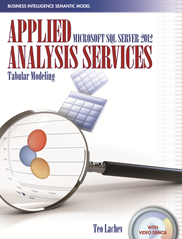
My new book, Applied Microsoft SQL Server 2012 Analysis Services (Tabular Modeling), will start shipping in a week with all popular resellers, such as Amazon, B&N, etc. I've been working on it for a few months and I'm excited to have it done. While waiting to buy the book, check the following resources to get you started with PowerPivot and Tabular: - A sample chapter – "Introducing Business Intelligence Semantic Model" - Video demos – I recorded over three hours of video content for selected exercises in the book An insightful tour that provides an authoritative yet independent view of this exciting technology, this guide introduces the Tabular side of the innovative Business Intelligence Semantic Model (BISM) that promotes rapid professional and self-service BI application development. Business analysts and power users will learn how to integrate data from multiple data sources, implement self-service BI applications with Excel, and deploy them...
-
ProcessUpdate and Partition Scans
February 7, 2012 / No Comments »
I'm working on minimizing the cube processing for a cube with some two billion rows in a fact table. I put together an ETL package that processes the dimensions with ProcessUpdate following by processing the latest partitions. I've noticed that processing one of the dimensions , which happens to be the largest (some 1 million rows) and most complicated dimension, resulted in partitions scans. The SQL Profiler showed the scans with the following events: Finished processing the '<partition name>' partition These partition scans don't result in SQL queries to the database and normally should execute pretty fast. In this case, however, the scans were taking plenty of time resulting in some 15 minutes delay in the incremental processing flow. With some help from T.K. Anand, it turned out that I had a design issue with that dimension. I discovered the issue by changing the KeyDuplicate error in the dimension ErrorConfiguration...
-
Record Attendance for Atlanta BI Group Last Night
February 1, 2012 / No Comments »
We had the pleasure to have some 70 people attending our January 30th, 2012 meeting of the Atlanta BI group. Our sponsor, Matrix Resources, was kind enough to give us the auditorium. FisionIO sponsored the meeting. Phil Per-Lee did us a "Prototypes with Pizza" presentation, titled Connecting the Dots. And, Carlos Rodrigues rocked the stage with the main presentation about dimensional modeling. I've uploaded pictures to the Photo Gallery section of our website and the slides to the Resources section. We've got some cool presentations lined up for next few months. Check our Calendar section to see what's coming.
-
Downloading Multiple Files from SharePoint using WebDav
January 19, 2012 / No Comments »
I had to download many ASP.NET pages from the SharePoint Pages library that were used to wrap up the Reporting Services ReportViewer webpart. I wanted the pages as files, so I could deploy them to another SharePoint server. Unfortunately, SharePoint doesn't support selecting and downloading multiple files. But, it does support the WebDAV protocol. Open Windows Explorer and type in the following URL: \\<SharePoint site>\<library> Example: \\elitex\Pages, where elitex is the SharePoint server and Pages is the document library. Windows Explorer shows all documents in the library. From there on, just copy the files you need to another folder. The only caveat is that you need to make sure the WebClient Windows service is running on your laptop. If you're trying to connect from Windows 2008 Server, then make sure the Desktop Experience role is installed as well, which installs that WebClient service.
-
Subscription and Alerts Issues with Analysis Services in SQL Server 2012
January 17, 2012 / No Comments »
As you probably now, Reporting Services doesn't allow you to create subscriptions with data sources that use Windows security because subsbscriptions are run in unattended mode. Moving to SQL Server 2012, we'll add Data Alerts to the list. This presents an issue if you use Analysis Services which only supports Windows security. The only option is to use Stored Credentials with the "Use as Windows credentials" checkbox checked. You won't able to pass the user identity by checking "Set execution context to this account". As with previous releases, "Set execution context to this account" works with the SQL Server data but it doesn't work with the Analysis Services provider. I raised this issue to Microsoft and I posted a bug report. The issue is under investigation but it's unlikely to get fixed before SQL Server 2012 ships. Please vote!
-
Online PowerPivot Class
January 13, 2012 / No Comments »
I am teaching my online Applied PowerPivot class for personal and team business intelligence on Jan 24th and 25th and there are still seats available.
-
Happy New Year 2012!
December 31, 2011 / No Comments »
As 2011 is winding down, it's time to reflect on the past and plan for the future. 2011 has been a very exciting year for Microsoft BI and me. Gartner positioned Microsoft as a leader in the 2011 Magic Quadrant for Business Intelligence Platforms. Although SQL Server 2012 will technically ship early next year, we can say it's a done deal as it's currently in a release candidate phase. The most important news from a BI perspective is the evolution of the Business Intelligence Semantic Model (BISM), which an umbrella name for both Multidimensional and Tabular models. The Tabular model provides us with a nice personal (PowerPivot for Excel)-team (PowerPivot for SharePoint)-organizational (Analysis Services Tabular) continuum on a single platform. Power View extends the BI reporting toolset with a sleek web-based reporting tool for authoring highly interactive and presentation-ready reports. In its second release, Master Data Services (MDS) comes out...

We offer onsite and online Business Intelligence classes! Contact us about in-person training for groups of five or more students.