Scenario: You need to personalize the captions of calculated members or/and KPIs of an SSAS cube. For example, a solution vendor may need to deploy a cube to multiple clients. Instead of maintaining separate cube definitions, the vendor may prefer to change the captions of certain calculated members and KPIs per client. There wasn't a good story in SSAS 2005 about such requirements. In SSAS…
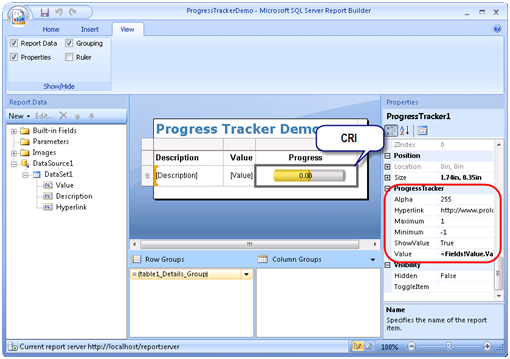
As I mentioned in my previous blog, Report Builder 2.0 RC1 has arrived. Although perhaps too early in the game, you may wonder how you can get the most out of Report Builder 2.0 and extend it when the built-in features are not enough. As Report Designer and Report Builder 2.0 share the same design surface, you may believe that they are equally extensible. Unfortunately,…
Thanks to Robert Bruckner's blog, I've learned that the Report Builder 2.0 (previously known as Report Designer Preview) Release Candidate 1 is available for download. This should be a feature-complete build of Report Builder 2.0, which is scheduled for official release in October. IMO, Report Builder 2.0 is one of most exciting features of Reporting Services. I expect it to blur the "great divide" between…
A few readers are asking about the whereabouts of my book Microsoft SQL Server 2008 Reporting Services, so I felt I need to write a short status report. The book is printed and it's on stock with the distributor. It's making its way slowly-y-y to the retail network. It turns out there are lots of things that need to happen before the book is finally…
There is a nasty known bug with SSAS 2008, where if a query that requests two measures with Sum and LastNonEmpty aggregate functions side by side and the query uses NON EMPTY (which all OLAP clients use by default), the server forces the measure with the SUM function to display empty. Steps to repro: Use the Analysis Services Tutorial cube (Lesson 10) which is included…
With the official release of SQL Server 2008, Microsoft retired the RC0 Feature Pack and added the SQL Server 2008 Feature Pack, August 2008 page. Unfortunately, the Report Builder 2.0 link got dropped along the way. Microsoft is aware of this issue and is planning to add a release candidate page for Report Builder 2.0 feature pack available for download toward the end of August.…
A new week comes with new issues... I ran into an interesting issue today with Windows integrated security and SharePoint. I was troubleshooting an issue on a behalf of a Windows user that connects to an SSAS server. To repro the issue, I used the SharePoint "Sign in as a different user" feature. To facilitate testing, I decided to save the password in the standard…
Microsoft released a Microsoft SQL Server 2008 Feature Pack, August 2008 page which includes a collection of stand-alone install packages that provide additional value for SQL Server 2008. Strangely, Report Builder 2.0 is excluded and nowhere to be found since the RC0 page has been taken offline. Update 8/7/2008: A RC for Report Builder 2.0 feature pack will be available for download toward the end…
Today, Microsoft announced that official release of SQL Server 2008. Build #10.0.1600.22 has been declared as a SQL Server RTM. SQL Server 2008 includes major enhancements to the Microsoft Business Intelligence Stack, some of which I have mentioned in my previous posts. Note that if you have Visual Studio 2008 on your machine, you must wait for a few more days to get the official release…
An interesting question has pop up on the Katmai RS 2008 discussion list today about how to implement a "green bar" group-level report that alternates background color for all rows in a group instance instead of doing this for each row. I attach the report sample I posted. What makes it interesting is that it demonstrates report variables – a new feature in RS 2008.…