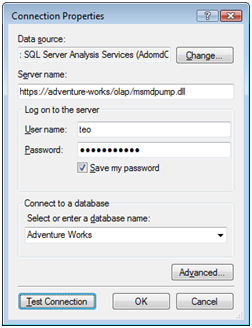
With risk to iterate the obvious, here is a lesson learned from the trenches: Scenario: You want to let external users browse an Analysis Services cube over the Internet. Setup: You have followed the steps in the Configuring HTTP Access to SQL Server 2005 Analysis Services on Microsoft Windows Server 2003 article by Edward Melomed to set up Analysis Services for HTTP connectivity. Issue: Windows…
Robert Bruckner on the Reporting Services team has started a blog. Robert oversees several key areas of Reporting Services, including Report Definition Language (RDL), data processing, report processing, data visualization, and performance/scalability. Many of you have gotten help from Robert on the Reporting Services discussion lists to which he frequently contributes. So, this sure it's going to be a must-read blog as his first posts…
A quick update on my book Applied Microsoft SQL Server 2008 Reporting Services. I am happy to announce that the work on the manuscript is over and the manuscript RTM'd (released to manufacturing). The paper copy should be available on the reseller sites and brick and mortar stores around the publication date (August 15th). Expect the ebook version around that time as well. Of course,…
Here is an awesome tip courtesy to the Craig Guyer's I Command Thee blog. You probably know that Visual Studio supports project configurations. In BIDS 2008, you can automate report deployment with configurations. For example, the following command deploys the solution using the settings of the QA configuration. C:\>devenv "C:\Books\RS2008\Code\ch03\Reports\Reports.sln" /deploy QA This is especially useful when automating deployment to SharePoint because you need to…
Courtesy to Francois Ajenstat, Director of Product Management for Microsoft SQL Server, we know that SQL Server 2008 is on the August price list. What this probably means according to my interpretation is that the SQL Server 2008 RTM date is close. More than likely, SQL Server 2008 will be released in August.
One of the new features in Reporting Services 2008 that debuted in the SQL Server 2008 RC0 build is the enhanced textbox report item. In previous releases, if you wanted to mix static and dynamic expression-based text, you either needed multiple textboxes or a Visual Basic expression to concatenate strings together. The first approach led to textbox "explosion". The disadvantage of the second approach was…
Microsoft has refreshed the product samples and AdventureWorks databases. I still have to figure out what's the AdventureWorksAS2008 database that is not released yet.
Today, Microsoft released an updated feature pack for SQL Server 2008 RC0. Among other things, it includes: A web downloadable installer for Report Builder 2.0 which is not included anymore with the SQL Server 2008 setup An updated version of the RS add-in for SharePoint Analysis Services 10.0 OLE DB Provider
Microsoft declared build #1442.32 to be the official SQL 2008 RC0 build and made it publicly available. Key SSRS improvements in this build: Rich text formatting. You can now format the text inside a textbox with different styles. Report Wizard to let the user auto-generate the report definition. Fully functional MDX Query Designer. An updated build of the Report Builder 2.0 (aka Report Designer Preview)…