-
Trying to Communicate
December 23, 2007 / No Comments »
Visual Studio 2008 embraces the exciting new world of Windows Communication Foundation (WCF) for communicating with services. However, pitfalls await the unwary. I've recently tackled invoking the Reporting Services Web service with WCF and I want to share my findings. The Visual Studio Add Web Reference menu has been renamed to Add Service Reference to denote that WCF can communicate with much more than Web services, including probably my Zune device. Although the dialog has somewhat changed, you will be find your way to generate the proxy. What's more surprising is that the auto-generated proxy methods now have somewhat different signatures. For example, the SQL Server Books Online has the following signature of the Reporting Services GetExecution Options API. public ExecutionSettingEnum GetExecutionOptions (string Report,out ScheduleDefinitionOrReference Item); Yet, WCF generates the following signature: public ServerInfoHeader GetExecutionOptions(string Report, out ExecutionSettingEnum executionOption, out ScheduleDefinitionOrReference Item); So, the returned value becomes an out parameter...
-
Analysis Services Many-to-Many Dimensions: Query Performance Optimization Techniques Whitepaper Available
December 22, 2007 / No Comments »
The Microsoft CAT team has released a new whitepaper Analysis Services Many-to-Many Dimensions: Query Performance Optimization Techniques. "Many-to-many dimension relationships in SQL Server 2005 Analysis Services (SSAS) enable you to easily model complex source schemas and provide great analytical capabilities. This capability frequently comes with a substantial cost in query performance due to the runtime join required by Analysis Services to resolve many-to-many queries. This best practices white paper discusses three many-to-many query performance optimization techniques, including how to implement them, and the performance testing results for each technique. It demonstrates that optimizing many-to-many relationships by compressing the common relationships between the many-to-many dimension and the data measure group, and then defining aggregations on both the data measure group and the intermediate measure group yields the best query performance. The results show dramatic improvement in the performance of many-to-many queries as the reduction in size of the intermediate measure group...
-
Brian Welcker Leaving SSRS
December 17, 2007 / No Comments »
As he posted here, Brian Welcker (Group Program Manager of Reporting Services) is leaving the Reporting Services team and moving to the Microsoft Healthcare Solutions Group. Brian did so much to build and promote Reporting Services. SSRS wouldn't have been the same if it wasn't for Brian. The technical community (myself included) will surely miss him. Let's wish Brian good luck with his new career!
-
Relational Guide to Monitoring and Analyzing with Microsoft Office PerformancePoint Server 2007
December 16, 2007 / No Comments »
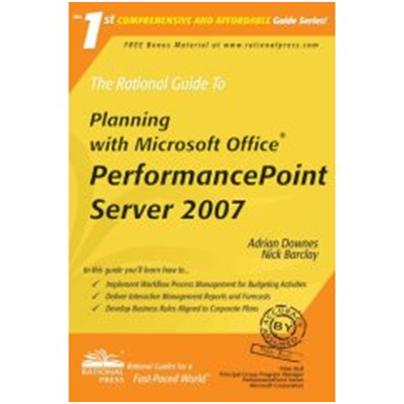
As you know, business scorecards are the latest BI craze. Nick Barclay was kind enough to send me a copy of his new book Monitoring and Analyzing with Microsoft Office PerformancePoint Server 2007 by Rational Press which he co-authored with a co-worker and friend Adrian Downes. This is one of these relatively-small and very practical books which helps you hit the ground running quickly. As its name suggests, the book focuses only on the monitoring and analyzing piece of PerformancePoint which was previously known as Business Scorecard Manager. Nick and Adrian wrote another book, the Rational Guide to Planning with Microsoft Office PerformancePoint Server 2007, which covers the Biz# portion of the product. I liked the author style and the practical examples included in the book. The authors show you how to build scorecards from a variety of data sources and deploy them to SharePoint or Reporting Services reports. I...
-
Getting Rid of the Vista Credentials Prompt
December 6, 2007 / No Comments »
There could be 1001 reasons why IE asks you for credentials when you access a website configured for Windows Authentication and none of them has to do with Reporting Services itself. Windows Vista and IE 7 add yet another one. IE 7 will prompt you for credentials if your computer is not added to a domain and you access a local website configured for Windows Authentication, such as http://localhost/reports. Thanks to the help from James Wu on the SSRS team and Bryan Noyes's blog, the solution is simple. Open IE and go to Tools, Internet Options, Security tab. Select the Local Intranet zone. Press the Sites button. Unselect the Automatically detect intranet network checkbox and check the three checkboxes below it. Restart IE. Now http://localhost/Reports or http://localhost/ReportServer shouldn't prompt for credentials. If it still prompts and you have SQL Server 2008 installed, it could be an issue with Kerberos. To...
-
Performance Improvements for MDX in AS 2008
November 26, 2007 / No Comments »
Here is a useful page from the SQL Server 2008 BOL that summarizes the SSAS performance improvements in Katmai pretty well. It also shows which functions are optimized. For example, the Lag function wasn't optimized in 2005 but now is.
-
Radius Producer "Produces" No-nonsense SSAS Support
November 21, 2007 / No Comments »
In my opinion, the biggest challenge the Microsoft BI initiative faces today is the inadequate support for Analysis Services. The premimum Microsoft reporting tools claim to support SSAS but they all take an idependent view about what features they should support or not. To make things worse, even supported features turn out to be not "supported" enough and subsequenly declared as "by design" or known limitations. This cripples UDM and forces customers to look outside the Microsoft BI stack, hoping to find third-party tools to fill in the gap. Recently, I had the pleasure to take a look at the pre-release bits of the Radius Producer by 90 Degree Software. Those of you who installed the November CTP of SQL Server 2008 and played with the standalone Report Designer, will undoubtedly find many similarities between both tools, in terms of artchitecture, designer experience, even look and feel. One feature that...
-
SQL Server 2008 November CTP Is Out
November 19, 2007 / No Comments »
The November CTP (CTP5) of SQL Server 2008 is out. Here are the most significant BI-related highlights that caught my attention. Reporting Services The standalone Report Designer has undergone a major facelift. It now sponsors a shiny Office 2007 ribbon interface. It will surely charm end users who are planning to use the standalone Report Designer for ad hoc reporting. The bad news is that there is still much integration work ahead. For example, the Analysis Services and custom data processing extensions are not integrated yet. Further, only the Dundas chart component has made the CTP5 cut. Nevertheless, I am very excited about the standalone Report Designer and its long-term potential to unite professional and end-user reporting needs. Analysis Services The block computation enhancements debut in CTP5. Based on my experiments, they result in 50-60 percent and more improvement in query response times. For example, a highly inefficient Report Builder...
-
Parameterized Parameter Prompts
October 18, 2007 / No Comments »
One new SSRS 2008 feature that international users will undoubtedly appreciate is parameterized parameter prompts. Previously, the parameter prompts were static. In SSRS 2008, you will notice the familiar function symbol (fx) next to the parameter prompt which means that the prompts can be expression-based. This allows the report author to change the parameter prompt caption at runtime. For example, you can retrieve the localized version of the parameter prompt from an external resource assembly based on the user language. UPDATE 03/27/2009 This feature didn't make it to the release version of SSRS 2008. SSRS 2008 doesn't support expression-based parameter prompts. The feature has been slated to a future release.
-
NEB Revenge in Katmai
October 9, 2007 / No Comments »
An advanced SSAS performance-related feature is Non Empty Behavior (NEB) which has been discussed in many places including this Mosha's blog. The issue with NEB in SSSAS 2005 is that you can very easily get it wrong. The server will trust you (this could be an optimistic assumption) and accept a NEB even if it's not correct. Example: CREATE MEMBER CURRENTCUBE.[Measures].[Profit Gap To Prior Period] AS [Measures].[Profit]-([Date].[Calendar].PrevMember, [Measures].[Profit]), FORMAT_STRING = "#,#;(#,#)", NON_EMPTY_BEHAVIOR = { [Measures].[Profit]}, VISIBLE = 1; Here, the intention is to default the expression for the Profit Gap To PriorPeriod calculated member to NULL if Profit is NULL. But the expression may be not be NULL even if Profit is NULL. This can yield incorrect results in 2005. In 2008, optimizations were made that don't use the NEB expression. The net effect is that some calculated members that use wrong NEBs can produce different, albeit correct, results in 2008....

We offer onsite and online Business Intelligence classes! Contact us about in-person training for groups of five or more students.