SQL Server Magazine published the second part of my Protect UDM with Dimension Data Security article in the October issue of the magazine. In this article, I explain how to use MDX expressions to implement dynamic dimension security. I discuss two practical approaches for meeting advanced requirements for securing UDM data. First, I present a solution in which the security policies are stored in a…
If your organization can afford SAN, here is another best practices article by Carl Rabeler from the SSAS team. The Scale-Out Querying with Analysis Services Using SAN Snapshots article "describes the use of virtual copy SAN snapshots in a load-balanced scalable querying environment for Microsoft SQL Server 2005 Analysis Services to increase the number of concurrent queries to Analysis Services servers with a rapid response…
Those of you preparing for Microsoft exam 70-445 Microsoft SQL Server 2005 Business Intelligence – Implementation and Maintenance may be interested to know that Microsoft Press has just published a training kit with the same title which I co-authored with Erik Veerman, Dejan Sarka, and Javier Loria from Solid Quality Learning. I wrote four of the SSAS chapters. I also took the actual exam prior…
As I mentioned in my Under the Hood post, the SSRS 2008 engine has been redesigned to perform on-demand report processing for better scalability. As a result, textbox values are calculated on-demand every time the containing page is rendered. Irrespective of the on-demand behavior, values of dataset-bound textboxes won't change because the underlying dataset is cached in the report database. Therefore, the end result for…
One of the major themes in SSRS 2008 is scalability. A significant effort will be made to ensure that SSRS scales well with large reports. Why is this needed? Recall that in SSRS 2005 (and 2000), report processing is instance-based. This means that the report engine would process the entire report as a snapshot, including textbox values, styles, etc. As a result, SSRS 2005 reports…
Performance is the most common incentive for using Analysis Services. Yet, despite the advances in the SSAS management tools, optimizing the MDX query performance is still considered as "black magic" by many. Graphical optimization tools similar to the SQL query optimizer and query showplan would definitely help but they are not expected anytime soon. Meanwhile, Microsoft has just published a 60-page whitepaper Identifying and Resolving…
Microsoft launches a preview of a cool search portal dubbed Tafiti to bring the web search to a new level and give Google a run for its money. From FAQ "Tafiti, which means 'do research' in Swahili, is an experimental search front-end from Microsoft, designed to help people use the Web for research projects that span multiple search queries and sessions by helping visualize, store,…
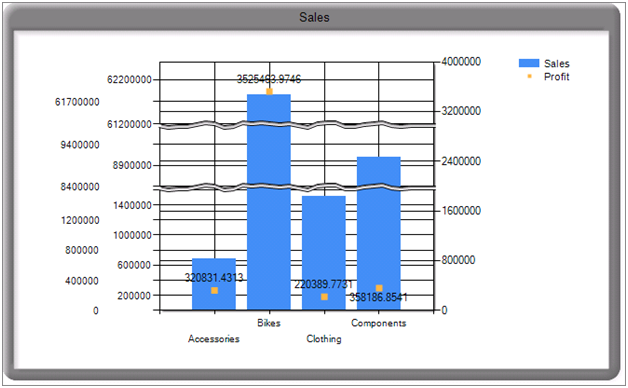
It is old news by now that Microsoft has acquired the intellectual rights to the Dundas Reporting Services controls, including the Dundas chart, map, gauge, and calendar. At this point, it is not known if all controls will make it to Katmai but the chart will definitely will. The July CTP (CTP4) includes a preliminary version of the Dundas chart that has been converted from…
As I mentioned in a previous blog, SQL Server 2008 will probably include an RDL Object Model. This is great news for developers who generate report definitions programmatically. No more custom RDL object models as the one I talked about during my TechEd presentation. The early incarnation of the promised object model is included in the July CTP (CTP4) and resides in the \Microsoft SQL…
Many report developers find the SSAS data provider too restrictive for authoring reports from UDM. Instead, they replace it with the native Microsoft OLE DB Provider for Analysis Services 9.0 which gives them maximum flexibility at the expense of convenience (the query has to be hand-generated, parameters are not supported, extended properties are not available, etc). By default, the OLE DB provider doesn't return the…