• Under the Hood

    August 30, 2007 / No Comments »

    One of the major themes in SSRS 2008 is scalability. A significant effort will be made to ensure that SSRS scales well with large reports. Why is this needed? Recall that in SSRS 2005 (and 2000), report processing is instance-based. This means that the report engine would process the entire report as a snapshot, including textbox values, styles, etc. As a result, SSRS 2005 reports are memory-bound. In general, the memory consumed by SSRS 2005 is proportional to the size of the report. The bigger the report, the more memory it would take. Therefore, large reports won't scale well. In contrast, the SSRS 2008 processing engine processes the reports on-demand. It pre-computes and saves only certain invariants, such as grouping, sorting, filtering, and aggregates. However, textbox values are calculated on-demand every time the containing page is rendered. To test this, drop a textbox on the report and set its value...

  • Identifying and Resolving MDX Query Performance Bottlenecks Whitepaper

    August 29, 2007 / 1 Comment »

    Performance is the most common incentive for using Analysis Services. Yet, despite the advances in the SSAS management tools, optimizing the MDX query performance is still considered as "black magic" by many. Graphical optimization tools similar to the SQL query optimizer and query showplan would definitely help but they are not expected anytime soon. Meanwhile, Microsoft has just published a 60-page whitepaper Identifying and Resolving MDX Query Performance Bottlenecks in SQL Server 2005 Analysis Services by Carl Rabeler and Eric Jacobsen. At first sight this resource looks like a must-read for anyone looking for tips to make that query execute a few seconds faster. From the article summary: "To improve the performance of an individual MDX query that is performing poorly, you must first identify the source(s) of the performance bottlenecks in the execution of the query. This requires that you understand how to use Windows and SQL Server 2005...

  • Microsoft Launches Tafiti

    August 24, 2007 / No Comments »

    Microsoft launches a preview of a cool search portal dubbed Tafiti to bring the web search to a new level and give Google a run for its money. From FAQ "Tafiti, which means 'do research' in Swahili, is an experimental search front-end from Microsoft, designed to help people use the Web for research projects that span multiple search queries and sessions by helping visualize, store, and share research results. Tafiti uses both Microsoft Silverlight and Live Search to explore the intersection of richer experiences on the Web and the increasing specialization of search." The Silverlight-based UI looks pretty sleek.

  • Charting the Future

    August 19, 2007 / No Comments »

    It is old news by now that Microsoft has acquired the intellectual rights to the Dundas Reporting Services controls, including the Dundas chart, map, gauge, and calendar. At this point, it is not known if all controls will make it to Katmai but the chart will definitely will. The July CTP (CTP4) includes a preliminary version of the Dundas chart that has been converted from a custom report item to a native region. Many of the properties are not hooked yet but you can witness some of the new enhancements. Although somewhat unpolished, the following report demonstrates some of these features. The report features two charts in one – a column sales chart and a scattered profit chart. They are projected on two value axes. Having a secondary axis wasn't supported by SSRS 2005. Also, the first value axis has axis breaks. Since the Bikes sales exceed by far the...

  • RDL Object Model on the Horizon

    August 14, 2007 / 3 Comments »

    As I mentioned in a previous blog, SQL Server 2008 will probably include an RDL Object Model. This is great news for developers who generate report definitions programmatically. No more custom RDL object models as the one I talked about during my TechEd presentation. The early incarnation of the promised object model is included in the July CTP (CTP4) and resides in the \Microsoft SQL Server\MSSQL.3\Reporting Services\ReportServer\bin\Microsoft.ReportingServices.RdlObjectModel.dll assembly. DISCLAIMER Before rejoicing too much, recall the usual disclaimer that everything is in a flux and a subject to change. Although here, the RDL Object Model may very well disappear in the final bits. Note that I disclaimed myself let me introduce you to the RDL Object Model (don't try to find it in BOL; long live .NET Reflector!). using System; using System.IO; using Microsoft.ReportingServices.RdlObjectModel; using Microsoft.ReportingServices.RdlObjectModel.Serialization; namespace RDL { class Program { static void Main(string[] args) { string idef = @"C:\Reports\Sales...

  • How to Get Extended Properties with SSAS OLE DB Provider

    August 14, 2007 / No Comments »

    Many report developers find the SSAS data provider too restrictive for authoring reports from UDM. Instead, they replace it with the native Microsoft OLE DB Provider for Analysis Services 9.0 which gives them maximum flexibility at the expense of convenience (the query has to be hand-generated, parameters are not supported, extended properties are not available, etc). By default, the OLE DB provider doesn't return the extended cell properties, such as format and color settings. Thanks to Robert Bruckner from the SSRS team, here is a precious tip to get the extended properties: Append Extended Properties="ReturnCellProperties=true" to the OLE DB connection string of your data source, e.g.: Provider=MSOLAP.3;Data Source=localhost;Initial Catalog="Adventure Works DW";Extended Properties="ReturnCellProperties=true" Request the cell properties in your MDX query as the SSAS provider does, e.g.: SELECT NON EMPTY { [Measures].[Internet Sales Amount], … } ON COLUMNS, NON EMPTY { [Sales Territory].[Sales Territory Group].[Sales Territory Group].ALLMEMBERS , …. } FROM...

  • SQL Server Katmai Reporting Services Forum

    August 14, 2007 / No Comments »

    In case you've missed it, the SSRS team has started a SQL Server Katmai Reporting Services forum and eagerly awaits your feedback.

  • Tablix – The Crown Jewel

    August 13, 2007 / No Comments »

    One of most important enhancements coming up in SQL Server 2008 Reporting Services is the new tablix region. In fact, I dare to predict that many folks will upgrade to SSRS 2008 just to get Tablix. What's tablix anyway? Tablix = Table + Matrix So, tablix combines the flexibility of the table region and the crosstab reporting features of the matrix region. Actually, a tablix is table, matrix, and list all in one but I guess the SSRS team decided to keep the name short. Don't be fooled by the old toolbar buttons because they just provide entry points to the tablix region. If you click the Matrix button, you will get a tablix region preconfigured for crosstab reporting, when you click the Table button you get a table report, and List button will give you a free-form Tablix. So, this is simple. In SSRS 2008, tablix powers all reports....

  • The New Kid on the Block (aka Stand-alone Report Designer)

    August 7, 2007 / No Comments »

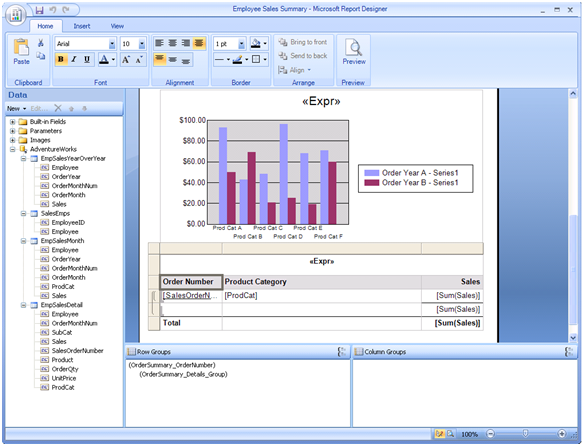
    The need for a stand-alone Report Designer is real. True, developers, including myself, enjoyed the VS.NET Report Designer. But novice users were overwhelmed with the complexity of the VS.NET IDE environment. In addition, not all IT shops rejoiced over the idea to install VS.NET or BIDS just to author reports. Enters the SSRS 2008 stand-alone report designer. As its name suggests, you run this designer completely outside VS.NET. In fact, in CTP4, VS.NET has not been yet integrated with the new designer (it still uses the RS 2005 designer). Therefore, to get the new RDL enhancements in CTP 4, such as tablix, you need to use the stand-alone report designer. Note that stand-alone doesn't mean embeddable. While a future release make this possible, it is unlikely that you will be able to embed the SSRS 2008 designer in custom .NET application. You launch the stand-alone report designer from the Report...

  • The Perfect Host

    August 4, 2007 / No Comments »

    This is my first blog about SSRS 2008. The July CTP (CTP4) of SQL Server 2008 (aka Katmai) includes the new hosting model of Reporting Services. Gone is the dependency to IIS and all the management headaches associated with it. Instead, the SSRS Windows service pulls a nice trick by hosting the http.sys kernel-mode device driver which listens for HTTP requests. Behind the scenes, the SSRS Windows service hosts application domains for the Report Manager and Report Server and forwards the incoming requests to them. You reserve URL addresses for Report Manager and Report Server by using the Reporting Services Configuration utility. If you have ever set up a web site in IIS, you know everything you need to reserve an URL address. The URL address consists of IP address, TCP port, and vroot. You can specify any unreserved port (in Vista and Windows Server 2003+ you can have SSRS...

Training

We offer onsite and online Business Intelligence classes! Contact us about in-person training for groups of five or more students.
For more information or to register click here!

Books

Learn Power BI at your own pace with our latest book Applied Microsoft Power BI. Targeting information workers, data analysts, pros, and developers, It is designed as an easy-to-follow guide for learning how to implement BI solutions spanning the entire personal-team-organizational BI spectrum.

Syndication