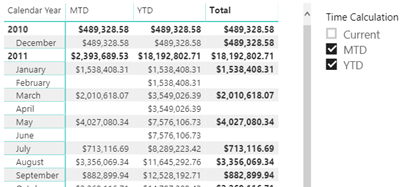
Just when I started thinking that there won't be any new BI features in SQL Server 2019, Christian Wade announced DAX calculation groups in CTP 2.3. His excellent post helped me try them out with Tabular Editor and Power BI Desktop and whip out this cool report. As Chris Webb pointed out, DAX calculation groups let us implement time calculations as in Multidimensional with a…
xVelocity (the storage engine behind Tabular, Power BI and columnstore indexes) is an in-memory columnar database, and it's such it's not suitable for detail-level reports, such as transaction-level reports. I wrote about performance implications with xVelocity and detail-level reporting here and here. In general, the lower the report grain and the more columns you add to the report (customer first name, last name, invoice number,…
I taught my Applied Power BI class last week to a group of smart data analysts. All of them were knowledgeable of T-SQL, which they have been using extensively for years to shape and transform the data and produce SSRS, Qlik and now Power BI reports. They haven't previously used Power Query, but they liked my overview of its features. However, they were rightfully confused…
How expensive is an xVelocity relationship? The answer depends on several factors, such as column cardinality, DAX calculations, and query itself. But it general, a relationship can add a significant overhead. Consider two tables: Customer (7.1 million rows) and Account Snapshot (187 million rows) and a relationship 'Account Snapshot'[CustomerKey] -> Customer[CustomerKey]. I'll use two queries for the test. The Relationship query uses the 'Account Snapshot'[CustomerKey]->Customer[CustomerKey]…
Struggling with DAX? Data Analysis Expressions (DAX) is the expression language of Power BI, Power Pivot, and Analysis Services Tabular. It's very powerful but it's usually perceived as complex and requiring a steep learning curve. Taught by an established expert, this two-day workshop is designed to help you become proficient with DAX. Think of this workshop as advanced Power BI training. Reserve your seat today…
Data Analysis Expressions (DAX) is the expression language of Power BI, Power Pivot, and Analysis Services Tabular. It's very powerful but it's perceived as complex, requiring a steep learning curve. I'm excited to announce a new 2-day "Applied DAX with Power BI" workshop that I designed to help you become proficient with DAX. You'll learn practical skills that will help you tackle a wide range…
Scenario: DAX has its own share of idiosyncrasies that can humble both novice and experienced users. Consider a common example where a measure attempts to return sales for the last date in the Date table. What makes this common is that many real-life calculations require measures that evaluate as of the user-specified date (as of date), which is what MAX('Date'[Date]) returns. =CALCULATE(SUM(Sales[SalesAmount]), MAX(Date[CalendarYear]) ) As…
Struggling with DAX? Data Analysis Expressions (DAX) is the expression language of Power BI, Power Pivot, and Analysis Services Tabular. It's very powerful but it's usually perceived as complex and requiring a steep learning curve. Taught by an established expert, this two-day workshop is designed to help you become proficient with DAX. Think of this workshop as advanced Power BI training. Reserve your seat today to attend this insightful 2-day workshop for only $999, when…
As a part of a semantic model assessment, I got to experiment with different configurations of Azure Analysis Services. In this case, the largest fact table has almost 2 billion rows so it's a good size model. I was particularly interested the correlation between a higher performance tier and query performance. One thing that I like about PaaS is that it's easy to change and…
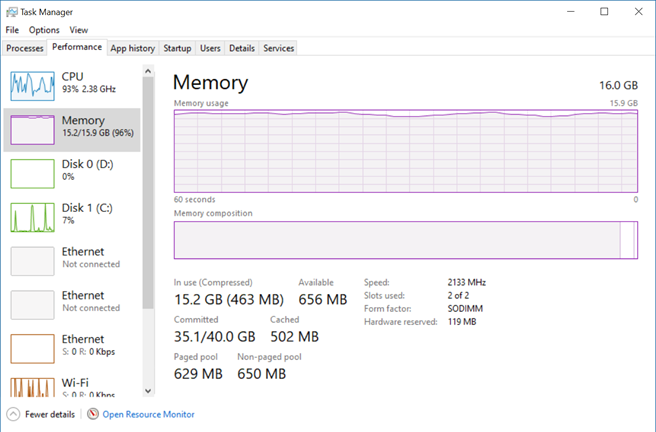
I'm doing an assessment of a data mart and semantic layer for an organizational BI solution. I was given the source of the Analysis Services Tabular model. Upon opening it locally, it took Visual Studio several minutes to open the project. Even worse, after the project was finally loaded, my laptop CPU utilization went into 80-90% and all the 16 GB of memory got exhausted…