MS BI fans, join us for the next Atlanta MS BI and Power BI Group meeting on November 4, Monday, at 6:30 PM at the Microsoft office in Alpharetta. Andy Lawrence will share best practices for impactful Power BI Dashboards. CCG Analytics will sponsor the meeting. For more details, visit our group page and don't forget to RSVP (fill in the RSVP survey if you're planning to attend). Presentation: Best Practices…
Power BI lets you filter the visual data by a measure, such as by a measure that dynamically calculates the customer's rank. This is convenient but there are performance implications related to the way Power BI autogenerates the DAX query. If a visual has a visual-level filter on a measure, Power BI Desktop defines a variable table filter that includes all measures in the visual.…
MS BI fans, join us for the next Atlanta MS BI and Power BI Group meeting on October 7, Monday, at 6:30 PM at the Microsoft office in Alpharetta. Qubole will show us how Presto, Azure Data Lake, and Power BI can be used to analyze Big Data. Qubole will sponsor the meeting. For more details, visit our group page and don't forget to RSVP (fill in the RSVP survey if…
MS BI fans, join us for the next Atlanta MS BI and Power BI Group meeting on September 10, Tuesday, at 6:30 PM at the Microsoft office in Alpharetta. This is a meeting not to miss. A DAX founder, Jeffrey Wang (Principal Software Engineer Manager at the Power BI product group) is coming all the way from Seattle to share DAX best practices with our group! Captech Consulting…
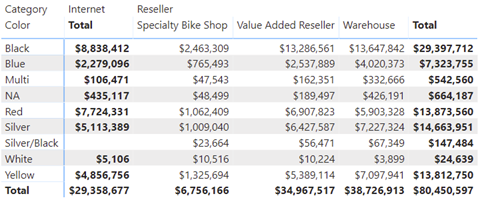
A recent requirement called for an asymmetric crosstab report in Power BI. Transitioned to Adventure Works, the final report looks like this. The Internet column shows the sales amount from FactInternetSales. Then, the matrix pivots on the BusinessType column in the FactResellerSales. Because, Internet sales don't relate to BusinessType, it doesn't make sense to pivot it. Instead, we want to show Internet sales in a…
Scenario: A client reports a memory spike during processing. They have a Tabular semantic model deployed to Azure Analysis Services. They fully process the model daily. The model normally takes less than 50 GB RAM but during processing, it spikes five times and Azure Analysis Services terminates the processing task complaining that it "reached the maximum allowable memory in our pricing tier". Normally, fully processing…
After learning how to model the data properly (the most important skill), DAX would be the next hurdle in your self-service or organizational BI journey. You won't get far in Microsoft BI without DAX. This letter shares a tip on how to identify DAX performance bottlenecks by using a recent feature in Power BI called Performance Analyzer. Learning DAX Before I get to Performance Analyzer,…
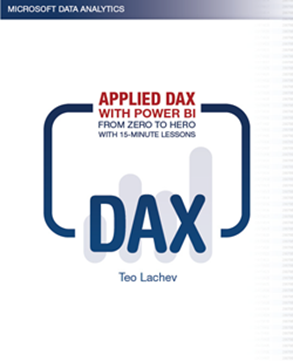
I'm excited to announce my latest book: "Applied DAX with Power BI: From zero to hero with 15-minute lessons". This book was born out of necessity. In my consulting practice, I had been teaching and implementing Power BI and Analysis Services Tabular, and people were constantly asking for DAX book recommendations. Indeed, DAX is not an easy topic and has its ways to humble even…
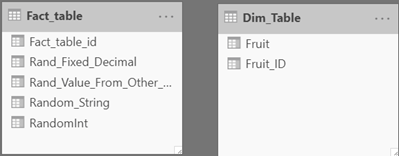
Scenario: You have a dimension table and a fact table, and you want to generate some test data, such by randomly looking up a value from the dimension table for each row in the fact table. The following DAX formula should get the job done but RANDBETWEEN doesn't work (although it works as a standalone function outside LOOKUPVALUE). Specifically, you get either the same value…
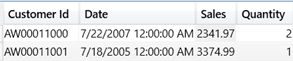
Scenario: If you want to pass an input table to a DAX query. For example, you might have an application that lets the user specify a subset of customers and as-of dates for each customer. Your query needs to calculate certain metrics, such as Sales, for the list of customers but as of the user-specified date for each customer, and potentially other parameters. It's impractical…