Atlanta BI fans, please join us in person for our next meeting on Monday, January 5th at 18:30 ET. Dean Jurecic will show you how Power BI visual calculations can simplify the process of writing DAX. And your humble correspondent will walk you through some of the latest Power BI and Fabric enhancements. Key2 Consulting will sponsor the meeting. For more details and sign up, visit our group page.
Delivery: In-person Level: Beginner/Intermediate Food: Pizza and drinks will be provided
Agenda:
18:15-18:30 Registration and networking
18:30-19:00 Organizer and sponsor time (news, Power BI latest, sponsor marketing)
19:00-20:15 Main presentation
20:15-20:30 Q&A
Overview: Do you sometimes get lost in a sea of complicated DAX and wonder if there is an easier way? Is it difficult to drive self-service reporting in your organization because business users aren’t familiar with the nuances of DAX and Semantic Models? Visual Calculations might be able to help!
Introduced in 2024 and currently in preview, this feature is designed to simplify the process of writing DAX and combines the simplicity of calculated columns with the on-demand calculation flexibility of measures. This session is an overview of Visual Calculations and how they can be used to quickly produce results including:
• Background
• Example Use Cases
• Performance
• Considerations and Limitations
Speaker: Dean Jurecic is a business intelligence analyst and consultant specializing in Power BI and Microsoft Fabric with experience across diverse industries, including utilities, retail, government, and education. Dean is a Fabric Community Super User who holds a number of Microsoft certifications and has participated in the “Ask the Experts” program for Power BI at the Microsoft Fabric Community Conference.
Sponsor: Key2 Consulting is a cloud analytics consultancy that helps business leaders maximize their data. We are a Microsoft Gold-Certified Partner and our specialty is the Microsoft cloud analytics stack (Azure, Power BI, SQL Server).
https://prologika.com/wp-content/uploads/2016/01/logo.png00Prologika - Teo Lachevhttps://prologika.com/wp-content/uploads/2016/01/logo.pngPrologika - Teo Lachev2025-12-30 07:19:272025-12-30 07:19:27Atlanta Microsoft BI Group Meeting on January 5th (Visual Calculations in Power BI)
Atlanta BI fans, please join us in person for our next meeting on Monday, December 1st at 18:30 ET. I’ll show you how to Fabric DirectLake semantic models can help you tackle long refresh cycles and scalability headaches. And your humble correspondent will walk you through some of the latest Power BI and Fabric enhancements. Improving will sponsor the meeting. For more details and sign up, visit our group page.
Delivery: In-person Level: Intermediate Food: Pizza and drinks will be provided
Agenda:
18:15-18:30 Registration and networking
18:30-19:00 Organizer and sponsor time (news, Power BI latest, sponsor marketing)
19:00-20:15 Main presentation
20:15-20:30 Q&A
Overview: Are your Power BI semantic models hitting memory limits? Tired of bending backwards to mitigate long refresh cycles and scalability headaches? Join me for a deep dive into Fabric Direct Lake — a game-changing feature that can help enterprise customers eliminate refreshes, lower licensing cost, and work with production-scale data instantly.
You’ll learn:
-Why Direct Lake is a breakthrough for large semantic models
-How to migrate from Import mode with real-world tools and strategies
-Common pitfalls and how to avoid them
-Performance insights and practical tips from actual project
Bonus: See how AI tools like Grok, Copilot or ChatGPT can streamline your migration process!
Whether you’re a BI pro, data engineer, or decision-maker, this session will equip you with the knowledge to scale smarter, design better, and deliver faster.
Speaker: Teo Lachev is a consultant, author, and mentor, with a focus on Microsoft BI. Through his Atlanta-based company Prologika (a Microsoft Gold Partner in Data Analytics and Data Platform) he designs and implements innovative solutions that bring tremendous value to his clients. Teo has authored and co-authored several books, and he has been leading the Atlanta Microsoft Business Intelligence group since he founded it in 2010. Microsoft has recognized Teo’s contributions to the community by awarding him the prestigious Microsoft Most Valuable Professional (MVP) Data Platform status for 15 years. Microsoft selected Teo as one of only 30 FastTrack Solution Architects for Power BI worldwide.
Sponsor: Prologika (https://prologika.com) helps organizations of all sizes to make sense of data by delivering tailored BI solutions that drive actionable insights and maximize ROI. Your BI project will be your best investment!
https://prologika.com/wp-content/uploads/2016/01/logo.png00Prologika - Teo Lachevhttps://prologika.com/wp-content/uploads/2016/01/logo.pngPrologika - Teo Lachev2025-11-26 14:47:552025-11-28 16:39:00Atlanta Microsoft BI Group Meeting on December 1st (Migrating Semantic Models to Fabric Direct Lake)
Like the Ancient Greek philosopher Diogenes, who walked the streets of Athens with a lamp to find one honest man, I have been searching for a convincing Fabric feature for my clients. As Microsoft Fabric evolves, more scenarios unfold. For example, Direct Lake storage mode could help you alleviate memory pressure with large semantic models in certain scenarios, as it did for one client. This newsletter summarizes the important takeaways from this project. If this sounds interesting and you are geographically close to Atlanta, I invite you to the December 1st meeting of the Atlanta MS BI Group where I’ll present the implementation details.
About the project
In this case, the client had a 40 GB semantic model with 250 million rows spread across two fact tables. The semantic model imported data from a Google BigQuery (GBQ) data warehouse. The client applied every trick in the book to optimize the model, but they’ve found themselves forced to upgrade from a Power BI F64 to F128 to F256 capacity.
I’ve written in the past about my frustration with Power BI/Fabric capacity resource limits. While the 25 GB RAM grant of a P1/F64 capacity for each dataset is generous for smaller semantic models, such as for self-service BI, it’s inadequate for large organizational semantic models. Ultimately, the developer must face gut wrenching decisions, such as whether to split the model into smaller semantic models to obey what are in my opinion artificially low and inflexible memory limits or ask for more money.
We’ve decided to replicate the GBQ data to a Fabric lakehouse and try Direct Lake to avoid the dataset refresh, which requires at least twice the memory. Granted, replicating data is an awkward solution, but currently Direct Lake requires data to be in Delta tables (Fabric Lakehouse, Data Warehouse, or shortcuts to Delta tables, such as in OneLake or Databricks).
Next, we migrated the largest semantic model from import to Direct Lake. You can find the technical details for the replication and migration steps we took in my blog “Migrating Fabric Import Semantic Models to Direct Lake”.
Performance considerations
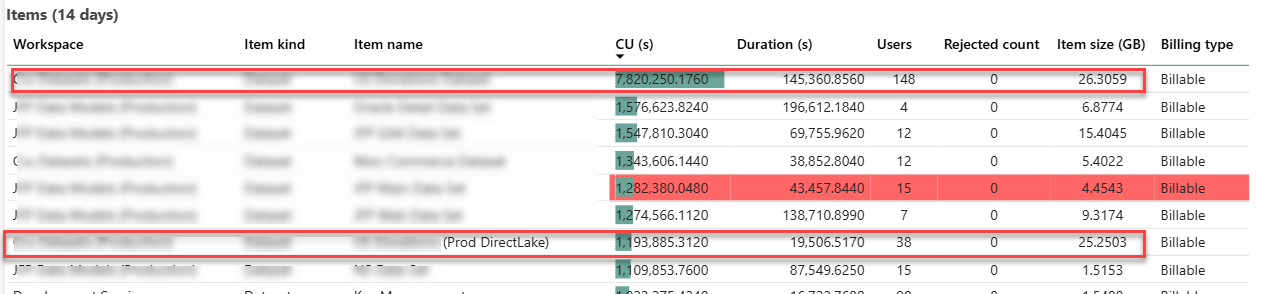
The following screenshot is taken from the Fabric Capacity Metrics app and it shows the maximum metrics over 14 days. The two enclosed items of interest are the original imported semantic model (the first item on the list) and its DL counterpart (the seventh item on the list).
The Direct Lake memory utilization was at a par with the imported model. With 1/5 of the user audience testing the dataset in production environment, that dataset grew to a maximum of 25 GB memory utilization which is in line with the imported model. It could have been interesting to downgrade the capacity, such as to F64, and observe how the DL model would react to memory pressure. However, as shown in the screenshot, the client had other large semantic models that can exhaust the F64 25 memory grant so we couldn’t perform this test.
Again, what we are saving here is the additional memory required for refreshing the model. In a sense, we shifted the model refresh to replicating the data from Google Big Query to a Fabric lakehouse. On the downside, an error during the replication process could leave the replicated tables in an inconsistent state (and user complaints because reports would show no data or stale data) whereas a failure during refreshing the model would fall back on the old model (Fabric builds a new in-memory cache during model refreshing).
We didn’t witness excessive CPU pressure during production testing. Further, the team didn’t notice any report performance degradation or increased CU capacity utilization.
Summary
Assuming you have exhausted traditional methods to alleviate memory pressure, such eliminating high-cardinality column, incremental refresh, etc., Direct Lake is a viable option to conserve memory of Fabric semantic models. However, it may require replicating your data to a Fabric lakehouse or migrating your data warehouse to Fabric so that it uses Fabric storage (Delta Parquet format) required for Direct Lake. If this is a new project and you expect large semantic models, your architecture should strongly consider Fabric Data Warehouse or Lakehouse to take advantage of Direct Lake storage.
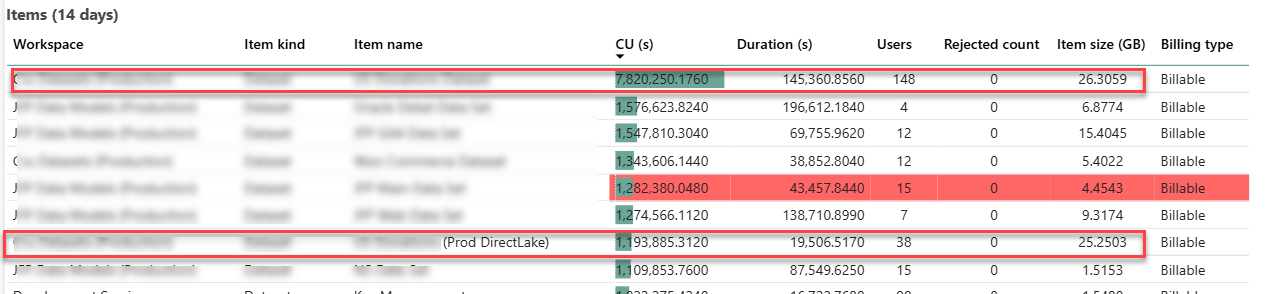
I’ve previously shared my experience with migrating a Fabric imported semantic model to Direct Lake. This blog follows up with additional observations about performance. The following screenshot is taken from the Fabric Capacity Metrics app and it shows the maximum metrics over 14 days. The two enclosed items of interest are the original imported semantic model (the first item on the list) and its DL counterpart (the seventh item on the list).
Memory utilization
As I explained in the first part, the whole reason for taking this epic journey was to solve the out-ot-memory blowouts and constant pressure to climb the Fabric capacity ladder. With 1/5 of the user audience testing the dataset in production environment, that dataset grew to a maximum of 25 GB memory utilization which is in line with the imported model. It could have been interesting to downgrade the capacity, such as to F64, and observe how the DL model would react to memory pressure. However, as shown in the screenshot, the client had other large semantic models that can exhaust the F64 25 memory grant so we couldn’t perform this test.
Again, what we are saving here is the additional memory required for refreshing the model. In a sense, we shifted the model refresh to replicating the data from Google Big Query to a Fabric lakehouse. On the downside, an error during the replication process could leave the replicated tables in an inconsistent state (and user complaints because reports would show no data or stale data) whereas a failure during refreshing the model would fall back on the old model (Fabric builds a new in-memory cache during model refreshing).
The team is currently exploring options to mitigate failures during replications, including incremental replication or using the Delta time-travel features. Replication errors aside, eliminating model refresh is a huge win.
CPU utilization
A while back, I got some feedback that an organization that attempted to switch to Direct Lake found that the capacity CPU utilization increased significantly causing them to revert to import mode.
I didn’t witness CPU pressure during production testing. Further, the team didn’t notice any report performance degradation or increased CU capacity utilization. If I must guess that organization didn’t force the model to Direct Lake Only, causing the model to go back between Direct Lake and Direct Query under certain conditions.
Summary
Assuming you have exhausted traditional methods to alleviate memory pressure, such eliminating high-cardinality column, incremental refresh, etc., Direct Lake is a viable option to conserve memory of Fabric semantic models. Unfortunately, it may require replicating your data to a Fabric lakehouse or migrating your data warehouse to Fabric so that it uses Fabric storage (Delta Parquet format) required for Direct Lake. If this is a new project and you expect large semantic models, your architecture should consider Fabric Data Warehouse or Lakehouse to take advantage of Direct Lake storage for your semantic models.
https://prologika.com/wp-content/uploads/2016/01/logo.png00Prologika - Teo Lachevhttps://prologika.com/wp-content/uploads/2016/01/logo.pngPrologika - Teo Lachev2025-08-24 18:04:052025-08-24 18:04:05Migrating Fabric Import Semantic Models to Direct Lake (Part 2)
I’ve recently written about strategies for addressing memory pressures with Fabric large semantic models and I mentioned that one of them was switching to Direct Lake. This blog captures my experience of migrating a real-life import semantic model to Direct Lake.
About the project
In this case, the client had a 40 GB semantic model with 250 million rows spread across two fact tables. The semantic model imported data from a Google BigQuery (GBQ) data warehouse. The client applied every trick in the book to optimize the model, but they’ve found themselves forced to upgrade from a Power BI P1 to P2 to P3 capacity.
I’ve written in the past about my frustration with Power BI/Fabric capacity resource limits. While the 25 GB RAM grant of a P1/F64 capacity for each dataset is generous for smaller semantic models, such as for self-service BI, it’s inadequate for large organizational semantic models. Ultimately, the developers must face gut wrenching decisions, such as whether to split the model into smaller semantic models, to obey what are in my opinion artificially low and inflexible memory limits. As a reference, my laptop has more memory than the P1/F64 memory grant and the price for 1 GB server RAM is $10.
So, we’ve decided to replicate the GBQ data to a Fabric lakehouse and try Direct Lake in order to avoid the dataset refresh which requires at least twice the memory. Granted, replicating data is an awkward solution, but currently Direct Lake requires data to be in a Fabric repository (Lakehouse or Data Warehouse) in the same tenant.
I’d like to indulge myself and imagine a future where other columnar database vendors will follow Microsoft and Databricks and embrace Delta storage, instead of proprietary formats, such as in the case of GBQ. This could allow semantic models to map directly to the vendor’s database, thus avoiding replication and facilitating cross-vendor BI architectures.
Replicating data
I used a Fabric Copy Job to replicate about 50 tables (all tables in one job) from GBQ to Fabric Lakehouse. Overall, the team was happy with how easy is to set up Copy Job and its job performance (it took about 40 minutes for full replication). As it stands (currently in preview), I uncovered a few Copy Job shortcomings compared to the ADF Copy activity:
No incremental extraction (currently in preview for other data sources but not for GBQ).
Doesn’t support mixing different options, such as incremental extraction for some tables and full load for others, or Overwrite mode for some tables an append for others. Currently, you must split multiple tables in separate jobs to meet such requirements. In addition, copying multiple tables doesn’t give you the option to use custom SQL statement to extract the data.
Bugs. It looks like every time we make a change to the Source Data, such as changing the name of the destination tables, the explicit column mappings are lost to a point where we had to stop using them.
4. Cannot change the job’s JSON file, such as if you want to quickly make find and replace changes.
5. The user interface is clunky and it’s difficult to work with. For example, you can’t resize or maximize the screen.
Semantic model migration notes
Here are a few notes about the actual migration of the semantic model to Direct Lake that go beyond the officially documented Direct Lake limitations:
Then, I used the Microsoft Semantic Link “Migration to Direct Lake” notebook. The notebook is very easy to use and did a respectable job of switching the table partitions to Direct Lake.
In this project, the client used a Power Query function to translate the column names. Luckily, the client had a mapping table. I used ChatGPT to update the model by asking to look up each column in the mapping table and derive what the sourceColumn mapping should be. Most of time was spent fixing these bindings.
Then, I used the preview feature of Power BI Desktop to create a project connected to the Direct Lake model. Then, I changed the model setting to Direct Lake behavior to avoid falling back on Direct Query.
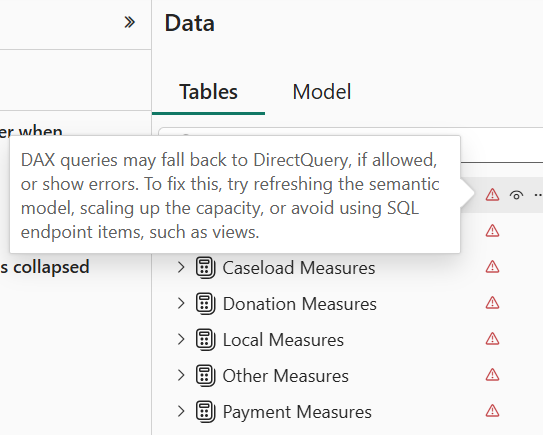
I quickly found that Direct Lake is very picky about metadata. Even if one column mapping is wrong, it invalidates the entire model. This manifests with errors showing for each table when you switch to the Model tab in Power BI Desktop.
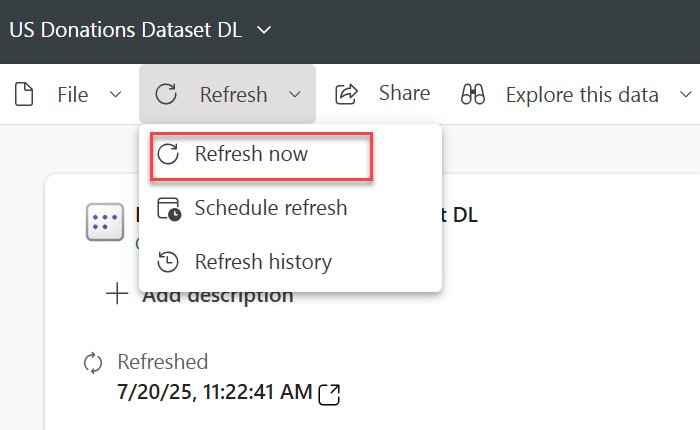
Attempting to refresh the model in Power BI Desktop to figure out what’s wrong produces all sorts of nonsensical errors. Instead, I used the “Refresh now” task in Power BI Service. This shows an error indicator next to the model that you can click to see the error description and you have to tackle each error one at the time by fixing it in the model.bim file in Power BI Desktop. Again, most errors were caused by wrong column mappings.
The Microsoft notebook doesn’t migrate field parameters successfully. I had to look up the extended properties for the main field and add it manually to the model.bim file.
The client had a Date dimension with dates starting with 1/1/1899 in order to support spurious dates from legacy data sources. This caused all measures to produce an error “A DateTime value is outside of the transportation protocol’s supported range. Dates must be between ‘1899-12-30T00:00:00’ and ‘9999-12-31T23:59:59’.” In import mode, Power BI auto-fixes bad dates but in DirectLake you must fix this on your own. So, we nuked 1899 in the date table.
The original model had two date-related tables mapped to the same DW Date table. This is not allowed in Direct Lake so I had to clone the Date table one more time in the lakehouse.
The original model used dummy tables to organize measures. These tables were created as DAX calculated tables which (together with calculated columns) are not allowed in Direct Lake. Instead, I created dummy tables with one column using a Python notebook in the lakehouse.
Using dummy tables to organize measures is a popular technique which I personally avoid for two main reasons. A while back I assessed a semantic model which had thousands of measures assigned to one Measures dummy table. This caused significant report performance degradation. Also, this approach confuses Power BI Q&A (not sure about copilot). I don’t know if Microsoft has resolved these issues, but I personally don’t use dummy tables. Instead, I assign measures to the actual fact tables.
Summary
Other than that, and after a few days of struggle, the model has been successfully blessed by Fabric as a Direct Lake model. Preliminary testing shows that performance is on par with import mode and we are optimistic that this approach will help significantly reduce the model memory footprint and possibly allow the client to downgrade the capacity, but more testing is warranted. And this will probably justify another blog in near future so stay tuned.
https://prologika.com/wp-content/uploads/2016/01/logo.png00Prologika - Teo Lachevhttps://prologika.com/wp-content/uploads/2016/01/logo.pngPrologika - Teo Lachev2025-07-20 12:46:112025-07-20 12:46:11Migrating Fabric Import Semantic Models to Direct Lake


 Like the Ancient Greek philosopher Diogenes, who walked the streets of Athens with a lamp to find one honest man, I have been searching for a convincing Fabric feature for my clients. As Microsoft Fabric evolves, more scenarios unfold. For example, Direct Lake storage mode could help you alleviate memory pressure with large semantic models in certain scenarios, as it did for one client. This newsletter summarizes the important takeaways from this project. If this sounds interesting and you are geographically close to Atlanta, I invite you to the December 1st meeting of the