• Implementing a Default Date Filter in Tabular and Power BI

    July 18, 2018 / No Comments »

    Problem: A long standing limitation in Analysis Services Tabular and Power BI is the lack of default members, such as to default a Date dimension to the last date with data. Users find this annoying, especially for time calculations which require a date context and won't produce results until you add a date-related field to the report one way or other. To aggravate things even more, Tabular switched to a JSON schema in SQL Server 2016. The new schema is great for expressing the metadata in clear and more compact way. However, because it's not extensiible, it precludes community tools, such as BIDS Helper (now called BI Developer Extensions) and DAX Editor, to extend Tabular features and fill in the gaps left by Microsoft. Workaround: Currently, there is no way to default a field in Tabular and Power BI. For the most common requirement to default a date filter, consider...

  • Determining Power BI Relationships

    July 16, 2018 / 2 Comments »

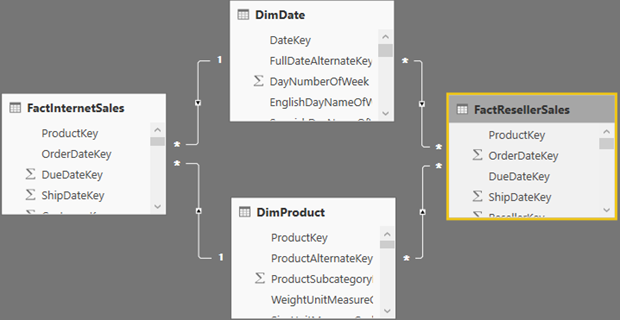
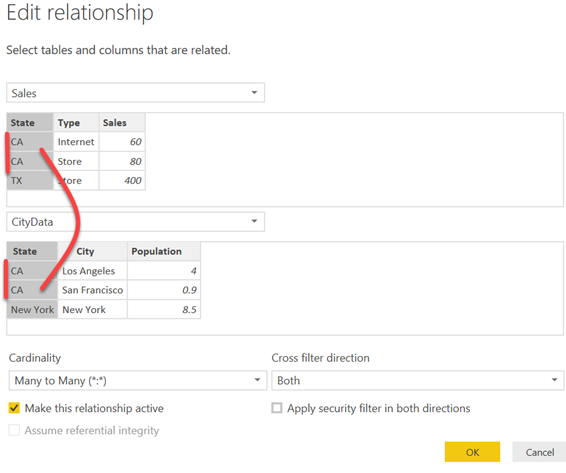
    Problem: Consider the following Power BI report that shows the sum of ResellerSales[SalesAmount] by SalesTerritory[SalesTerritoryCountry], Employee[FullName], and ResellerSales[SalesOrderNumber]. This report is based on the following schema consisting of three tables. However, If there isn't a direct relationship between ResellerSales and Employee, the moment you add an unsummarized field from the second table on the many side, such as Employee[FullName] after adding SalesTerritoryCountry and ResellerSales[SalesOrderNumber), you'll get the error "Error: Can't determine relationships between the fields". Solution: Interestingly, the report works fine if a summarized field, such as COUNT(Employee[EmployeeKey]) is used. In this case, the SalesTerritory dimension acts as a conformed dimension joined to two fact tables. The reason why it doesn't work when Employee[FullName] is added is because there is no aggregation on the Employee table and the relationship between ResellerSales[SalesOrderNumber] and Employee[FullName] becomes Many:Many over SalesTerritory which is now a bridge table. One employee may be associated with multiple sales and...

  • MVP For 15 Years!

    July 1, 2018 / No Comments »

    Got awarded for Microsoft Most Valuable Professional (MVP) - Data Platform again. This will make my 15th consecutive year to be recognized by Microsoft for my expertise and contributions to the community! Learn more about the MVP program at https://mvp.microsoft.com/en-us/Overview.

  • Beware Fast Columnar Databases

    June 29, 2018 / No Comments »

    A large company uses the SAP HANA ERP system. Users requires real-time access to transactional data. To avoid performance degradation, SLT replication (trigger-based change data capture) replicates data to another SAP HANA system that is used solely for reporting. The problem is that the more detailed the report gets and the more columns it has, the slower it gets and SAP HANA throws out of memory exceptions. SAP HANA is an in-memory columnar database like Tabular. So, it stores data in columns, not rows. Columnar databases are primarily designed for analytical reports which typically have a few columns (sales by customer, product, date), but can potentially aggregate large datasets. As the reporting grain lowers and more columns are added (order number, order line item, customer name, phone number, etc.), a columnar database has to cross-join more and more columns. This is not efficient and performance quickly degrades irrespective that storage...

  • Atlanta MS BI and Power BI Group Meeting on June 25

    June 19, 2018 / No Comments »

    MS BI fans, join us for the next Atlanta MS BI and Power BI Group meeting on Monday, June 25th at 6:30 PM. Your humble correspondent will share 10 ways  Power BI can help augment your existing or envisioned Power BI strategy. DevScope will sponsor the meeting and demo their PowerBI Robots offering.  For more details, visit our group page and don't forget to RSVP (use the RSVP survey on the main page) if you're planning to attend. Presentation: 10 Ways to Empower Your BI Strategy with Power BI Level: Intermediate Date: June 25, 2018 Time 6:30 – 8:30 PM ET Place: South Terraces Building (Auditorium Room) 115 Perimeter Center Place Atlanta, GA 30346 Overview: Not sure what value Power BI can bring to your BI infrastructure? Join me to discuss 10 ways Power BI can help augment your existing or envisioned Power BI strategy. If you're interested in the Power BI but you're not...

  • Common Data Service for Analytics: The Good, the Bad, the Ugly

    June 14, 2018 / No Comments »

    UPDATE 11/15/2018: Common Data Service for Analytics is superseded by Power BI dataflows. Find the updated review here. In a previous blog I discussed the Common Data Service for Apps (CDS for Apps). I explained that CDS for Apps is more suitable for OLTP-type applications, which is why its main client is PowerApps apps saving data in normalized tables. Since good things shouldn't come alone, Microsoft is readying another CDS flavor, Common Data Service for Analytics (CDS for Analytics), which is oriented towards supporting analytical requirements. Microsoft provided a good introduction to CDS for Analytics in the "Common Data Service for Analytics (CDS-A) and Power BI - an Introduction" video and "Introduction to Common Data Service For Analytics" video. Without rehashing what has been already announced and said, I'd like to share a few notes from what I've learned so far. The following table compares the two CDS types. CDS...

  • Power BI Feature Discrepancies for Data Acquisition

    June 10, 2018 / 1 Comment »

    Power BI churns out new features fast but not all features are available everywhere. As one of the most confusing aspects of Power BI, feature availability depends on the data acquisition method (data import vs live connections) and across Power BI product offerings (Power BI Desktop, Power BI Service, Power BI Report Server, and Power BI Mobile). Microsoft has left gaps in the product documentation and UI to clearly indicate feature availability. For example, while you can add a Q&A button in Power BI Desktop irrespective of whether you import or connect live, the button won't work with live connections because Q&A for Creators is available only when data is imported. This blog is my first attempt to clarify the feature availability based on the data acquisition method. All features work when you import data. Therefore, this option is not listed in the table. Direct connections however and not that...

  • 10 Ways to Empower your BI Strategy with Power BI

    May 19, 2018 / No Comments »

    Standing room today for my presentation on the same subject at SQL Saturday Atlanta. I uploaded the slides to the event site and to my LinkedIn profile page. This week was packed with training events. One more event to organize for the Atlanta Power BI Group on Monday...

  • Atlanta MS BI and Power BI Group Meeting on May 21

    May 14, 2018 / No Comments »

    MS BI fans, join us for the next Atlanta MS BI and Power BI Group meeting on Monday, May 21st at 6:30 PM. Paco González will take us into a deep dive into Microsoft Cognitive Services and how to integrate them with Power BI. SolidQ will sponsor the meeting. And your humble correspondent will introduce you to Power BI Premium incremental refresh. For more details, visit our group page and don't forget to RSVP (use the RSVP survey on the main page) if you're planning to attend. Atlanta BI Group May 21st Meeting Reminder Please RSVP to help us plan food by 2 PM on the day of the meeting by latest: Go to the Atlanta BI home page (atlantabi.pass.org). Choose Yes and submit the RSVP survey found at the right top corner of the page. Please note that the voting system tracks votes by cookies. If you don't see the option to...

  • Microsoft Common Data Service for Apps: The Good, the Bad, the Ugly

    May 12, 2018 / No Comments »

    BI and data integration projects often benefit from an operational data source (ODS), whose benefits and design I discussed in my "Designing an Operational Data Store (ODS)" newsletter. Think of the Microsoft Common Data Service for Apps (CDS for Apps) as a cloud ODS by Business and for Business. Officially introduced in 2016 and running on Azure SQL Database, CDS for Apps is now the entity and data model behind Dynamics 365. This is where Dynamics 365 stores its data. Microsoft is readying a preview of another CDS flavor (CDS for Analytics) in June 2018. Think of CDS for Apps as the OLTP version of the ODS and is designed for transactions (this is why it's layered on top of SQL Server), while CDS for Analytics is oriented towards OLAP (this is why is layered on top of Azure Storage). Both CDS types support standardized entities, whose definitions are documented...

Training

We offer onsite and online Business Intelligence classes! Contact us about in-person training for groups of five or more students.
For more information or to register click here!

Books

Learn Power BI at your own pace with our latest book Applied Microsoft Power BI. Targeting information workers, data analysts, pros, and developers, It is designed as an easy-to-follow guide for learning how to implement BI solutions spanning the entire personal-team-organizational BI spectrum.

Syndication