• Another Successful Power BI Workshop

    May 11, 2018 / No Comments »

    Thank you to everyone attending the Power BI workshop by Prologika yesterday. We had another great turnout with more than 50 people from 30+ companies attending the event at the Microsoft Technology Center in Alpharetta! Kudos to Eric Flamm and Michael Folarinde for the great job proctoring the event. Here is some feedback that the attendees shared in the post-event survey: "I was frustrated and confused with using Power BI service and Desktop because I didn't know how to manipulate the visualizations, slicers, etc. and thought the tools were not capable. I walk away from this now knowing this information and excited to use the tools to transform data to help our business." "Very informative and showed me new things despite me using PBI for a few months." "Very instructive and knowledgeable of our instructor Teo. He is very patient and answered all my questions." "The presenter was great. He was obviously...

  • Notes on Power BI Incremental Refresh

    May 8, 2018 / 1 Comment »

    In my "Why Business Like Yours Choose Power BI Over Sisense" blog, I discussed how Sisense seeks a competitive advantage by offering a user-friendly designer connected to the their ElastiCube, thus claiming that Sisense is a better choice with larger datasets because business users don't have to use professional tools (Visual Studio) or deploy to external servers. Things have changed in Power BI since then. Microsoft increased the dataset size to 1 GB (Power BI Pro) and 10 GB (Power BI Premium). A 10 GB compressed dataset is a lot of data (probably allowing you to import over a billion rows). But fully refreshing a large dataset is no fun and it can take many hours (see my blog "Processing AAS Models Asynchronously" for some stats). Fortunately, the May release of Power BI Desktop brings incremental refresh, which a feature that was previously only available in Analysis Services. As its...

  • Help Improve Excel as Analysis Services Front End

    May 2, 2018 / No Comments »

    Everyone has a different opinion about what self-service BI should be. But to many people the journey starts and stops with Microsoft Excel. Excel is the self-service BI nirvana. If the user can't see and filter the detail data, even the most sophisticated self-service BI tool cannot be trusted. And since everyone knows how to do this in Excel, why should they use other tools? To me, the best self-service BI is empowering business users to connect to an organizational semantic model, ideally with Excel as a front end. Most of my current projects use Analysis Services Tabular for implementing semantic models. Therefore, it's so frustrating that Excel still lacks good support for Tabular. For example, it splits a Tabular table into two tables ("dimension" and "measure group") because Excel still uses the MDX interface. To make things worse, all fields in the "dimension" table has a Text data type because it...

  • Presentations by Prologika at SQL Saturday Atlanta 2018

    May 1, 2018 / No Comments »

    SQL Saturday Atlanta is a must-attend, full-day event for the community, by the community. This year SQL Saturday will take place on May 19th at Gwinnett Technical College - Alpharetta, 2875 Old Milton Pkwy, Atlanta, Georgia, 30009. Prologika will deliver two presentations: Master Data Management with SQL Server 2016 MDS According to the Top Business Intelligence Trends 2018 survey by BI-Survey.com and based on feedback from over 2,000 BI professions, the top BI trend this year is Master Data/Data Quality Management. Having consulted with a large insurance company on master data management with SQL Server 2016 for years, Neal Waterstreet has plenty of best practices to share on this topic, so join his session at 8:30 AM. Want to know the position Master Data Management and MDS play in an organization's overall data strategy? We'll review the key concepts and the different roles and responsibilities to help you get your...

  • Tableau Prep vs. Power Query

    April 26, 2018 / 18 Comments »

    After a few years of extensive development and beta testing, Tableau announced its data preparation tool (Tableau Prep) for "redefining your data prep experience". Previously, Tableau relied on other vendors, such as Alteryx, for self-service data preparation. Naturally, I wanted to take it for a spin and compare it with the Microsoft Power Query (available for free in Power BI Desktop and Excel), which has been around since January 2013. Power Query was initially introduced as an Excel add-on but now it's available in both Excel and Power BI Desktop. For those of you pressed for time, here is the gist: Criteria Power Query Tableau Prep Price Free $70/user/month for Creator bundle Integration Integrated with Power BI and Excel Stand-alone (with preview in Tableau Desktop) Prepackaged Connectors 70 26 Custom Connectors Yes No Row-level transformations Keep rows, remove rows, remove duplicates, promote headers, group by, merge, append, pivot, transpose, combine...

  • Atlanta MS BI and Power BI Group Meeting on April 30th

    April 23, 2018 / No Comments »

    MS BI fans, join us for the next Atlanta MS BI and Power BI Group meeting on Monday, April 30th at 6:30 PM. Patrick LeBlanc will do a deep dive into Power BI Report Server. TEKsystems will sponsor the meeting. And your humble correspondent will demo several latest Power BI features: buttons and Q&A. For more details, visit our group page and don't forget to RSVP (use the RSVP survey on the group page) if you're planning to attend. Atlanta BI Group April 30th Meeting Reminder Please RSVP to help us plan food by 2 PM on the day of the meeting by latest: Go to the Atlanta BI home page (atlantabi.pass.org). Choose Yes and submit the RSVP survey found at the right top corner of the page. Please note that the voting system tracks votes by cookies. If you don't see the option to submit the survey, clear your browser cookies, or right-click the...

  • Processing AAS Models Asynchronously

    April 22, 2018 / No Comments »

    Analysis Services normally requires a live connection between the client and server. If the connection is interrupted, the server considers that the client has lost interest and cancels the running operation.Strictly speaking, there is  a 'long running operations' (LRO) protocol built over the HTTP XMLA messaging protocol which mitigates the issue of disconnects by attempting to keep alive the request/responses. This helps avoid the HTTP disconnection problem for the client libraries and improve the reliability of client applications. But in the end, your mileage will vary depending on the reliability of the networks in between the client machine and the service endpoint. You don't have to worry about the connection quality when you send queries as they usually execute fast. Processing, however, is a different story as it might take very long. As a reference point, a 4 billion database can take easily half a day to refresh. Babysitting processing and hoping that...

  • Understanding AAS Synchronization

    April 18, 2018 / No Comments »

    None of the Multidimensional and Tabular semantic models I've implemented required scaling out, but I understand that some scenarios might benefit from it, such as B2B or B2C reporting. Depends on the implementation approach, another benefit could be implementing a highly available farm. Implementing a scaled-out, on-premises SSAS farm is not easy. There are different techniques but all of them involve a compromise between availability and latency. Azure Analysis Services sought to make this easier. It's as easy as changing a slider and AAS synchronizes everything somehow, right? Wrong. Here are the high-level notes of how AAS synchronization works: As a part of configuring synchronization, you can specify a designated processing node. If you do specify a processing node, processing takes place on that node only and the updated cache is distributed to the query nodes. If you don't specify a processing node, one of the query nodes handles both...

  • Demystifying Tabular Object Level Security (OLS)

    April 15, 2018 / No Comments »

    Object-level security (OLS) is a frequently requested security feature when implementing semantic models. For example, a current project disallows some sales persons to see sensitive measures, such as Margin and Profit. In Multidimensional, modelers could use cell security to meet such requirements with the risk of compromising performance. Starting with SQL Server 2017 (compatibility level 1200), Tabular supports object-level security to disallow access to entire tables or specific columns without a performance penalty. As it stands, OLS has the following limitations (for a full list, review the documentation): There is no user interface for defining OLS. Instead, after defining your roles and row filters as you'd typically do, you need the extra step to open the model.bim source code and enter the OLS definition manually. For example, this Users role definition disallows access to the GrossProfit column. Fortunately, SSDT preserves OLS when you make changes to the role in the Role...

  • Another Successful Power BI Workshop

    April 13, 2018 / No Comments »

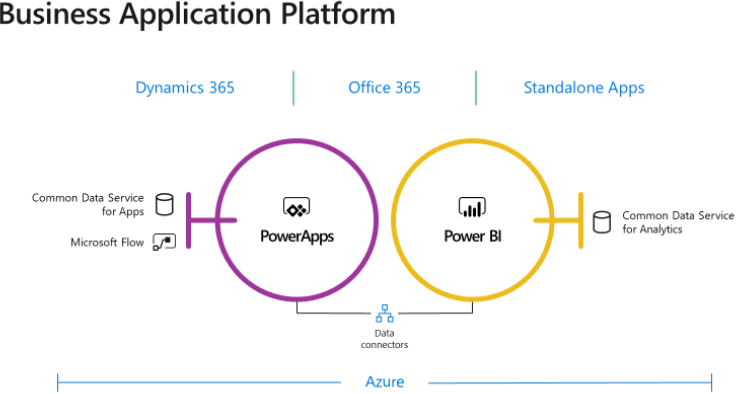
    Thank you to everyone attending the Power BI workshop by Prologika yesterday. We had great turnout with more than 50 people from 30 companies attending the event at the Microsoft Technology Center in Alpharetta! The key takeaways were: Many companies transition to Power BI because of its great value-to-cost proposition. PowerQuery is a fantastic tool for data cleansing and transformation that is missing in other competitor offerings. Power BI can deliver rich visualization capabilities that delight end users and surpass by far the capabilities of traditional reporting tools. Instead of being a just a stand-alone BI tool, Power BI is a part of a rich ecosystem of products and services that allows you to extend Power BI in versatile ways.

Training

We offer onsite and online Business Intelligence classes! Contact us about in-person training for groups of five or more students.
For more information or to register click here!

Books

Learn Power BI at your own pace with our latest book Applied Microsoft Power BI. Targeting information workers, data analysts, pros, and developers, It is designed as an easy-to-follow guide for learning how to implement BI solutions spanning the entire personal-team-organizational BI spectrum.

Syndication