-
Quadrants Here, Quadrants There…
February 26, 2018 / No Comments »
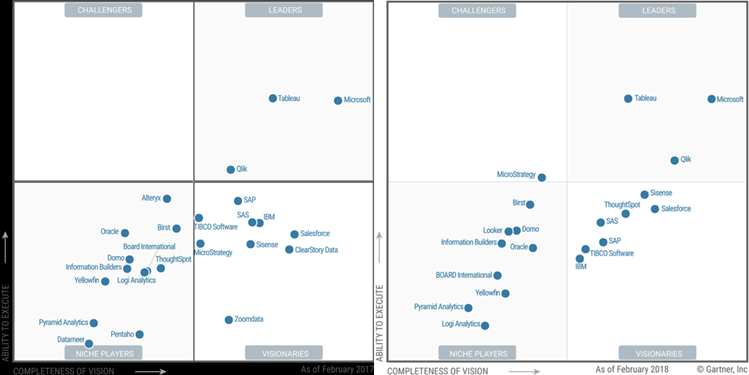
While we're waiting for the Gartner 2018 Magic Quadrant for Data Analytics (should be out any moment), two others related to data analytics were released. 2018 Magic Quadrant for Data Management Solutions for Analytics This one evaluates "complete software system that supports and manages data in one or more file management systems (usually databases)". So, think of traditional and cloud-based data warehousing. I'm surprised to see AWS ahead of Microsoft and Oracle in the ability to execute, given that Amazon doesn't have on-premises offerings (see the ML quadrant below where apparently that's important). 2018 Magic Quadrant for Data Science and Machine-Learning Platforms This one evaluates "vendors of data science and machine-learning platforms. These are software products that data scientists use to help them develop and deploy their own data science and machine-learning solutions." I personally don't agree with Gartner on the Microsoft Visionary rank, given all the investments Microsoft has...
-
Unblocking MDX Queries from SSRS Reports
February 23, 2018 / No Comments »
I love performance optimization. It's exciting to peek under the hood and take a deep dive in the mysterious world of how Microsoft designed things. And it always humbles me by bringing forth gaps in my knowledge. Scenario: You have SSRS reports that query Analysis Services Multidimensional cubes. When users request reports in Report Manager (aka Web Portal starting with SSRS 2016) and … the report hangs sporadically, without even getting to the ReportViewer page… for minutes. The server doesn't appear to be under resource pressure. The issue happens when the cube is being processed. And no, this is not about locking. Solution: This one wasn't trivial to figure out. The profiler showed that when the report is requested, SSRS fires the first MDX query (typically, a query that populates the parameter available values). The breakthrough came when I executed the same query in SSMS while the SSRS one was...
-
Atlanta MS BI and Power BI Group Meeting on February 26th
February 22, 2018 / No Comments »
MS BI fans, join us for the next Atlanta MS BI and Power BI Group meeting on February 26th at 6:30 PM. Stacey Jones will explain how Power BI can integrate with other systems, such as Dynamics and Salesforce. SentryOne will sponsor the meeting. And your humble correspondent will show you two latest Power BI features: report sharing and date tables. For more details, visit our group page and don't forget to RSVP (use the RSVP survey on the group page) if you're planning to attend. Presentation: Integrating Power BI with Dynamics and Other Solutions Level: Intermediate Date: February 26, 2018 Time 6:30 – 8:30 PM ET Place: South Terraces Building (Auditorium Room) 115 Perimeter Center Place Atlanta, GA 30346 Overview: Microsoft has differentiated itself for many years as the company that not only sells software, but software that works well together. For example, many companies sold suites of office productivity software, but none sold...
-
Tableau Hyper vs. Power BI xVelocity
February 18, 2018 / 6 Comments »
To compete more effectively with Power BI, Tableau acquired a database technology called HyPer. Like the Microsoft xVelocity in-memory technology (formerly known as VertiPaq), which powers Analysis Services Tabular, Power BI, and SQL Server Columnstore, HyPer is an in-memory database system. Hyper was initially developed as a research project at the Technical University of Munich. Tableau explains that "with Hyper, transactions and analytical queries are processed on the same column store, with no post-processing needed after data ingestion. This reduces stale data and minimizes the connection gap between specialized systems. Hyper's unique approach allows a true combination of read-and write-heavy workloads in a single system. This means you can have fast extract creation without sacrificing fast query performance. (We call that a win-win.)". Tableau shipped Hyper with Tableau v10.5. Here, we have a statement that Tableau claimed that Hyper achieved 3x faster data extraction and 5x increase in query performance...
-
Overwriting Power BI Filters
February 14, 2018 / No Comments »
Scenario: You've created a dashboard-looking Power BI report that has a filter. Most visuals on a report page need to show only data for the selected filter but some must ignore the filter. Solution: There are several solutions to achieve this goal depending on requirements. Let's start with the no-brainer and move down in complexity. Move the unfiltered visuals to another report page -- Slicers and page-level filters filter visuals on the same page (note that the Power BI Desktop February update allows you to configure a report-level slicer). By moving the visuals that should remain unaffected by the slicer to another page, you're effectively ignoring the page-level filtering. Use a slicer and "Edit Interactions" – If you use a slicer, you can use the Edit Interactions feature (Format ribbon) to specify which visuals ignore the slicer selection. Edit Interactions is described in more detail here. Consider using time calculations –...
-
PASS Summit 2018 Registration
February 10, 2018 / No Comments »
Planning to attend the PASS Summit this year? The PASS Summit is the go-to conference for data professionals that will take place November 6-9, in Seattle, WA. You have two options to register: Early bird registration priced at $1,699 has started and it will continue until March 23, 2018. As a bonus, use code LGSTRMZB8 at registration to get streaming access to all PASS Summit 2017 content! Pay the regular price after March 23, 2018.
-
Visual-level Formatting in Power BI
February 7, 2018 / No Comments »
Scenario: You want to overwrite the formatting of some field in a Power BI Visual, such as in the case of showing the field in one visual with decimals and then in another without decimals. Or, you might want to overwrite the default format when connected live to a semantic model. You search left and right, bing the Internet, and still no clue as to why Power BI doesn't have this feature. Answer (that you probably won't like): Most visuals already support display units and decimals. Table and matrix would probably get this feature very soon. We don't have ETA for full custom format string override (per visual). Your vote counts so vote on ideas.powerbi.com. As a best practice, I recommend applying format settings in the model so that it's applied consistently to all reports. In the narrower case of formatting measures, you can create a new measure and change its...
-
Mark as Date Table in Power BI
February 6, 2018 / No Comments »
In my "Understanding Dates in Power BI Quick Measures" blog, I mentioned that having a Date table is a best practice but Quick Measures didn't support it. Fortunately, the February update of Power BI Desktop fixes this. Now you can mark a Data table as such, as you've been able to do in Excel Power Pivot since the beginning. Marking a date table accomplishes three things: Disables the Power BI-generated date hierarchies (aka as inline hierarchies). Good riddance! Check the same blog for details of why inline hierarchies should be avoided. Allows you to use your Date table for time calculations in Quick Measures. Makes DAX time calculations work even if the relationship between a fact table and the Date table is created on a field that is not a date field, such as a smart integer key (YYYYMMDD). Previously, you had to create the relationship on a field of...
-
Reporting on Concatenated Field in DAX
February 3, 2018 / No Comments »
Scenario: You have a concatenated field stored in a table. For example, a medical claim might have several denial reasons. Instead of representing this as a Many-to-Many relationship, you've decided to store this a comma-delimited field, such as to allow the user to see all codes on one row. However, users are asking to produce counts grouped by each reason code, such as this one: Solution: Follow these steps to implement a DAX measure that dynamically parses the string. Implement a DenialReason table with a single column DenialReason that stores the distinct reason codes. Add the table to your Power BI Desktop/Tabular model. Leaving it hanging without a relationship. Add a CountByDenialReason DAX measure that parses the string: CountByDenialReason := CALCULATE ( SUMX ( Claim, IF ( NOT ISEMPTY ( FILTER ( VALUES ( DenialReason[DenialReason] ), PATHCONTAINS ( SUBSTITUTE ( Claim[DenialReason], ",", "|" ), DenialReason[DenialReason] ) ) ), 1 ) ) ) The NOT ISMPTY clause checks if the row contains any reasons. The PATHCONTAINS checks...
-
Business Value of Semantic Model
January 31, 2018 / No Comments »
A while back I wrote about the ROI for BI and this blog happened to be one of my post popular blogs. I'm a big fan of a BI semantic model for the reasons I outlined in my "Why Semantic Layer" newsletter. Although written five years ago, these are still valid reasons and a semantic model plays a prominent role in every organizational BI solution. But management cares about business value and not architectures. Allow me to share just one feedback that I got today from one of our insurance customers. In the insurance business, a loss triangle is very important way to analyze losses incurred from claims. Previously, it would take an actuary in this company a month to compile the data and produce a loss triangle report for several important measures, such as Loss Paid Inception to Date. With the semantic model we implemented, it takes seconds. How...

We offer onsite and online Business Intelligence classes! Contact us about in-person training for groups of five or more students.