Fabric Data Warehouse: The Good, The Bad, and the Ugly
“Patience my tinsel angel, patience my perfumed child
One day they’ll really love you, you’ll charm them with that smile
But for now it’s just another Chelsea [TL: BI] Monday”
Marrillion
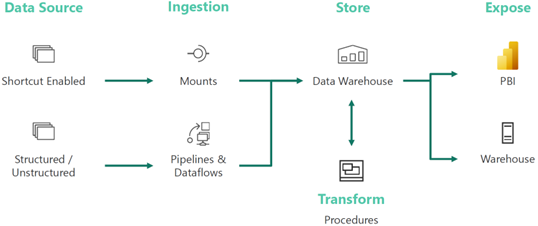
Continuing our Power BI Fabric journey, let’s look at another of its engines that I personally care about – Fabric Warehouse (aka as Synapse Data Warehouse). Most of my real-life projects require integrating data from multiple data sources into a centralized repository (commonly referred to as a data warehouse) that centralizes trusted data and serves it as a source to Power BI and Analysis Services semantic models. Due to the venerable history of relational databases and other benefits, I’ve been relying on relational databases powered by SQL Server to host the data warehouse. This usually entails a compromise between scalability and budget. Therefore, Azure-based projects with low data volumes (up to a few million rows) typically host the warehouse in a cost-effective Azure SQL Database, while large scale projects aim for Synapse SQL Dedicated Pools. And now there is a new option on the horizon – Fabric Warehouse. But where does it fit in?
The Good
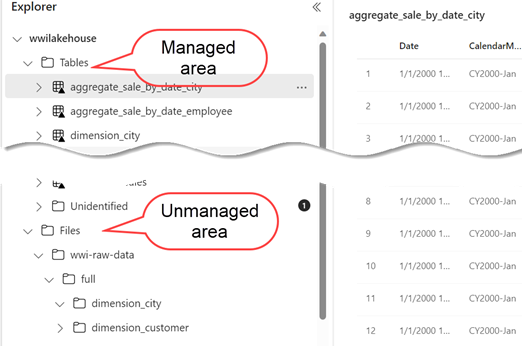
Why would you care about Fabric Warehouse given that Microsoft has three (and counting) Azure SQL SKUs: Azure SQL Database, Azure SQL Managed Instance, and Synapse SQL Dedicated Pools (based on Azure SQL Database)? Ok, it saves data in an open file format in OneLake (delta tables), but I personally don’t quite care much about how data is saved. We could say that SQL Server is also (although proprietary) a file-based engine that served us well for 30+ years. I care much more about other things, such as performance, budget, and T-SQL parity. However, as I mentioned in the previous Fabric-related blogs, the common delta format across Fabric enables data virtualization, should you decide to put all your eggs in one basket and embrace Fabric for all your data needs. Let’s say you have some files in the lakehouse managed zone. You can shortcut lakehouse delta tables to the Data Warehouse engine and avoid data movement. By contrast, previously you had to spin more ETL to move data from the Synapse serverless endpoint to the Synapse dedicated pools.
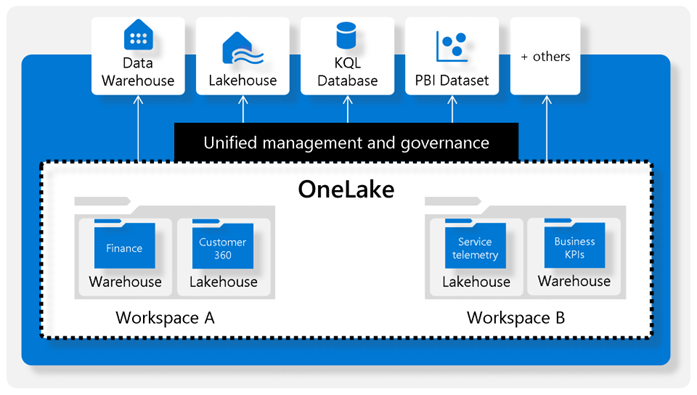
A big improvement is that you can also cross-query data warehouses and lakehouses, which wasn’t previously possible in Azure Synapse.
You can do this by writing familiar T-SQL queries with three-part-naming, such as querying a lakehouse table in your warehouse:
SELECT TOP (100) * FROM [wwilakehouse].dbo.dimension_customer
In fact, the elimination (or rather fusion) of Synapse Dedicated Pools and Serverless is a big plus for me. The infinite scale and instantaneous scalability that resulted from decoupling compute and store sounds interesting. I don’t know how Fabric Warehouse will evolve over time but I really hope that at some point, it will eliminate the afore-mentioned Azure SQL SKU decision for hosting relational data warehouses. I hope it will support the best of both worlds – the ability to dynamically scale (as serverless Azure SQL Database) up to the large scale of Synapse Dedicated Pools.
The Bad
Now that Azure SQL SKUs are piling up, Microsoft owes us serious benchmarks for Fabric Warehouse analytical and transactional loads.
Speaking of loads and considering that Fabric Warehouse saves data in columnar structures (Parquet files), this is not a tool to use for heavy OLTP loads. Columnar formats fit data analytics like a glove when data is analyzed by columns, but they will probably perform poorly for heavy transactional loads. Again, benchmarks could help determine where that cutoff point is.
Unlike Power BI Premium (P) capacities, Fabric capacities acquired by purchasing an Azure F plan can be scaled up or down (like Power BI Embedded A* plans). However, like A* plans, this requires manual intervention. I was hoping for dynamically scaling up and down workloads within a capacity to meet more demand and reduce cost. For example, I should be able to configure the capacity to auto-pause Fabric Warehouse when it is not in use and the data is imported in a Power BI dataset.
As I mentioned in my Fabric Lakehouse: The Good, The Bad, and the Ugly post, given that both saves data in the same format, I find the Lakehouse and Warehouse engines redundant and confusing. Currently, ADLS shortcomings are implicated for this separation and my hope is that at one point they will merge. If you are a SQL developer, you should be able to use SQL, and if you prefer notebooks for whatever reason, you can use Python or whatever language you prefer on the same data. This will be really nice and naturally resolve the lakehouse-vs-warehouse decision point.
The Ugly
Due to the fact that it’s completely rewritten, a work in progress, and therefore subject to many limitations, as it stands Fabric Warehouse is unusable for me.
After the botched Synapse saga, Microsoft had the audacity to call this offering the next generation of Synapse warehouse (in fact, the Fabric architecture labels is as Synapse Data Warehousing, I guess to save face) despite the fact that they pretty much start from scratch at least in terms of features. I call it “Oops, we did it again, overpromised and underdelivered, got lost in the game, Ooh, baby, baby…” I’ll give Fabric Warehouse a year or so before I revisit. If my hope for Fabric Warehouse as a more straightforward choice for warehousing materializes, I also wish Microsoft decouples it from Fabric and makes it available as a standalone Azure SKU offering. Which is pretty much my wish for all tools in the Fabric bundle. Bundles are great until you decide to opt out and salvage pieces…
Finally, after all the push and marketing hoopla, Synapse SQL Dedicated Pools seems to be on an unofficial deprecated path. I guess Microsoft has seen the writing on the wall from competing with other large-scale DW vendors. The current guidance is to consider them for high-scale performance while the “evolved” and “rewritten” Fabric Synapse Warehouse should be at the forefront for future DW implementations. And there is no migration path from Dedicated SQL Pools.