What credentials do you use to refresh your Power BI semantic models from Azure SQL SKUs, such as Azure SQL Database. Probably your credentials or a designated Entra account? Both are not ideal for a variety of reasons, including requiring a password. More advanced users might be using service principals, which are more secure but require secret renewal after a maximum of 24 months, which is a hustle.
Somewhere along the way without me noticing, Microsoft added a better authentication option for refreshing Power BI semantic models: workspace identity. This option lets the Power BI workspace using its own managed identity to authenticate to the data source. And it’s available in all Power BI and Fabric SKUs!
What’s not clear from the documentation is how to grant permissions to the workspace identity to read data from Azure SQL SKUs but it’s no different that granting access to the Azure Data Factory managed identity.
Create the workspace identity as explained in the documentation. It has to be done for each workspace that has your published model(s).
In SSMS, connect to your Azure SQL Database using Entra credentials that has permissions to manage security (SQL login won’t work).
Open a new query connected to your database.
Execute the following script assuming you want to grant read permissions to the workspace identity:
CREATE USER [<workspace name>] FROM EXTERNAL PROVIDER;
ALTER ROLE db_datareader ADD MEMBER [<workspace name>];
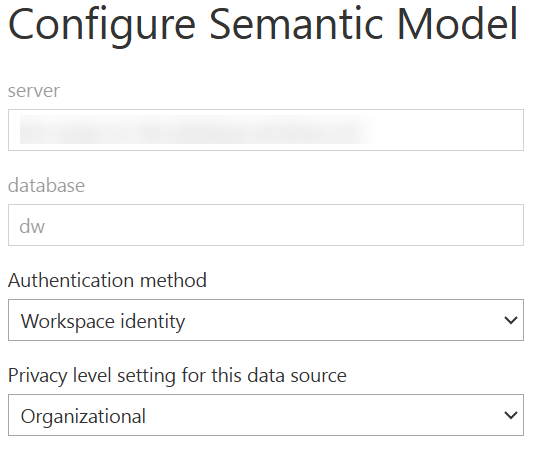
Then back to Power BI, configure your semantic model for workspace identity authentication:
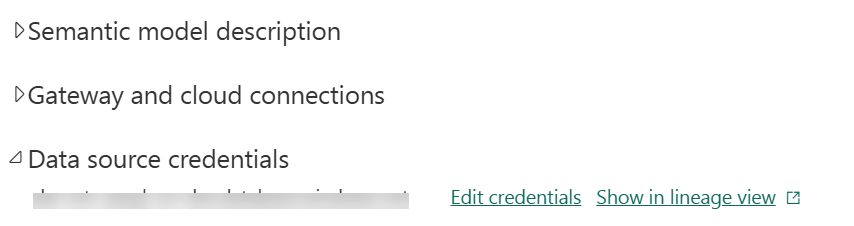
Navigate to the semantic model settings and click “Edit credentials”.
Select “Workspace identity” as the authentication method.
That’s it. Using the workspace identity to read data during model refresh is more secure and easier to manage.
Atlanta BI fans, please join us in person for our next meeting on Monday, December 1st at 18:30 ET. I’ll show you how to Fabric DirectLake semantic models can help you tackle long refresh cycles and scalability headaches. And your humble correspondent will walk you through some of the latest Power BI and Fabric enhancements. Improving will sponsor the meeting. For more details and sign up, visit our group page.
Delivery: In-person Level: Intermediate Food: Pizza and drinks will be provided
Agenda:
18:15-18:30 Registration and networking
18:30-19:00 Organizer and sponsor time (news, Power BI latest, sponsor marketing)
19:00-20:15 Main presentation
20:15-20:30 Q&A
Overview: Are your Power BI semantic models hitting memory limits? Tired of bending backwards to mitigate long refresh cycles and scalability headaches? Join me for a deep dive into Fabric Direct Lake — a game-changing feature that can help enterprise customers eliminate refreshes, lower licensing cost, and work with production-scale data instantly.
You’ll learn:
-Why Direct Lake is a breakthrough for large semantic models
-How to migrate from Import mode with real-world tools and strategies
-Common pitfalls and how to avoid them
-Performance insights and practical tips from actual project
Bonus: See how AI tools like Grok, Copilot or ChatGPT can streamline your migration process!
Whether you’re a BI pro, data engineer, or decision-maker, this session will equip you with the knowledge to scale smarter, design better, and deliver faster.
Speaker: Teo Lachev is a consultant, author, and mentor, with a focus on Microsoft BI. Through his Atlanta-based company Prologika (a Microsoft Gold Partner in Data Analytics and Data Platform) he designs and implements innovative solutions that bring tremendous value to his clients. Teo has authored and co-authored several books, and he has been leading the Atlanta Microsoft Business Intelligence group since he founded it in 2010. Microsoft has recognized Teo’s contributions to the community by awarding him the prestigious Microsoft Most Valuable Professional (MVP) Data Platform status for 15 years. Microsoft selected Teo as one of only 30 FastTrack Solution Architects for Power BI worldwide.
Sponsor: Prologika (https://prologika.com) helps organizations of all sizes to make sense of data by delivering tailored BI solutions that drive actionable insights and maximize ROI. Your BI project will be your best investment!
https://prologika.com/wp-content/uploads/2016/01/logo.png00Prologika - Teo Lachevhttps://prologika.com/wp-content/uploads/2016/01/logo.pngPrologika - Teo Lachev2025-11-26 14:47:552025-11-28 16:39:00Atlanta Microsoft BI Group Meeting on December 1st (Migrating Semantic Models to Fabric Direct Lake)
Atlanta BI fans, please join us in person for our next meeting on Monday, November 3rd at 18:30 ET. Jason Romans (Microsoft MVP) will show you how to use Semantic Link Labs to troubleshoot unreliable reports and semantic models. And your humble correspondent will walk you through some of the latest Power BI and Fabric enhancements. Improving will sponsor the meeting. For more details and sign up, visit our group page.
Delivery: In-person Level: Intermediate Food: Pizza and drinks will be provided
Agenda:
18:15-18:30 Registration and networking
18:30-19:00 Organizer and sponsor time (news, Power BI latest, sponsor marketing)
19:00-20:15 Main presentation
20:15-20:30 Q&A
Overview: It’s dangerous to go alone—take Semantic Link Labs!
When users are the first to discover that a Power BI report is broken, the damage is already done. Trust is lost, adoption slows, and credibility suffers. Instead of wandering into these traps unprepared, what if you had the Master Sword in hand—ready to defeat broken models and guard against treacherous usability pitfalls? That’s the power of Semantic Link Labs.
In this session, we’ll set out on a quest through Microsoft Fabric notebooks and pipelines, using Semantic Link Labs as our weapon and shield against unreliable reports. Along the way, we’ll face down the “mini-bosses” of BI development:
• Reports that collapse due to structural changes
• Models that underperform because best practices were skipped
• Usability pitfalls that make reports “technically fine” but functionally broken for end users
You’ll learn how to install and configure Semantic Link Labs, explore its legendary features, and see how it integrates seamlessly into Fabric. We’ll then take it a step further, automating health checks and governance with notebooks and pipelines—turning one-time fixes into repeatable spells.
By the end of this adventure, you’ll uncover your own “Triforce of Best Practices”—a report that tracks the best practices of all semantic models in your environment. You’ll leave equipped with a map, a shield, and the Master Sword itself: the tools you need to keep your BI world in legendary shape, where broken reports are discovered early, performance issues are vanquished, and best practices reign supreme.
Speaker: Jason Romans is a Business Intelligence engineer in Nashville, TN working with the Microsoft Business Intelligence stack. Jason is a Microsoft MVP who started his career as a DBA and over the years moved to working in his passion of Business Intelligence and data modeling. His first computer was a Commodore 64 and he’s been hooked ever since. Blog: www.thedaxshepherd.com Sessionize: https://sessionize.com/jason-romans/ LinkedIn: https://www.linkedin.com/in/jason-r-sql-jar
Sponsor: Improving is a leading IT professional services firm committed to helping companies achieve lasting success through modern technology. With core expertise in AI, Data, and Applications, we specialize in transforming legacy systems, building cloud-native platforms, and delivering intelligent, future-ready solutions for today’s complex business needs.
https://prologika.com/wp-content/uploads/2016/01/logo.png00Prologika - Teo Lachevhttps://prologika.com/wp-content/uploads/2016/01/logo.pngPrologika - Teo Lachev2025-10-29 12:18:032025-10-29 12:18:03Atlanta Microsoft BI Group Meeting on November 3rd (Semantic Link Labs: A Link to the Future)
Atlanta BI fans, please join us in person for our next meeting on Thursday, October 9th (note that we are meeting on Thursday for this meeting) at 18:30 ET. Sukhwant (Senior Product Manager, Microsoft) will explain why you should consider Fabric SQL databases. And your humble correspondent will walk you through some of the latest Power BI and Fabric enhancements. For more details and sign up, visit our group page.
Delivery: In-person Level: Intermediate Food: Pizza and drinks will be provided
Agenda:
18:15-18:30 Registration and networking
18:30-19:00 Organizer and sponsor time (news, Power BI latest, sponsor marketing)
19:00-20:15 Main presentation
20:15-20:30 Q&A
Overview: Microsoft Fabric is an all-in-one analytics platform, right? Wrong! With the introduction of SQL databases last year, we now have an all-in-one data platform. During this session you will hear directly from the product team about why we added SQL databases to Fabric, who should be using them, how this is different from Azure SQL databases, how to get started through an end-to-end demo, and the integration story with the rest of the platform.
If you’re a DBA that’s been trying to move applications for running SQL or a business user with limited database skills and no DBAs to be found, you’ll want to hear all about this exciting new offering that is simple, automated, and optimized for AI.
Speaker: Sukhwant has served as a Product Manager at Microsoft for the past few development cycles. During this time, she’s focused on the entire product management lifecycle, from working with development teams and user experience to collaborating with cross-functional teams to drive customer satisfaction in ensuring our products not only meet but exceed customer expectations.
Before joining Microsoft, she held various full-time/contracting roles as a technology leader for over two decades in software lifecycle development, system integration and enterprise architecture design. Her expertise extends to Data Strategy, Analytics, and Web Content Management. Throughout her career, she has successfully led numerous projects, both small and large, from inception through to implementation. She is a proponent of the servant-leader philosophy, which aims to continuously improve and empower those she works with.
Sponsor: At CloudStaff.ai, we’re making work MORE. HUMAN. We believe in the power of technology to enhance human potential, not replace it. Our innovative AI and automation solutions are designed to make work easier, more efficient, and more meaningful. We help businesses of all sizes streamline their operations, boost productivity, and solve real-world challenges. Our approach combines cutting-edge technology with a deep understanding of human needs, creating solutions that work the way people do! https://cloudstaff.ai
https://prologika.com/wp-content/uploads/2016/01/logo.png00Prologika - Teo Lachevhttps://prologika.com/wp-content/uploads/2016/01/logo.pngPrologika - Teo Lachev2025-10-03 12:22:122025-10-03 12:22:12Atlanta Microsoft BI Group Meeting on October 9th (Everything You Want to Know About SQL Databases in Fabric)
Atlanta BI fans, please join us in person for our next meeting on Monday, September 8th at 18:30 ET. Jeff Levy (Data Architect @ Protiviti) will show us how to implement Azure DevOps for data engineering projects in Microsoft Fabric. And your humble correspondent will walk you through some of the latest Power BI and Fabric enhancements. For more details and sign up, visit our group page.
Delivery: In-person Level: Intermediate Food: Pizza and drinks will be provided
Agenda:
18:15-18:30 Registration and networking
18:30-19:00 Organizer and sponsor time (news, Power BI latest, sponsor marketing)
19:00-20:15 Main presentation
20:15-20:30 Q&A
Overview: This session explores how to implement Azure DevOps for data engineering projects in Microsoft Fabric. You’ll learn the following:
Version Control Lakehouse assets (Pipelines / Notebooks / SQL Objects)
Manage environments with reusable YAML templates
Apply CI/CD Practices via the DevOps Build and Release Pipelines
The session is ideal for data engineers and DevOps practitioners aiming to bring agility, consistency, and governance to Fabric-based solutions.
Speaker: With over 12 years of expertise in designing, implementing, and optimizing data warehouse solutions, Jeff Levy (Data Architect @ Protiviti) is a seasoned Data Warehouse Architect specializing in SQL Server and Azure ecosystems. He has a proven track record of transforming complex data requirements into scalable, high-performance architectures that empower data-driven decision-making. These solutions have leveraged the full capabilities of Azure technologies, such as Azure Synapse Analytics, Databricks, and Microsoft Fabric. With a deep understanding of SQL, data modeling, and ETL processes, he has delivered many scalable and economic solutions to fit client needs. Jeff has worked across many verticals including Healthcare, Telecom and Retail / Consumer Product Goods (CPG)
Sponsor: Protiviti
https://prologika.com/wp-content/uploads/2016/01/logo.png00Prologika - Teo Lachevhttps://prologika.com/wp-content/uploads/2016/01/logo.pngPrologika - Teo Lachev2025-09-05 14:11:422025-09-05 14:14:45Atlanta Microsoft BI Group Meeting on September 8th (End-to-End Azure DevOps for Data Engineering in Microsoft Fabric)
I had the privilege to participate in the early preview program of the new TMDL View in Power BI Desktop which is currently in public preview in the latest January release of Power BI Desktop. Without reiterating what was said in the announcement, I’d like to mention three main benefits of this feature:
Ability to access the entire model metadata – This includes features don’t have User interface in Power BI Desktop. Traditionally, BI developers have been relying on Tabular Editor to do so. Now you have another option although it requires knowing the TMLDL language. Alas, TMLD doesn’t come with user interface although it does support Autocomplete.
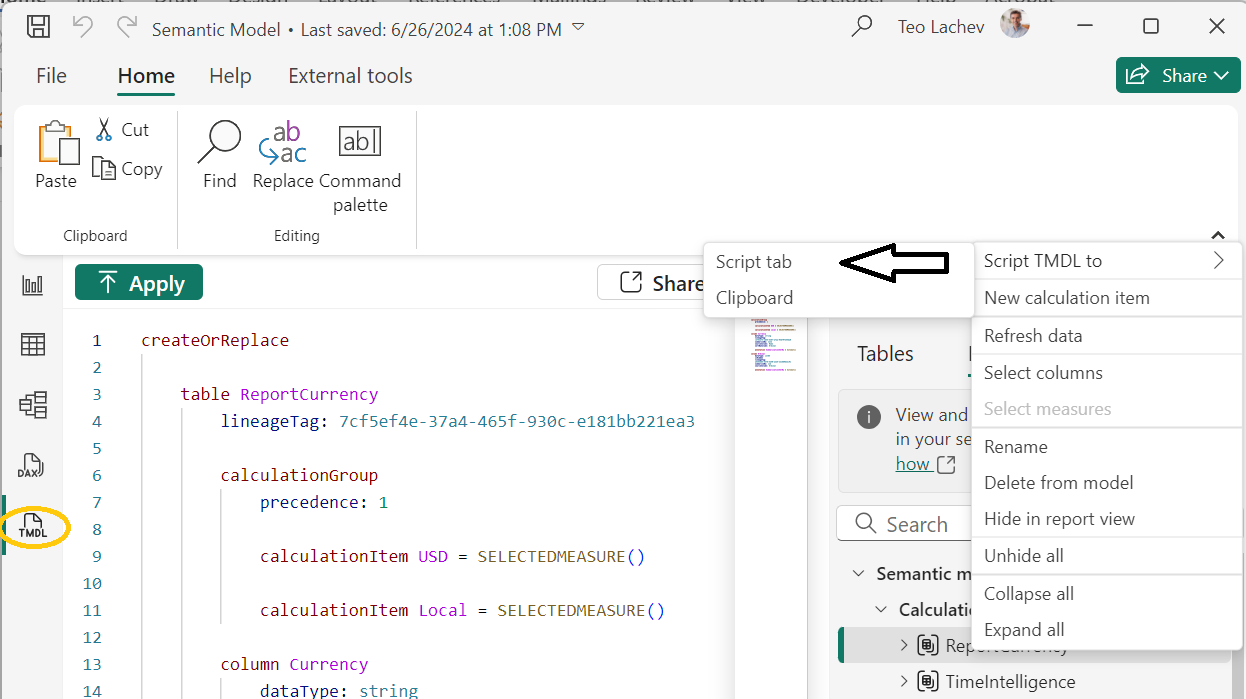
Ability to copy specific model features from one Power BI Desktop file to another – For example, in the screenshot below, I have scripted a calculation group. Now, I can open another Power BI Desktop file, copy the script and apply it. Of course, the target model must include the referenced entities, otherwise I’ll get an error.
Automating tasks – Hopefully, in near future support creating add-ins to automate certain aspects like creating macros in Excel by programming the Excel VBA object model. For example, a developer should be to use the Tabular Object Model (TOM) API to create TMDL scripts and apply them to a semantic model.
https://prologika.com/wp-content/uploads/2016/01/logo.png00Prologika - Teo Lachevhttps://prologika.com/wp-content/uploads/2016/01/logo.pngPrologika - Teo Lachev2025-01-22 17:12:262025-01-22 17:12:26TMDL View in Power BI Desktop
I conducted recently an assessment for a client facing memory pressure in Power BI Premium. You know these pesky out of memory errors when refreshing a biggish dataset. They started with P1, moved to P2, and now are on P3 but still more memory is needed to satisfy the memory appetite of full refresh. The runtime memory footprint of the problematic semantic model with imported data is 45 GB and they’ve done their best to optimize it. This newsletter outlines a few strategies to tackle excessive memory consumption with large semantic models. Unfortunately, given the current state of Power BI boxed capacities, no option is perfect and at end a compromise will probably be needed somewhere between latency and performance.
Why I don’t like Premium licensing
Since its beginning, Power BI Pro per-user licensing (and later Premium Per User (PPU) licensing) has been very attractive. Many organizations with a limited number of report users flocked to Power BI to save cost. However, organizations with more BI consumers gravitated toward premium licensing where they could have unlimited number of report readers against a fixed monthly fee starting at listed price of $5,000/mo for P1. Sounds like a great deal, right?
I must admit that I detest the premium licensing model because it boxes into certain resource constraints, such as 8 backend cores and 25 GB RAM for P1. There are no custom configurations to let you balance between compute and memory needs. And while there is an auto-scale compute model, it’s very coarse and it applies only to processing cores. The memory constraints are especially problematic given that imported models are memory resident and require more than twice the memory for full refresh. From the outside, these memory constraints seem artificially low to force clients into perpetual upgrades. The new Fabric F capacities that supersede the P plans are even more expensive, justifying the price increase with the added flexibility to pause the capacity which is often impractical.
It looks to me that the premium licensing is pretty good deal for Microsoft. Outgrown 25 GB of RAM in P1? Time to shelve another 5K per month for 25 GB more even if you don’t need more compute power. Meanwhile, the price of 32GB of RAM is less than $100 and falling.
It will be great if at some point Power BI introduces custom capacities. Even better, how about auto-scaling where the capacity resources (both memory and CPU) scale up and down on demand within minutes, such as adding more memory during refresh and reducing the memory when the refresh is over?
Strategies to combat out-of-memory scenarios
So, what should you do if you are strapped for cash? Consider evaluating and adopting one or more of the following memory saving techniques, including:
Switching to PPU licensing with a limited number of report users. PPU is equivalent of P3 and grants 100GB RAM per dataset.
Optimizing aggressively the model storage when possible, such as removing high-cardinality columns
Configuring aggressive incremental refresh policies with polling expressions
Moving large fact tables to a separate semantic model (remember that the memory constraints are per dataset and not across all the datasets in the capacity)
Implementing DirectQuery features, such as composite models and hybrid tables
Switching to a hybrid architecture with on-prem semantic model(s) hosted in SQL Server Analysis Services where you can control the hardware configuration and you’re not charge for more memory.
Lobbying Microsoft for much larger memory limits or to bring your own memory (good luck with that but it might be an option if you work for a large and important company)
Considering Direct Lake storage
If Fabric is in your future, one relatively new option to tackle out-of-memory scenarios that deserves to be evaluated and added to the list is semantic models configured for Direct Lake storage. Direct Lake on-demand loading should utilize memory much more efficiently for interactive operations, such as Power BI report execution. This is a bonus to the fact that data Direct Lake models don’t require refresh. Eliminating refresh could save tremendous amount of memory to start with, even if you apply advanced techniques such as incremental refresh or hybrid tables to models with imported data.
I concluded that if Direct Lake is an option for you, it should be at the forefront of your efforts to combat out-of-memory errors with large datasets.
On the downside, more than likely you’ll have to implement ETL processes to synchronize your data warehouse to a Fabric lakehouse, unless your data is in Fabric to start with, or you use Fabric database mirroring for the currently supported data sources (Azure SQL DB, Cosmos, and Snowflake). I’m not counting the data synchronization time as a downside.
Atlanta BI fans, please join us online for our next meeting on Monday, December 2nd at 5PM ET (please note the change to our usual meeting time to accommodate the presenter). Rui Romano (Product Manager at Microsoft) will discuss how the new TMDL language for Power BI models can unlock new scenarios that previously weren’t possible. For more details and sign up, visit our group page.
Presentation: “Semantic Modeling as Code” with TMDL using Power BI Desktop Developer Mode (PBIP) and VS Code Delivery: Online Level: Intermediate to Advanced
Overview: The landscape for developing enterprise-scale models has never been more exciting than it is now! Developer mode in Power BI Desktop and the new TMDL language unlock new scenarios that previously weren’t possible, such as great source control and co-development experiences with Git integration. Additionally, the TMDL Visual Studio Code extension offers a new, powerful and efficient, code-first semantic modeling experience. Join us to discover the new and powerful ways you can leverage TMDL to accelerate your model development and get a sneak peek into the TMDL roadmap from the Power BI product team.
Speaker: Rui Romano is an experienced Microsoft Professional with a deep passion for data and analytics. He has spent the last decade helping companies make better data-driven decisions and is known for his innovative and practical solutions to complex problems. Currently works as a Product Manager at Microsoft on the Power BI product team, focusing on Pro-BI experiences.
https://prologika.com/wp-content/uploads/2016/01/logo.png00Prologika - Teo Lachevhttps://prologika.com/wp-content/uploads/2016/01/logo.pngPrologika - Teo Lachev2024-11-26 13:51:452024-11-26 13:51:45Atlanta Microsoft BI Group Meeting on December 2nd (Semantic Modeling as Code)
Atlanta BI fans, please join us in person for our next meeting on Monday, November 4th at 6:30 PM ET. Stacey Jones (Principal Data & AI Cross-Solution Architect at Microsoft) and Elayne Jones (Solutions Architect at Coca-Cola Bottlers Sales and Services) will explore the AI and Copilot capabilities within Microsoft Fabrics. And I’ll help you catch up on Microsoft BI latest. I will sponsor the event which marks the 14th anniversary of the Atlanta Microsoft BI Group! For more details and sign up, visit our group page.
Details
Presentation: Accelerating your Fabric Data Estate with AI & Copilot Delivery: In-person Date: November 4th, 2024 Time: 18:30 – 20:30 ET Level: Beginner to Intermediate Food: Pizza and drinks will be provided
Agenda:
18:15-18:30 Registration and networking
18:30-19:00 Organizer and sponsor time (events, Power BI latest, sponsor marketing)
19:00-20:15 Main presentation
20:15-20:30 Q&A
Venue
Improving Office
11675 Rainwater Dr
Suite #100
Alpharetta, GA 30009
Overview: In this presentation, we will explore the groundbreaking AI and Copilot capabilities within Microsoft Fabric, a comprehensive platform designed to enhance productivity and collaboration. By leveraging advanced machine learning algorithms and natural language processing, Microsoft Fabric’s AI/Copilot not only streamlines workflows but also provides intelligent insights and automation, empowering users to achieve more with less effort. Join us as we delve into the features and functionalities that make Microsoft Fabric an indispensable tool for modern enterprises.
Sponsor: CloudStaff.ai
https://prologika.com/wp-content/uploads/2016/01/logo.png00Prologika - Teo Lachevhttps://prologika.com/wp-content/uploads/2016/01/logo.pngPrologika - Teo Lachev2024-10-29 11:57:302024-10-29 11:57:30Atlanta Microsoft BI Group Meeting on November 4th (Accelerating your Fabric Data Estate with AI & Copilot)
Role-playing dimensions are a popular business requirement but yet challenging to implement in Power BI (and Tabular) due to a long-standing limitation that two tables can’t be joined multiple times with active relationships. Declarative relationships are both a blessing and a curse and, in this case, we are confronted with their limitations. Had Power BI allowed multiple relationships, the user must be prompted which path to take. Interestingly, a long time ago Microsoft considered a user interface for the prompting but dropped the idea for unknown reasons.
Given the existing technology limitations, you have two implementation choices for implementing subsequent role-playing dimensions: duplicating the dimension table (either in DW or semantic model) or denormalizing the dimension fields into the fact table. The following table presents pros and cons of each option:
Option
Pros
Cons
Duplicate dimension table in semantic model or DW
No or minimum impact on ETL
Minimum maintenance in semantic model
All dimension attributes are available
Metadata complexity and confusion
(potentially mitigated with perspectives that will filter metadata for specific subject area)
Denormalizing fields from into fact table
Avoid role-playing dimension instances
More intuitive model to business users
Increased fact table size and memory footprint
Impact on ETL
Limited number of dimension attributes
Track visited dimension changes as Type 2 with incremental extraction (while it could be Type 1)
If applicable, inability to reuse the role-playing dimension for another fact table and do cross-fact table analysis
So, which approach should you take? The middle path might make sense. If you need only a limited number of fields for the second role-playing dimension, you could add them to the fact table to avoid another dimension and confusion. For example, if you have a DimEmployee dimension and you need a second instance for the person making the changes to the fact table, you can add the administrator’s full name to the fact table assuming you need only this field from DimEmployee.
By contrast, if you need most of the fields in the role-playing instances, then cloning might make more sense. For example, analyzing fact data by shipped date or due date that requires the established hierarchies in DimDate, could be addressed by cloning DimDate. Then to avoid confusion, consider using Tabular Editor to create perspectives for each subject area where each perspective includes only the role-playing dimensions applicable to that subject area.
Yet, a narrow-case third option exists when you only need role-playing measures, such as SalesAmountByShipDate and SalesAmountByDueDate. This scenario can be addressed by forcing DAX measures to “travel” the inactive relationship by using the USERELATIONSHIP function.
https://prologika.com/wp-content/uploads/2016/01/logo.png00Prologika - Teo Lachevhttps://prologika.com/wp-content/uploads/2016/01/logo.pngPrologika - Teo Lachev2024-10-11 17:42:502024-10-11 17:42:50Implementing Role-playing Dimensions in Power BI



 I conducted recently an assessment for a client facing memory pressure in Power BI Premium. You know these pesky out of memory errors when refreshing a biggish dataset. They started with P1, moved to P2, and now are on P3 but still more memory is needed to satisfy the memory appetite of full refresh. The runtime memory footprint of the problematic semantic model with imported data is 45 GB and they’ve done their best to optimize it. This newsletter outlines a few strategies to tackle excessive memory consumption with large semantic models. Unfortunately, given the current state of Power BI boxed capacities, no option is perfect and at end a compromise will probably be needed somewhere between latency and performance.