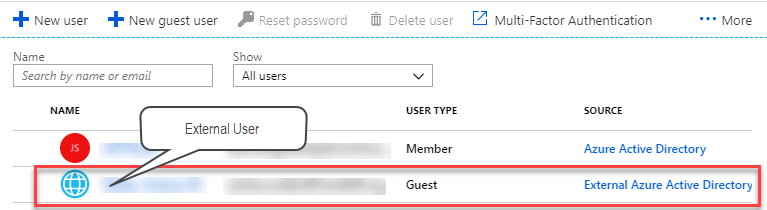
Power BI lets you share content directly with external users for B2B and B2C scenarios. When the benefits of this sharing option outweigh its limitations (read-only reports, requiring Azure AD federated access, per-user licensing, rendering the report inside Power BI), this is the easiest way to share Power BI content with an external party. However, the documentation, which is otherwise excellent, doesn't explain the steps…
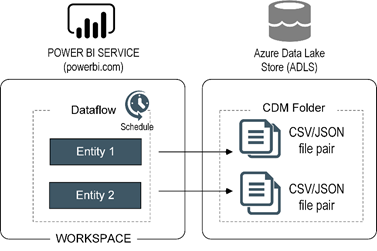
Happy Holidays! I hope you're enjoying this special time of the year. According to Gartner, "poor data quality is hitting organizations where it hurts – to the tune of $15 million as the average annual financial cost in 2017". Data integration is another huge challenge, you know it and I know it. Microsoft hopes that Power BI dataflows will help data analysts tackle these issues…
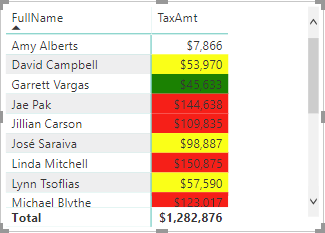
If you have used SSRS, you know that paginated reports are very customizable, and you can make almost any property expression-based. Power BI is yet to deliver expression-based properties to change settings based on runtime condition, such as to change the font style based on the actual value or user selection. Currently, there are two places where you can use a DAX measure for expression-based…
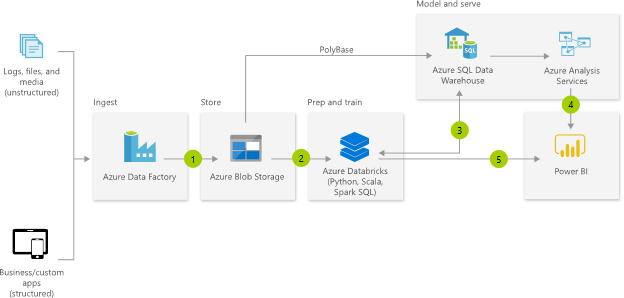
If you're a BI architect responsible for designing Azure-based cloud BI solutions and you're not following the James Serra's blog, you're missing a lot. Previously an independent consultant and MVP, James works now as a Big Data/Data Warehouse Evangelist at Microsoft. I can't agree more with his latest blog "Should I load structured data into my data lake?" We've heard a lot lately about what…
MS BI fans, join us for the next Atlanta MS BI and Power BI Group meeting on December 3th, Tuesday at 6:30 PM at the Microsoft office in Alpharetta. I will discuss Power BI dataflows. A3 will sponsor the event. For more details, visit our group page and don't forget to RSVP (use the RSVP survey on the main page) if you're planning to attend. Presentation: Understanding Power BI…
This blog is an update of my previous blog "Common Data Service for Analytics: The Good, the Bad, the Ugly". Things have changed in the past 6 months. The Common Data Service for Analytics is no more. It got superseded by Power BI dataflows, which Microsoft officially introduced at the PASS Summit last week. Think of dataflows as "Power Query in the Cloud". Dataflows is…
MS BI fans, join us for the next Atlanta MS BI and Power BI Group meeting on October 30th, Tuesday at 6:30 PM at the Microsoft office in Alpharetta. Neal Waterstreet will tackle the important and pervasive issue of bad data quality. ZAP BI will sponsor the event. And your humble correspondent will introduce you to Power BI Home and data profiling. For more details, visit our…
Want to know what Power BI features are in the works and when they will be released? My "Power BI Features Report" showed you how to find what features were released over time so it's retrospective. On the other hand, Business Applications Release Notes are forward looking. For example, the October release notes for BI go all the way to March 2019. The release notes…
What's the first thing that comes to mind when you hear "linked server"? Performance issues or a snail image, right? Many developers don't like linked servers because they are "slow" although they rarely bother to investigate the underling issue, much less to fix it. Linked servers are a very useful and commonly used feature of SQL Server. They allow SQL Server to query external data…
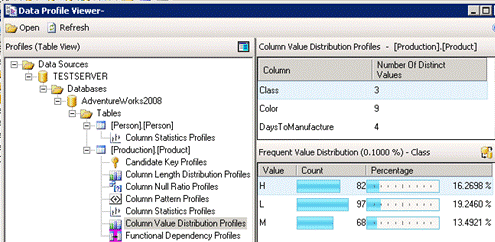
You know it and I know it. Data quality is a BIG problem that reduces the business value of BI. ETL practitioners will probably recall that SSIS includes a comprehensive Data Profiling Task but it is somewhat difficult to set up, especially if you wanted to profile multiple tables. It saves the results in an xml file and then you could use the Data Profile…