
-
Azure Data Factory is Getting Better All the Time
August 21, 2021 / No Comments »

Three years ago, I wrote that it would probably take a decade for to mature and close the gap with SSIS. To its credit thought, while it's still lagging in the area of extensibility, ADF added features that we don't have in SSIS so I'm developing a taste for it: Schema drift – Suppose you want to automatically stage new columns as they added to a source table. Or, columns might be deleted from the source but your ETL shouldn't fail. You can't do these things with SSIS which is tightly coupled with the data source schema. ADF data flows, however, can handle this. Parallel loops – Want to loop through some tables but load them in parallel? The ADF ForEach loop can be parallelized up to 50 concurrent threads. Source partitioning – Let's say you have a big source table and you want to speed up staging. You can...
-
Atlanta MS BI and Power BI Group Meeting on August 2nd
July 25, 2021 / No Comments »

Please join us online for the next Atlanta MS BI and Power BI Group meeting on Monday, August 2nd, at 6:30 PM. Avi Singh (LearnPowerBI.com) will discuss how you can achieve a successful Power BI career. For more details and sign up, visit our group page. Presentation: How to Create a Successful Power BI Career Without the Struggle (By "Niching Down") Date: August 2nd Time: 6:30 – 8:30 PM ET Place: Click here to join the meeting Overview: Your Grandma was right! You cannot please everyone. And when you go out there and wave your flag as a Power BI Professional, that's exactly what you are trying to do. And it doesn't work. Either you get no results or have to work really hard for every inch of progress. The problem is that most professionals either miss or mess-up the first crucial step of their Power BI Career - Niching...
-
Interactive Excel Pivots in Power BI
July 19, 2021 / No Comments »
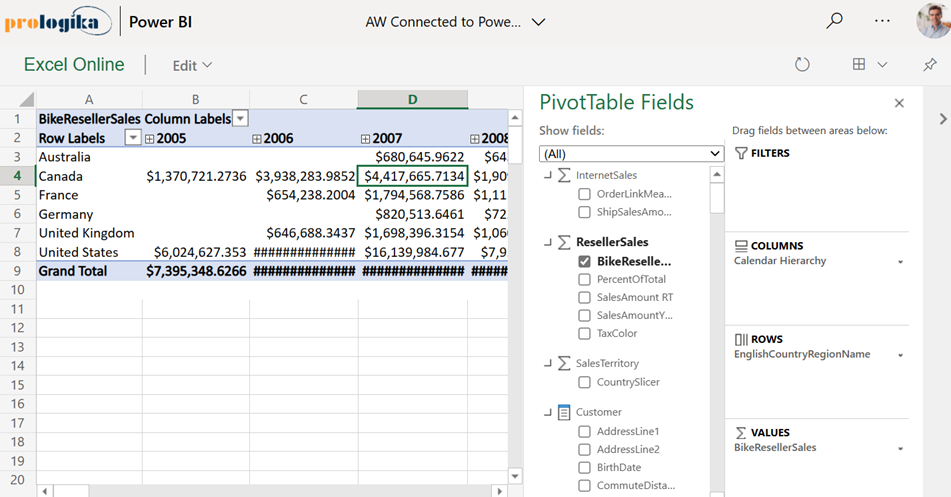
A long-standing limitation of Power BI has been that Excel pivot reports connected to external Analysis Services models can't be interacted with when uploaded to Power BI Service. You get the cached pivot report but any attempt to interact with the report online (that is in Excel Online), such as to change a slicer or filter, would result in an error complaining that the connection can't be refreshed and there hasn't been a workaround. Today, Microsoft partially lifted this limitation by supporting interactive pivots connected to Power BI datasets. Unfortunately, pivots connected to external Analysis Services models (both on-prem and cloud) still don't support interactivity. For some reason, this feature is called "connected PivotTable refresh" although a better name would be "interactive Excel pivots finally". It works in Power BI Pro and Premium. Unlike the initial announcement that speculated that this feature would be available by simply uploading your Excel...
-
Cloud Inhibitors
July 11, 2021 / No Comments »

In a previous blog, I said I consider it a travesty when a vendor's cloud offering prohibits direct access to the data in its native storage, which is typically a relational database, and therefore a perfect store for data analytics and integration, such as to run real-time analytics or export the data to load a data mart. There is nothing simpler than connecting to a relational database, which is designed to handle efficiently select and filter operations. Unfortunately, it's becoming a norm where the move to the cloud requires going through all sorts of hoops to access the data. Some enlightened providers offer direct access to the native store by charging a premium fee. However, this is not usually an option and most vendors require you call their REST APIs. Since, the move to the cloud shouldn't make things more difficult, I call these vendors "cloud inhibitors". Such vendors usually...
-
Synapse Serverless: The Good, The Bad, and The Ugly
June 29, 2021 / No Comments »
When you a provision a Synapse workspace, you get a serverless endpoint for free (or almost free). This endpoint represents Synapse Serverless: a query service for ad-hoc exploration of data in CVS, Parquet, and JSON files stored in Azure Data Lake. The Good Being able to query files using SQL is great. Some of you might remember the U-SQL language that was introduced a few years ago alongside Azure Data Lake Storage (ADLS) Gen 1 which is now deprecated. It never caught up because it looked like SQL but it wasn't (it was actually closer to C#). Now we're talking about real SQL. To query files! This opens the possibility to implement a logical warehouse (the emphasis is on logical as everyone to my knowledge who tried to replace a data warehouse with a data lake has failed). Or, you can connect Power BI to the serverless endpoint and start...
-
Atlanta MS BI and Power BI Group Meeting on July 5th
June 27, 2021 / No Comments »
Please join us online for the next Atlanta MS BI and Power BI Group meeting on Monday, July 5th, at 6:30 PM. Reid Havens (Consultant and MVP) will show us how to get the most out of Power BI bookmarks and buttons. And I'll cover the Power BI latest enhancements. For more details and sign up, visit our group page. Presentation: Bedazzling Your Bookmarks & Buttons Date: July 5th Time: 6:30 – 8:30 PM ET Place: Click here to join the meeting Overview: Bookmarks and Interactive Buttons are two of the best ways to add web-like user experiences into Power BI reports. Bookmarks help create a more seamless filter and navigation experience. Buttons can be used with bookmarks, but can also be leveraged for a lot of other report functionality and navigation. Speaker: Reid Havens is the founder of Havens Consulting Inc. and is a Microsoft Most Valued Professional (MVP)....
-
Top 5 Reasons to Switch to Power BI Gen2
June 17, 2021 / No Comments »
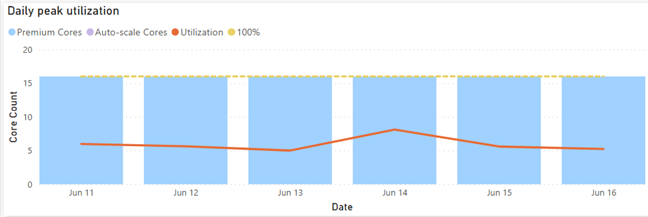
You should definitely switch your Power BI Premium capacities to Gen2 although you might wait until it goes GA because Gen2 is currently in preview if you're risk-averse. I switched an enterprise client P2 node to Gen 2 a few months ago and here are the top benefits we observed: Lower CPU utilization The Gen1 P2 node was under CPU pressure so the client was considering upgrading to P3. This went away after switching to Gen2 as the graph below shows. That's because each operation essentially has access to all the cores on the node (which is essentially a P3 node). This can give you a nice boost to performance as well. This doesn't mean that you get more cores for free. If Power BI detects that the CPU used by the capacity (across all its datasets/dataflows/etc.) is exceeding the CPU that you have purchased, then subsequent operations would be...
-
Power BI Aggregations: Limitations and Workarounds
June 9, 2021 / No Comments »

Power BI aggregations are meant to speed up queries to large DirectQuery tables, as a DBA would create summarized tables to speed up queries to large tables. The most appealing aspect of telling Power BI about these aggregations is that Power BI will automatically redirect the query to the aggregation cache if it determines that its dimensionality matches the dimensionality of the aggregated table, as explained in the documentation. However, there are a couple of limitations worth emphasizing that will prevent this from happening: Power BI requires regular relationships with 1:M cardinality and uni-directional filter between the dimension table and aggregation table. Many-to-many cardinality (aka "limited" relationships in the documentation) won't work. For example, you might have a Customer table related with 1:M to a CustomerFilter table. Queries involving the CustomerFilter table won't hit the aggregation cache. Dynamic relationship won't hit the cache either. For example, as a workaround for...
-
Atlanta MS BI and Power BI Group Meeting on June 7th
June 2, 2021 / No Comments »
Please join us online for the next Atlanta MS BI and Power BI Group meeting on Monday, June 7th, at 6:30 PM. Stacey Jones (Principal Data Solutions Architect with Microsoft) will introduce us to Azure Purview. And I'll cover the Power BI latest enhancements. For more details and sign up, visit our group page. Presentation: Data Governance with Azure Purview Date: June 7th Time: 6:30 – 8:30 PM ET Place: Click here to join the meeting Overview: Have auditors asked for a report detailing sensitive data in your Company? Are you having trouble finding out where all your data resides? Are Data Scientists and analysts wasting time finding the right data? What will be impacted if I change this column in a table? Where is personnel data stored? Are we in compliance with information security standards that apply to us? If you answered yes to any of these or related...
-
Tracing Anonymous Logons
May 27, 2021 / No Comments »

In a recent project, I had to execute an SSIS package deployed to the catalog from a stored procedure. The package uses Windows authentication to connect to the data sources. When executing the package from the catalog or from the stored procedure, the package immediately fails and the following two errors are logged: DTS_E_CANNOTACQUIRECONNECTIONFROMCONNECTIONMANAGER. The AcquireConnection method call to the connection manager "Source" failed with error code 0xC0202009. There may be error messages posted before this with more information on why the AcquireConnection method call failed. OLE DB error has occurred. Error code: 0x80040E4D. An OLE DB record is available. Source: "Microsoft SQL Server Native Client 11.0" Hresult: 0x80040E4D Description: "Login failed for user 'NT AUTHORITY\ANONYMOUS LOGON'.". The culprit of course is that this scenario requires Kerberos delegation because of the two-hop authentication required: From SSMS on my development machine to the server where the SSIS package is executed From...
Training
 We offer onsite and online Business Intelligence classes! Contact us about in-person training for groups of five or more students.
For more information or to register click here!
Books
 Learn Power BI at your own pace with our latest book Applied Microsoft Power BI. Targeting information workers, data analysts, pros, and developers, It is designed as an easy-to-follow guide for learning how to implement BI solutions spanning the entire personal-team-organizational BI spectrum.

